


Backups Not Working?
Hey everyone!
I've recently updated to the latest version of Audition, but I noticed that since the update my backup's don't seem to be working.
I lost all my edits on a multitrack yesterday after a crash. Usually I would go into the backup's folder and open up the newest version, and that would only set me back by a little bit. But in this instance, there was only one backup which was made right at the start of the session.
The file itself had reverted to the same state as that backup, despite having manually saved multiple times throughout. So I'm not really sure what has gone on here.
Could anyone shine a light on the issue, and if I have the incorrect settings or something?
Here's what my current backup/autosave settings look like.
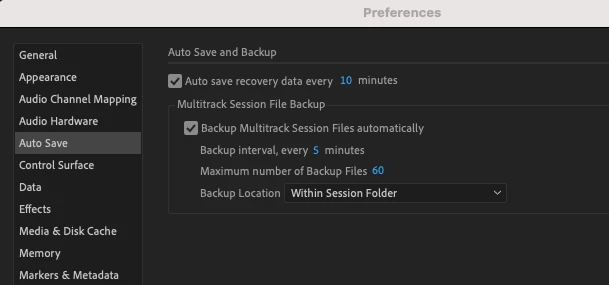
I have plenty of memory space left, so that shouldn't be the issue.
Also I'm working on another multitrack today and I've been keeping an eye on the backup folder to see if any are being made, and it looks like I'm having the same issue. I've also tested if the autosave works and, again, it isn't autosaving every 10 mins. When I manually save I can see the file update, but that is the only time something happens.
Please help!
Many thanks.
 AdChoices