Participant
July 3, 2023

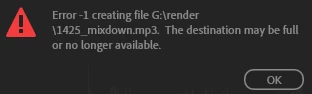
Error-1 The destination may be full or no longer available.

  • July 3, 2023
  • 6 replies
  • 1175 views

Hello.


I recently encountered this error - I have no idea what could be causing it as the 2TB hard drive i'm writing this to has 1TB left in storage. It's a normal solid state drive, freshly partitioned. I have cleared media cache, the issue does not go away. 

Can anyone give me a solution to this?

___
ASUS ProArt X670E Motherboard
AMD Ryzen 9 7950X3D 16-Core Processor
128gb RAM
RTX 3090 GPU

6 replies

Participant
February 15, 2025

I wrote something wrong above, I'm correcting it.

Izotope ozone, remove this and the problem will be solved. I couldn't transfer sound. I deleted it and it was solved. No problem.

Participant
February 15, 2025

Hello, I had the same problem, I installed this, it wasn't there before, it happened after I installed it, then I deleted it and it was fixed, now I can export the sound without any problems.

Known Participant
July 4, 2023

This happened to me after the latest update from  Adobe for Audition....just re-install a previous version, it started saving again no problem for me

SteveG_AudioMasters_
Community Expert
Community Expert
July 4, 2023

Others with a similar 'fail to save' error have hinted at there being a problem specifically with MP3 files, and that, quite frankly, is a bit of a mystery. One thing you might like to try is to see if the same thing happens on the beta release of Audition - and if it does, then report it as an issue/bug on the specific beta forum, which I believe is much more likely to be seen by the devs.

TheVolgunAuthor
Participant
July 4, 2023

Update - Thanks for your response SteveG. So, it only seems to happen when i export .mp3.  Also the exports are very, very slow. Much slower than usual. I recently upgraded my machine so i'm only experiencing this now. I've tried to generate a log report but all of the logs i generate, even when i've just encoutered the error have no mention of the issue i seem to be having.
I disabled malware bytes (my anti-virus software) completley - no effect.
Ran as adminstrator on windows 10 - no effect.
What did have an effect was when I disabled Izotope VocalSynth/ Neutron Pro in my regular document template. I'm unsure as to why i'm having a problem with these VST's now with my new machine as my old machine handled them with no problem for the past 3 years.  Is this just something I need to bare in mind now or are there options I can try to alleviate the problem?

SteveG_AudioMasters_
Community Expert
Community Expert
July 4, 2023

If the drive has plenty of space left on it, then you have to start investigating the last part of the error message - '...or no longer available'. Are you running Audition as a user with Administration rights? If, for whatever reason, Audition doesn't think that the person using it has rights of access to the entire path to your drive, it won't write to it. Another potential source of confllict is anti-virus software; you may need to grant permission in that before you can have access to it. Whatever it is, it's almost bound to be something along these lines.