


Pressing M key places a marker but also seeks to the end of the file
Hi Audition lovers,
I have used markers since forever, the shortcut key M to create one at wherever the cursor is.
Today I found that I press M, and it places a marker, but my view suddenly changes. The visible area window has moved to the end of the current file. The Marker was placed also.
before here I am

Press M and then suddenly I'm here (right end of the file) and my marker was created back where it was supposed to

I checked my shortcuts for M and removed a couple (that were not related to cursor position) about adding CD cue markers (for Shift+M and Ctrl+M)
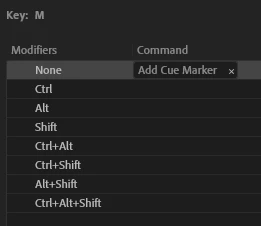
Yet still, if I'm zoomed in at all, and press M, I get my marker, but then I teleport to the edge of the file, and have to maneuver back to where I was.
Can you think of why this is happening?
Thanks for reading!
Audition 23.3.0.55, says I'm up to date.
 AdChoices