


Open for Voting
When saving a session a .docx file gets overwritten/deleted
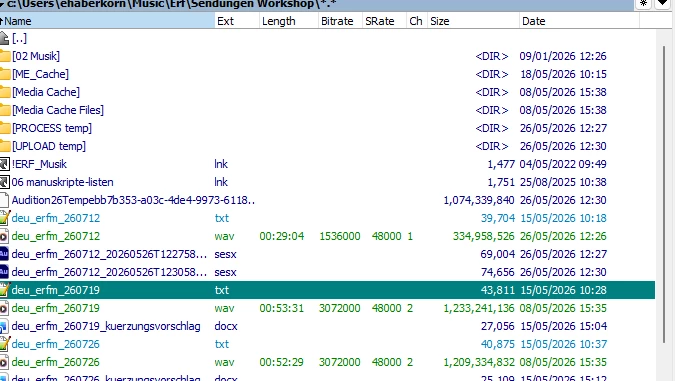
I make use of a .docx file to document the edits I need to make in the sound file. The image below shows the .docx files for the edits for July 19 and 26. I also had a .docx file for 260712.
I can save the edited sound file without any issue. However, as soon as I save my multitrack session (.sesx), the .docx file disappears.
At first I thought it might just have been deleted, but I can neither find it in the recycle bin nor recover it with an undelete app. This happens every time I save a session.
None of the other files are affected.
Steps to reproduce:
- Create or place a .docx file in the same working folder as the Audition project
- Work on and save audio edits normally
- Save the multitrack session (.sesx)
- The .docx file disappears immediately after saving the session
Expected result:
The .docx file remains untouched in the folder.
Actual result:
The .docx file disappears completely (not in recycle bin, not recoverable).
System details:
- Adobe Audition version: 26.0.0056
- Operating system:Windows 11 - Build 8390
- Storage location: local drive
- File system: NTFS
Additional notes:
- This happens consistently, not randomly
- Only .docx files are affected
- Other project or media files in the same folder remain intact
 AdChoices