


May 19, 2018

P: Banding in previews

  • May 19, 2018
  • 13 replies
  • 457 views

When I convert images to B&W, with some of the Adobe-supplied B&W profiles I see a lot of pixelated banding in the sky of standard previews (when in loupe view after pressing the 'E' key).

Rebuilding the preview doesn't help.

The only workaround is building a 1:1 preview, either by zooming in or by giving the command to build a 1:1 preview. I can then discard the 1:1 preview and still have a clean standard preview.

The preview quality level in the catalog settings is of no influence. My previews are set for 2880 pixels, which exactly matches my screen.

I'm using LR Classic 7.3.1 on a 2017 15" MacBook Pro (2.9 Ghz i7, 16GB RAM, Radeon Pro 560 w/4GB RAM) running MacOS 10.13.4 with both images and catalog on the local SSD.

Files are .RAFs from a Fuji X-T2. I'm seeing this with at least Adobe-supplied profiles BW 02 and BW 03.
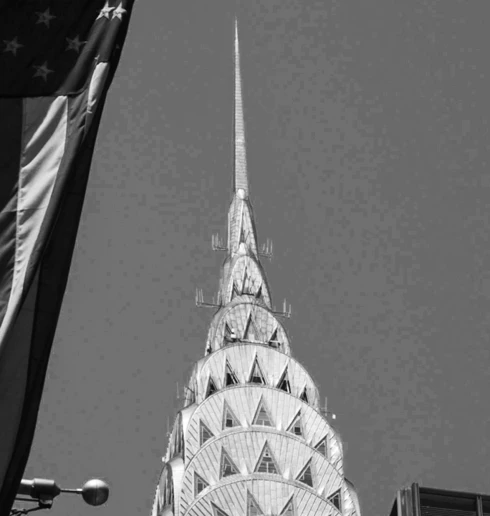

Screendump of portion of screen before building 1:1 preview
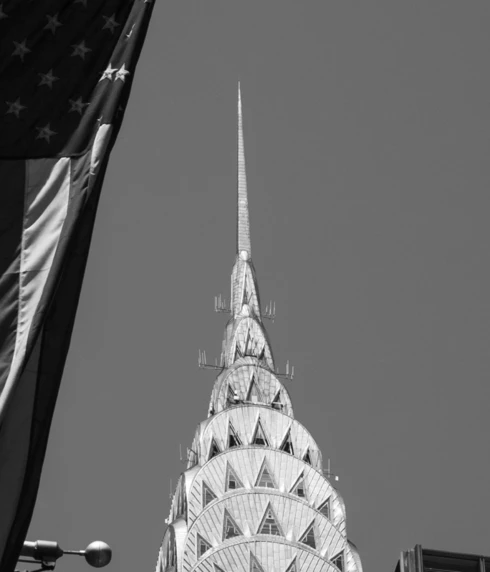

Roughly the same portion of the screen after building and discarding 1:1 previews.

Is this normal behavior, am I doing something wrong, or is this a bug?

This topic has been closed for replies.

13 replies

October 10, 2018
Thanks for adding your support, Sven! Luckily Venkatesh above replied he managed to reproduce so it should be on the radar. I hope it will get solved when Adobe releases the new 2019 versions.
Known Participant
October 10, 2018
I have the issue also in general, not depending on certain profiles.
Known Participant
October 10, 2018
yes, I tried also all kinds of solution proposals like this. I have the issue in Library mode and slideshow mode. I  also had it temporarily in Develop mode, that however got resolved after reinstallation of LR.
Known Participant
October 10, 2018
yes, I have reported it also several times. Too bad that official reps seem to have difficulties to reproduce that.
September 12, 2018
It always was disabled, so I'm afraid that's not the answer to my particular problem but thanks for chiming in! Wish it were the solution!
Inspiring
September 12, 2018
I had the Same problem. I resolved it by going to LIGHTROOM > PREFERENCES > PERFORMANCE.

Then disable the check box entitled: USE SMART PREVIEWS INSTEAD OF ORIGINALS FOR IMAGE EDITING.
August 30, 2018
Keeping this on the agenda as the latest update (7.5) hasn't resolved this and I'm also seeing it with color profiles (e.g. Adobe Landscape) on Canon 5D Mk III files. When there are subtle gradations in the sky, e.g. early hours before sunrise, it'll pop up as a sort of a rainbow effect where I get a subtle band of a different color (green or pink) where the sky in reality going from purple to blue. Again, making a 1:1 preview solves it. I'm surprised not more people are reporting this.
July 11, 2018
Hi Venkatesh, I was just curious if there's any progress on this issue? I'm still seeing it in 7.4 and saw the status of this problem is still at 'acknowledged' and not 'in progress'.
May 22, 2018
If you mean color noise reduction, then the answer is it doesn't make a difference.
May 22, 2018
Good to know, thanks!