


Daisuke Yanagiya
Known Participant
June 18, 2020

P: Camera Raw/Lightroom Classic: X100V Camera Profile White Balance Shift

  • June 18, 2020
  • 14 replies
  • 663 views

Strange behavior of camera profiles for X100V.
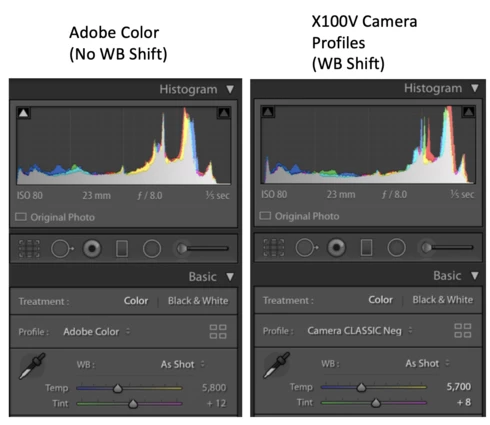
When applying camera profiles (like Camera Provia/Standard) to X100V RAW, white balance (temperature/tint) automatically shift.
This is specific behavior of X100V raw, the other Fujifilm Cameras don't reproduce this.
X-T3 and X-T30 use Camera Profiles v2, but X100V uses old original Camera Profiles v1.
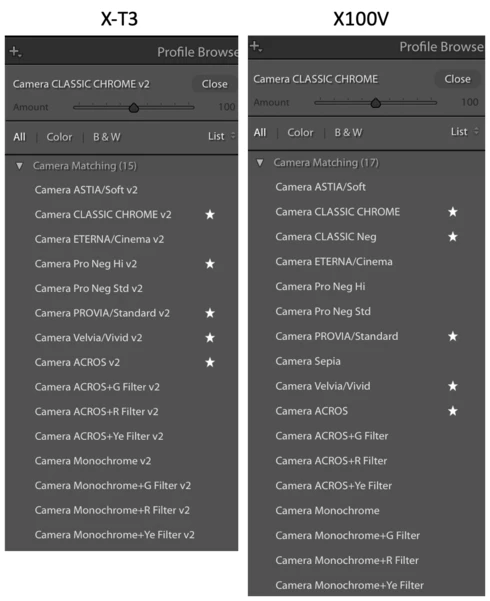

It's inconvenient when dealing with multiple X-Series cameras with common preset.

Camera: X100V
Macbook Pro 16
LrC 9.3

This topic has been closed for replies.

14 replies

Rikk Flohr_Photography
Community Manager
Community Manager
August 18, 2020

Updates to Camera Raw, Lightroom Classic, and the Lightroom Ecosystem were released yesterday evening and contain a fix for this issue.  Please install the appropriate update and see if it solves this problem.

Thank you for your patience.
Rikk Flohr: Adobe Photography Org
Daisuke Yanagiya
Known Participant
June 19, 2020
Hello Rikk
Thanks for your response, then I'll wait for the upcoming release.
TheDigitalDog
Inspiring
June 19, 2020
So it's a specific Adobe supplied profile?
Author “Color Management for Photographers" & "Photoshop CC Color Management/pluralsight"
Rikk Flohr_Photography
Community Manager
Community Manager
June 19, 2020
The Camera Raw team has reviewed this issue and determined that there is a slight difference in WB AS Shot between Adobe raw and CM profiles. We will correct this in an upcoming release. 

Thank you for the report. 
Rikk Flohr: Adobe Photography Org
Daisuke Yanagiya
Known Participant
June 19, 2020
Why? I'm reporting this issue and asking questions because I don't know why.

Both LrC and Lr offer "v2" camera profiles for X-T3, v1 is not available for X-T3
Both LrC and Lr offer "v1" camera profiles for X100V, v2 is not available for X100V

#1. X-T3 / LrC / v2 Camera Profile : No white balance shift
#2. X-T3 /  Lr   / v2 Camera Profile : No white balance shift
#3. X100V / LrC / v1 Camera Profile : White balance shift occurs
#4. X100V /  Lr   / v1 Camera Profile : No white balance shift

Only #3 has this issue. I hope this clarify your misunderstanding.
TheDigitalDog
Inspiring
June 19, 2020
If it is a profile issue why doesn't it manifest in both products and why not use a better (custom) profile?

” Confirmed standard Lr (not classic) don't reproduce this WB shift issue. ”
Author “Color Management for Photographers" & "Photoshop CC Color Management/pluralsight"
Daisuke Yanagiya
Known Participant
June 19, 2020
Sorry, I don't understand your logic at all. It's obviously X100V specific profile issue.
Is there any camera that LrC behave like this?
TheDigitalDog
Inspiring
June 19, 2020
Then it's not a profile issue.
Be useful to have an raw from the camera, ideally of a ColorChecker to test.
Author “Color Management for Photographers" & "Photoshop CC Color Management/pluralsight"
Daisuke Yanagiya
Known Participant
June 19, 2020
This WB shift issue reproduce when the LrC's WB is set "as shot" regardless of in-camera WB settings when the photo was taken.
The WB don't shift when you specify Temperature/Tint value or select WB items from pull down list (like daylight) in LrC.

Confirmed standard Lr (not classic) don't reproduce this WB shift issue.
TheDigitalDog
Inspiring
June 19, 2020
Yes is a simple answer that is possible. In fact you verify that's the case (exactly why ONLY Adobe who has the source code know). Now again, is it solely the profile? Comparison with a custom daylight profile would provide a better idea.
Author “Color Management for Photographers" & "Photoshop CC Color Management/pluralsight"