


DougB PDX
Known Participant
January 28, 2020

P: Camera Raw/Lightroom: Dehaze altering the color-balance/white-balance of photos

  • January 28, 2020
  • 42 replies
  • 5704 views

As much as I love the Dehaze slider, there is one thing about it that I absolutely HATE and that is when it decides to go psycho in altering the color-balance/white-balance of photos.

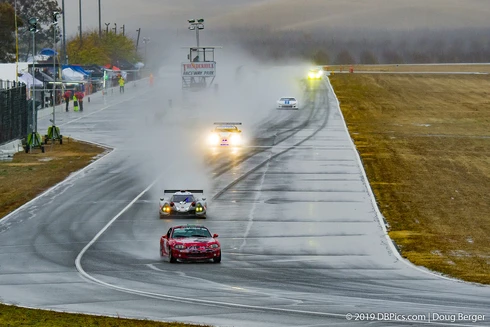
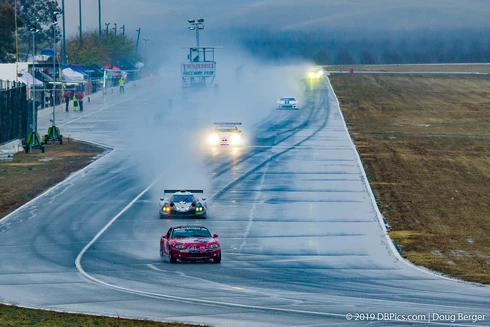
These example photos may not show up (I've had issues with photos disappearing from being uploaded), but here is one pair from earlier today... the tint setting on WB is just 50k apart, one click on the arrow key.. but the difference is HUGE.

All settings are identical between the 2 photos, the only change was hovering the mouse over the WB tint slider and pressing the up/down key once.. changing from 5850k to 5800k

I often get similar shifts going from consecutive, continuous-high photos from frame to frame with the exact same settings, no changes in wb settings, and it all seems related to the dehaze slider and the way it analyzes the photos.

Years ago, I thought I actually had a defective camera, as the photos would change biggly even using the same exact settings 0.1sec apart.  Eventually, I tracked down the cause.  The programming of the Dehaze feature.

So, the problem I wish they could figure out is some way to get Dehaze to not do massive shifts in WB


42 replies

Earth Oliver
Legend
May 10, 2020
Rikk, has any progress been made with this issue? I'm grading a ton of sequences today which need heavy Dehaze, and the bug is making my job not possible.
DougB PDX
DougB PDXAuthor
Known Participant
March 2, 2020
Sorry, notification of your post went into my spam email... I will add to the onedrive folder.. let me know if you need the link again and I'll email it to you
Rikk Flohr_Photography
Community Manager
February 27, 2020
@doug

The team responded that they need two consecutive and very similar frames to compare. Can you provide?
Rikk Flohr: Adobe Photography Org
DougB PDX
DougB PDXAuthor
Known Participant
February 5, 2020
Rikk, I uploaded another photo (and xmp and dcp) to the OneDrive folder that are a good example.. and this is using a different model camera.. and the color jump point is different.. 5350 vs 5400
DougB PDX
DougB PDXAuthor
Known Participant
January 30, 2020
I love how your lack of basic comprehension = my need to grow up
DougB PDX
DougB PDXAuthor
Known Participant
January 30, 2020
except that this was reporting a bug, and wanting Adobe to fix the bug..

which your response contributed nothing in that regard.

I love how people get SO butthurt when they were the problem in the first place. 

It isn't my fault that you were not smart enough to understand that Lightroom Classic refers to Lightroom Classic.. and that ACR does not equal Photoshop.. ACR is in both things, it is the engine.. and you probably missed, that I was correct in observing the bug is with the engine... and your response was of ZERO benefit.

Let me give you a hint... 

being sarcastic was being NICE to you..

ideally I'd have just been able to delete your response as it contributed nothing of value for confirming the bug, nor discussing the problem.

Maybe next time you'll pay attention and THINK about if you're really helping or not, because this had NOTHING to do with soliciting advice for countering the effects of the bug.

Yeah, 30,000 photos is a busy weekend...  my bad, didn't realize us large-volume event shooters needed to seek pre-approval from you or something.
Participating Frequently
January 30, 2020
Your just full of it....

Never said you were processing 30,000 photos, which I find again that your just full of it...

You posted "Camera Raw/Lightroom" - Camera Raw refers to Photoshop.

You could have just shut up and let my answer be helpful to those processing an image or two in camera raw but no, you had to open your mouth and let us all be aware your just full of it....
even your 'wow thank you' smacks of sarcasm. Grow up.
Bob Somrak
Legend
January 30, 2020
I think more people will agree with Edmund.
M4 Pro Mac Mini. 48GB
DougB PDX
DougB PDXAuthor
Known Participant
January 30, 2020
Edmond, I'm sorry I did not realize I needed to seek your opinion about what responses in my thread are acceptable to you or not.   Rather than focusing on your disapproval of sarcasm, maybe it would be more helpful going forward for folks to actually consider if their posts are truly helpful or not.   To be clear, I mean helpful to the person who started the topic and the program they are working in, not simply helpful to the ego/satisfaction of the person responding.

For example, this topic was about Lightroom (and ACR in LR), not Photoshop, therefore advice to respond to a software bug/problem by exporting images to a separate program isn't terribly useful or helpful when the purpose of Lightroom is to quickly process many photos with consistent results from frame to frame.

Simply put, the response did not contribute to diagnosing or solving the problem,

I said thank you, in case others reading my find the suggestion helpful, and illustrated specifically why it wasn't helpful to me.

Sorry if you were triggered.  I'll try to be sure my future responses to threads that you were not participating in do not offend you.
Inspiring
January 30, 2020
Sarcasm - works so well on a help forum. 😕😕