


DougB PDX
Known Participant
January 28, 2020

P: Camera Raw/Lightroom: Dehaze altering the color-balance/white-balance of photos

  • January 28, 2020
  • 42 replies
  • 5704 views

As much as I love the Dehaze slider, there is one thing about it that I absolutely HATE and that is when it decides to go psycho in altering the color-balance/white-balance of photos.

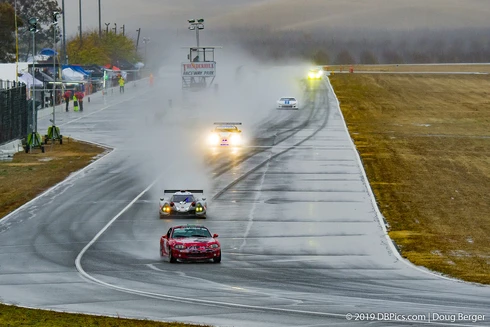
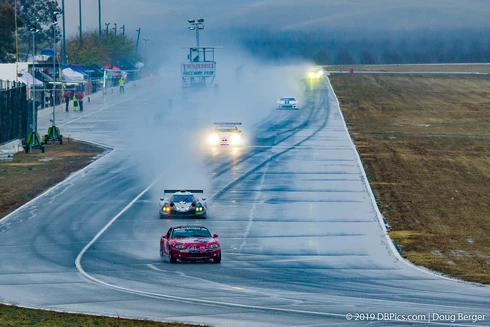
These example photos may not show up (I've had issues with photos disappearing from being uploaded), but here is one pair from earlier today... the tint setting on WB is just 50k apart, one click on the arrow key.. but the difference is HUGE.

All settings are identical between the 2 photos, the only change was hovering the mouse over the WB tint slider and pressing the up/down key once.. changing from 5850k to 5800k

I often get similar shifts going from consecutive, continuous-high photos from frame to frame with the exact same settings, no changes in wb settings, and it all seems related to the dehaze slider and the way it analyzes the photos.

Years ago, I thought I actually had a defective camera, as the photos would change biggly even using the same exact settings 0.1sec apart.  Eventually, I tracked down the cause.  The programming of the Dehaze feature.

So, the problem I wish they could figure out is some way to get Dehaze to not do massive shifts in WB


42 replies

Rikk Flohr_Photography
Community Manager
January 29, 2020
I've logged an issue with the Camera Raw team and attached your files, Doug. You can pull them offline if you like. 
Rikk Flohr: Adobe Photography Org
Bob Somrak
Legend
January 29, 2020
Rikk

I did a little more experimenting 

I took one of the photos I posted above and did a reset and applied a Radial Filter over the whole photo and applied a large Dehaze and the issue also occurred using the Local Dehaze with a small change in Temp at one point on the Temp Slider.
M4 Pro Mac Mini. 48GB
Bob Somrak
Legend
January 29, 2020
I agree it doesn't happen with all photos.  I got lucky and picked a couple with a lot of blue and yellow and orange where the result is EXTREME
M4 Pro Mac Mini. 48GB
DougB PDX
DougB PDXAuthor
Known Participant
January 29, 2020
I should add that it is very far from happening with every photo..  I see it happen maybe 100 or 1000 apart, but it appears to happen when when there is a lot of specific colors in a photo (I've seen it most often with yellows, greens, or oranges).. but I've never spent time trying to make it happen, I'm always trying to make it go away.. because I want consecutive photos to look the same, and having them look massively different because sometimes the dehaze tool goes overboard.
Bob Somrak
Legend
January 29, 2020
Rikk,

I tried my examples in ACR and it exhibits the same behavior as in Lr.  Its odd the major change is in only one spot on the temp slider.
M4 Pro Mac Mini. 48GB
DougB PDX
DougB PDXAuthor
Known Participant
January 29, 2020
Yes, doing the same thing in PS ACR.

I've emailed you the files.
Rikk Flohr_Photography
Community Manager
January 29, 2020
In your first example Doug, if you take those two files into Camera Raw and apply identical settings, does Camera Raw exhibit the same color difference as Lightroom? 

Knowing that would help identify which team with which to file the bug. 

Additionally, would you be willing to send us the raw files with XMP data accompanying so that we can attach the me to the issue once we identify the correct team?
Rikk Flohr: Adobe Photography Org
Bob Somrak
Legend
January 29, 2020
Seems like a bug

I have two photos that exhibit the same behavior with just a 50k temp change with a large dehaze.  It only happens at one spot on the temp slider.  Notice the large change in the Histogram.  If I am not on this spot than the histogram changes very little with 50k temp changes.


M4 Pro Mac Mini. 48GB
DougB PDX
DougB PDXAuthor
Known Participant
January 29, 2020
Wow, thank you!!  Processing 30,000 photos in Lightroom, that will be a HUGE help!!
Participating Frequently
January 29, 2020
To counter the effects of color shift, you can use the dehaze slider in photoshop camera raw filter , on a duplicate layer set to luminosity blend mode.