


Known Participant
July 31, 2016

P: Camera Raw: Problems with ACR presets

  • July 31, 2016
  • 25 replies
  • 1270 views

Hello, I’m having some trouble with Photoshop CC, specifically with the Camera Raw Filter.

I have created multiple ACR presets that I use to apply various photo effects to my images. When I created these presets and saved them, I specifically didn't check any of the settings relating to the Transform, Lens Profile Corrections, Chromatic Aberration, Lens Vignetting and the Camera Calibration panels.
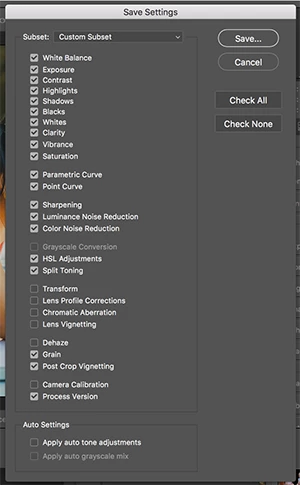


I did this because I don’t want those settings to change when I apply one of my presets. The settings in those sections are generally related to the workings of my equipment and I don’t want to have to redo those settings if I decide to apply an effect to my image.

This method generally works with one significant exception. Even though I have specifically left Lens Corrections out of my saved settings (by not checking that box when saving the preset), some settings in the Lens Correction panel (specifically the Defringe Purple Hue and Green Hue sliders) always get reset to the default values
when the preset is applied.

Can anyone give me some thoughts on this? 

Thanks-

Mary

This topic has been closed for replies.

25 replies

LucyLu62Author
Known Participant
August 16, 2016
Hi Jeffrey,

Can I ask if there has been any movement on this issue?

Also, I don't know if you've read this thread since you posted to it 2 weeks ago, but there is an additional (but related) issue with how the Camera Raw settings are applied when done through an action using the CR filter in Photoshop. To see the specifics of this, you can see the discussion between me and Steve Sprengel above. 

So I'm just checking in to see if there's been any movement and to make sure that you all are aware of the additional issue....

Thanks!

Mary
LucyLu62Author
Known Participant
August 2, 2016
Thanks! I'll wait tight and see if Adobe replies...
ssprengel
Inspiring
August 2, 2016

Someone at Adobe may reply with an answer to whether is should be split up.  It is usually better, but there is quite a bit of detail, here, already. 

It may also be possible to split off a portion of this discussion to a new thread (or two given Cristen's finding the Preset-in-Bridge-Action issue, though it might be the same thing manifesting differently). but I'm not sure what all can be done with the forum management tools.

LucyLu62Author
Known Participant
August 2, 2016
Thanks!

Do you think I should start a new conversation about this? Or what do you think I should do to make sure it gets addressed in addition to the previous issue? Thoughts?
ssprengel
Inspiring
August 2, 2016

Yeah, that helps describe what you're doing.

LucyLu62Author
Known Participant
August 2, 2016
Hi Steve,

I'm opening a Jpeg (in Photoshop) that has no settings saved with it.

I create a copy of the background layer and convert that copy to a Smart object. I then apply a CR filter to the Smart Object so that the settings in the CR filter remain editable:


I then run an action that opens the CR filter and applies the preset that only contains the Process Version. The preset is applied using 'Load Setting' option of the flyout menu of the CR filter.


Does that help?

Thanks!

-Mary
ssprengel
Inspiring
August 2, 2016

So you are running an action from within Photoshop, using the CR Filter, not Bridge using the CR plug-in?

And you're opening JPGs that have settings saved in them from prior opening in the CR plug-in or the action is reopening them without settings and everything is default?

I'm a little  hazy on how the JPGs "have settings" that are then reset by the application of a CR Filter.

LucyLu62Author
Known Participant
August 2, 2016

Hi Everyone,

Sorry for the delayed response! I didn’t notice the additional comments until just now.

Ok, so to test how presets are applied within an action, I applied the Camera Raw Filter with PS to a JPEG image and set every setting (I think I got them all) to non-zero values. Note that I stayed in color, no greyscale conversion was applied.

I then created a preset and saved with it nothing but the Process Version checked and applied that preset using an action.

 The following settings reverted to zero when I did this:

 Basic Panel:

  • Contrast
  • Blacks
  • Clarity
  • Vibrance
  • Saturation

 Tone Curve:

  • All values in the Parametric Tone Curve reset to zero but the values in the Point curve were untouched.

 HSL/Greyscale:

  • All values in the three HSL Panel (Hue, Saturation, Luminance) reset to zero.

Split Toning

  • Nothing changed in this panel.

 Lens Corrections, Effects, Camera Calibration and Transform Panels:

  • Every setting in these four panels reset to zero.

This seems a pretty big deal. So do you both think I should set up a separate conversation about this issue to make sure that it doesn’t get lost in the other one? I’m very new to this forum-these issues have been my first posts-so I’m not sure how best to proceed.

 Thanks!

 Mary

Inspiring
August 2, 2016
Okay, this is outside of the way I've used actions. I've never run an action to apply a Camera Raw preset. I've used Bridge for batch application through Develop Settings, or the CR Filter.

So I've tried this a couple of ways.  I created an action that applies a split-tone preset through the Camera Raw Filter to an open image that I'd just applied settings to. That did just that without changing any settings I applied. All was well, but that was one image opened in CR, and running an action during the session.

I then used a batch action from Bridge on 4, 2 of which had no settings, 2 that had settings, and I found something VERY disturbing. If you're running an action images from Bridge, it opens the image in CR first and uses the last-used settings. It doesn't use the Camera Raw Defaults that it otherwise opens with. So my first image had a +1.15 exposure and + 35 Clarity —to be very obviously changed in a given direction. The three other images opened to those settings. If I changed the settings on the next image, then the one after picked up those settings.

It's most definitely not resetting to CR defaults, even if it has previously applied CR settings. Feeling like driving yourself crazy? If you open in CR and click Done, those settings aren't considered a Previous Conversion.

I next tried it with JPEGS. I applied settings to them in CR so they would automatically open in CR when running the batch action. In this case, the JPEGs were reverted to Camera Raw defaults on open. I lost whatever settings I had applied before the action even got around to running the split tone preset through the CR filter. 

So if Camera Raw is supposed to work with actions, meaning we can batch action them, even if Mary is doing something else, I think this needs to be separated from the original, as you suggested, and made a separate Issue. The results are definitely not consistent between the formats, and in all cases, they aren't desirable.

I can apply a preset through Bridge without it overriding existing settings to single or multiple files, JPEG or raw. Certainly my Exposure and Clarity remained the same and nothing else was altered if I reopened them in CR and looked to see what had been affected.
ssprengel
Inspiring
August 2, 2016

This request for clarification was for Mary who reported a second issue in the reply above my comment.  It's related to presets but when applied in an action and not otherwise related to the issue that started this thread.

This is what I'm referring to that she said:

If I try to apply the preset as part of an action in Photoshop. It seems as if there are some values that, if not set within the preset (by not being saved as part of the preset) that get set to their default values when an action applies that preset.

I am also not trying to learn how to use presets or understand what the term preset means.  I know all that.  I'm asking for clarification about a 2nd bug Mary seems to be reporting.

What Mary is reporting is that when using a preset in an action "some values" that weren't stored as part of the preset get reset to their defaults.  The clarification I'm asking for is precisely which settings are those "some values" that get set to their defaults erroneously, if it is all of them or just specific ones in the few items she left unchecked in the original example.  In other words if you uncheck everything except, say, Process Version, what areas settings are reset to their default values besides the few specific lens-related items she mentioned that were part of her original preset discussion.