Known Participant
July 31, 2016

P: Camera Raw: Problems with ACR presets

  • July 31, 2016
  • 25 replies
  • 1270 views

Hello, I’m having some trouble with Photoshop CC, specifically with the Camera Raw Filter.

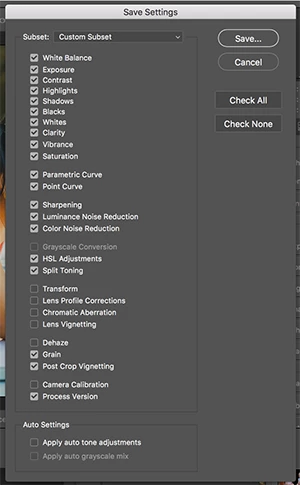
I have created multiple ACR presets that I use to apply various photo effects to my images. When I created these presets and saved them, I specifically didn't check any of the settings relating to the Transform, Lens Profile Corrections, Chromatic Aberration, Lens Vignetting and the Camera Calibration panels.


I did this because I don’t want those settings to change when I apply one of my presets. The settings in those sections are generally related to the workings of my equipment and I don’t want to have to redo those settings if I decide to apply an effect to my image.

This method generally works with one significant exception. Even though I have specifically left Lens Corrections out of my saved settings (by not checking that box when saving the preset), some settings in the Lens Correction panel (specifically the Defringe Purple Hue and Green Hue sliders) always get reset to the default values
when the preset is applied.

Can anyone give me some thoughts on this? 

Thanks-

Mary

This topic has been closed for replies.

25 replies

Inspiring
August 1, 2016
No, everything doesn't get reset. If I'm following you, what you're worried about is whether or not you can adjust settings for an image, then use a saved preset that only is applied to a specific area, such as split-tone. Your settings aren't reset to the default settings. Not even Detail and Sharpening if I've modified it, and the Detail tab, if you use Adobe's defaults, does have both sharpening and noise reduction applied.

You can save presets each with only a very specific feature, and then apply them one on top of another, if you so choose. They won't conflict if you set it up right, and your manual settings won't conflict if you never modify, say, the basic tab in a saved preset.

Is that what you're worried about?
ssprengel
Inspiring
August 1, 2016

This seems like a more serious issue, since it messes with all the values, not just Defringe Hue values.  I am not one who uses Actions with ACR hardly at all. 

Do all of the values that are in unchecked sections (for example if you also unchecked Exposure and Sharpening, etc) get reset to defaults or is it just the ones that you've mentioned? 

And has this behavior recently changed with the latest version?  I worry that this one comment might get lost since it is something else than the original reported issue.

LucyLu62Author
Known Participant
August 1, 2016
🙂
Inspiring
August 1, 2016
Got it. Obviously a problem then. The CR team has always been quick to respond to issues, so fingers crossed. . .
Inspiring
August 1, 2016
I think it's very unexpected that we can't save the chromatic aberration sliders as part of our custom Camera Raw defaults. I was surprised. <G>

To have to always save it as part of the preset to override the default is obviously not desirable. I set it to 0 for my CR defaults, so have never cared about the sliders, but if Mary is setting it to non-zero amounts, definitely I can see the problem here.

Who are the "eng" team?
LucyLu62Author
Known Participant
August 1, 2016
Thank you!
LucyLu62Author
Known Participant
August 1, 2016
Cristen, I'm sorry, I was taking screen shots quickly to post them here. The issue happens when the Amount sliders are set to nonzero amounts.

Thanks again for your response!
Legend
August 1, 2016
Thanks. I've asked the eng team to look into this issue.
Inspiring
August 1, 2016
But you've set Profile to disable automatic chromatic aberration correction, and you've set the Amount here to 0. So what is the problem? The sliders will have to be set somewhere. You can't remove the sliders. So if you want the sliders in a specific location, you have to save that location and save it in the preset.

With everything OFF, the position of the sliders, should you turn it on manually, is irrelevant, no? They're not doing anything. In the screenshot, note that I still have the Amount of influence set to 0, but I've moved the sliders to a position different from shipping version. The only reason I'd have to do that is if I find that's where my camera, when it displays chromatic aberration, usually needs the sliders to be set.

By saving Chromatic Aberration with the subset of settings, I can have the sliders anywhere I want. But they have to be somewhere, so Adobe set them somewhere, perhaps where they found them most often useful. We can't change that without a deliberate override.

LucyLu62Author
Known Participant
August 1, 2016
Hi Cristen, 

I did exactly that. I edited the Camera Calibration panel and the Lens Correction panel, including the 'manual' part of that panel which deals with the hue adjustments.


Then I saved it as the default using the flyout menu as the new default.


Then I applied a preset that was saved without checking the setting for Transform, Lens Profile Corrections, Chromatic Aberration, Lens Vignetting and the Camera Calibration panels. When I did, the camera profile and calibration and the lens profile stay the same but the hue sliders (in the 'Manual' part of the Lens Correction panel reset to 30/70 for purple and 40/60 for green.