


Known Participant
July 31, 2016

P: Camera Raw: Problems with ACR presets

  • July 31, 2016
  • 25 replies
  • 1270 views

Hello, I’m having some trouble with Photoshop CC, specifically with the Camera Raw Filter.

I have created multiple ACR presets that I use to apply various photo effects to my images. When I created these presets and saved them, I specifically didn't check any of the settings relating to the Transform, Lens Profile Corrections, Chromatic Aberration, Lens Vignetting and the Camera Calibration panels.
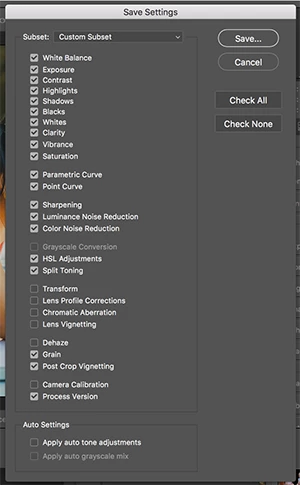


I did this because I don’t want those settings to change when I apply one of my presets. The settings in those sections are generally related to the workings of my equipment and I don’t want to have to redo those settings if I decide to apply an effect to my image.

This method generally works with one significant exception. Even though I have specifically left Lens Corrections out of my saved settings (by not checking that box when saving the preset), some settings in the Lens Correction panel (specifically the Defringe Purple Hue and Green Hue sliders) always get reset to the default values
when the preset is applied.

Can anyone give me some thoughts on this? 

Thanks-

Mary

This topic has been closed for replies.

25 replies

Inspiring
August 1, 2016
Did you set everything on every tab to the setting you want Camera Raw to default to if you don't override it with a preset, then save it on the Basic tab flyout menu as a New Camera Raw Default?

I should add, this IS what any raw image will open with, so be sure you're okay with seeing the file with these settings before you've used any presets. For instance, if you always set Sharpen amount to 25%, then that's what you should set here.

LucyLu62Author
Known Participant
August 1, 2016

Hi Cristen,

Thanks for the response!

I tried using a custom default for Camera Raw, but the hue sliders still reset when I apply a preset. So you are seeing something different? Hmmmm...

But I agree with what you're thinking - that by not checking a feature, Camera Raw thinks you're resetting it to the default. 

Inspiring
July 31, 2016
Have you tried creating a custom default for Camera Raw? I've always used a custom default, and I've never seen what you're seeing. In fact, I just tested it by making a preset, and saving the preset leaving out a ton of settings. My custom default setting  for those settings I left out came through.

My guess is that by not checking a feature, you're telling Camera Raw to set it to the default. Could you live with a different default setting from Camera Raw's? It might solve the problem for you.
LucyLu62Author
Known Participant
July 31, 2016
Hi Steve, 

Thanks for looking into this. Yes, I originally created these presets in LR and the problem didn't happen there. 

The issue get even worse if I try to apply the preset as part of an action in Photoshop. It seems as if there are some values that, if not set within the preset (by not being saved as part of the preset) that get set to their default values when an action applies that preset. So in the case above, when I apply this preset as part of an action, it looks like all values within the unchecked panels-the Transform, Lens Profile Corrections, Chromatic Aberration, Lens Vignetting and the Camera Calibration panels-get reset to their default values.

Mary
ssprengel
Inspiring
July 31, 2016

I can duplicate this.   Even saving just Process Version and nothing else in a preset will reset the Defringe Purple Hue Range and Green Hue Range to their default values when that preset is applied.  Examining the preset.xmp file shows only the PV saved, no Defringe values.

So it appears that the bug is any application of any saved preset will reset the Defringe Hue sliders to default values.

Lightroom does not have this problem.  Saving and applying a preset doesn't change the Defringe slider values unless they are part of the saved preset values.