


markovesterinen
Participating Frequently
June 9, 2016

P: Can't read DNG files from Fuji X-E2 anymore

  • June 9, 2016
  • 75 replies
  • 2251 views

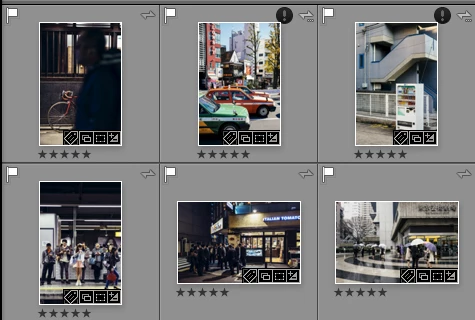
Just installed the new Lightroom CC 2015.6 / 6.6 update and i have a really strange issue. All my files are in DNG format. Everything works fine except the files from my Fuji X-E2. Lightroom and Photoshop can't read these anymore! The files get's a black exclamation mark next to them. See the screenshot. 
All files from the other Fuji X-series cameras works just fine. It's only X-E2 files that doesn't. 
The files work just fine with any other software and i tried them on a different computer which has the previous version of lightroom CC and there they work just fine!
Is there a way to make a roll-back to previous version?
This topic has been closed for replies.

75 replies

Light-Zone
Participating Frequently
June 28, 2016
Thank you for the suggestion. Unfortunately my chat session was somewhat less successful. Although I had contacted Adobe about this issue on the 9th of June, instead of granting my request for a credit, they are going to "escalate" my complaint / request.

Sampath: May I know for how many days you have facing the issue to install the Products ?

William Levitt: I tried installing the updates on the 9th of June. I immediately rolled back to the previous version with the help of Adobe Support on that same day since the update did not recognize the 10K+ files I have in LR. I use Fujifilm XE-2, and the raw files that have been converted to .dng files are not recognized by the newest version of both LR and PS. This is a known issue with Adobe.

Sampath: Thanks for the information

Sampath: William, I checked with my resources and see that I can help you to Escalate this case to our next level so that they will check with that and help you
Sampath: Is there anything else I can help you with?

William Levitt: Thank you. Will this happen now in this chat session?

Sampath: No you will be contacted back via email within 2-3 business days.

I'll update this post as necessary. I hope others have more immediate luck than I.
Participating Frequently
June 28, 2016
I contacted Adobe Support via their chat system and learned the following about this issue:
1. The "Adobe development team" is aware of this issue and working on a solution.
2. As of this date, the latest versions of LR CC 2015.6, PS CC 2015.6, and ACR 9.6 continue having this problem with Fuji DNGs from the X-E2.
3. The only solution at this time is to roll back those apps to the previous versions: LR CC 2015.5.1, PS CC 2015.1.1, and ACR 9.5.1. Instructions for rolling back can be found in this thread, I think.
4. I was told that the next updates to these apps will fix this problem, but no date could be given as to when this would happen.
5. When I suggested that I, and others like me who are paying subscribers to CC versions of LR and PS, should be given a credit on our subscriptions for not being able to use the latest versions of these apps, the customer service person promptly credited my Adobe account for one month's payment.
If you you are a LR/PS CC subscriber, I'd recommend contacting Adobe support and getting a similar credit until this problem is fixed.
Light-Zone
Participating Frequently
June 27, 2016
You are not alone Chris. That "cool new tool" is ok, but not if I cannot access any of my dng files. I am considering looking into Capture One. For those of us who cannot upgrade due to a bug, Adobe should offer us a reduced monthly rate for our subscription. We're paying full price for older software.
Inspiring
June 27, 2016
I am a Lightroom user and I had to downgrade to the previous version because Lightroom no longer worked with my files. I don't know when if ever I will upgrade to a newer model. They used to test this stuff, but when you have a job and under the gun why would they add new cool features but you cannot use your files? This makes no sense! I am paying monthly for a program I cannot update for fear it won't work with the very basics of the program. Opening and editing my files. 
Inspiring
June 26, 2016


With Fuji raf Files converted to dng shows file unsupported or damaged.You can use the Develop Module for some changes but there is no possibility to export the file. You get the same error message.


Light-Zone
Participating Frequently
June 26, 2016
Also still no fix for the same issue in Photoshop 2015.5 either.
Inspiring
June 26, 2016
actually no fix in LR 2015.6 and ACR

Light-Zone
Participating Frequently
June 24, 2016
Thanks for the update!
Just Shoot Me
Legend
June 22, 2016
Just updated to the newest version of PS 2015, 2015.5, and the problem isn't fixed yet in ACR and Bridge.
Bridge now displays Fuji X-E2 DNG images for a short time, as thumbnails in the content area, and full image in the preview area, but then the preview becomes a small thumbnail and the original thumbnail in the Content area is just an Icon.

Adobe you need to FIX THIS
Inspiring
June 22, 2016
+1 LR 6.6 is not working for my X E2, but worked fine with my X-Pro2. Reverted to LR 6.5 and X-E2 raw files are good to go now. Hopefully adobe gets the fix soon.