


markovesterinen
Participating Frequently
June 9, 2016

P: Can't read DNG files from Fuji X-E2 anymore

  • June 9, 2016
  • 75 replies
  • 2251 views

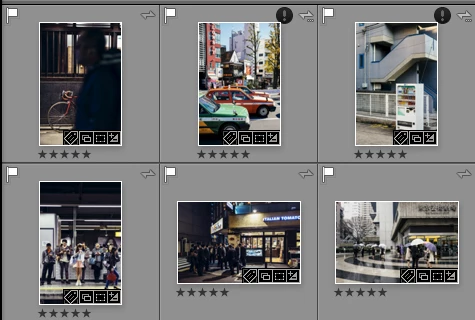
Just installed the new Lightroom CC 2015.6 / 6.6 update and i have a really strange issue. All my files are in DNG format. Everything works fine except the files from my Fuji X-E2. Lightroom and Photoshop can't read these anymore! The files get's a black exclamation mark next to them. See the screenshot. 
All files from the other Fuji X-series cameras works just fine. It's only X-E2 files that doesn't. 
The files work just fine with any other software and i tried them on a different computer which has the previous version of lightroom CC and there they work just fine!
Is there a way to make a roll-back to previous version?
This topic has been closed for replies.

75 replies

Inspiring
June 21, 2016
Hi, I just want to add my name in the list of experiencing the same problem. It would be great to have the fix as soon as possible. Thanks and good luck getting it out soon.
Participating Frequently
June 21, 2016
Will Adobe mention that this issue has been fixed when it announces its next LR CC update (and PS CC)? (I've had to roll back both apps, plus Adobe Camera Raw, to previous versions to resolve this issue and don't want to have to go through this again until I'm assured problem has been solved.) Thanks.
Rikk Flohr_Photography
Community Manager
June 18, 2016
For PS/ACR users who want to roll back to 9.5.1: https://helpx.adobe.com/camera-raw/kb/camera-raw-plug-in-installer.html.
Rikk Flohr: Adobe Photography Org
Participant
June 17, 2016
Yes, Rikk could you provide the link to install the previous vetsio of PScc. Thanks@
Inspiring
June 14, 2016
How about providing the link to install the previous version of Photoshop.
Rikk Flohr_Photography
Community Manager
June 14, 2016
Rolling back Lightroom wouldn't help, banu nair. Photoshop doesn't interact with Lightroom in that way. You would have to roll back Adobe Camera Raw (as in roll back "Photoshop" )in order to access the DNGs created from the Fuji E X2 from inside of Photoshop. 
Rikk Flohr: Adobe Photography Org
Participant
June 14, 2016
Hi Rikk,
I am experiencing this problem in photoshop cc. Do you think rolling back and installing LR CC 201576.0 will enable me to use photoshop? 
Just Shoot Me
Legend
June 13, 2016
Roll back to 2015.5.1/6.5.1 from here
http://blogs.adobe.com/lightroomjournal/2013/06/keeping-lightroom-up-to-date.html

Uninstall, Install LR CC 2015.0/6.0, Upgrade to 2015.5.1/6.5.1 
Rikk Flohr_Photography
Community Manager
June 13, 2016
The official response at the top of this thread is your best workaround at the moment.
Rikk Flohr: Adobe Photography Org
Participant
June 13, 2016
IT'S A PITTY. I AM LOOSING  TIME 😞 CAN YOU GIVE ME A FEEDBACK ON THE PROCESS? DO YOU THINK THE PROBLEM WILL BE SOLVED?