

Participating Frequently
July 25, 2023

P: Canon 24-240 lens profile v3

  • July 25, 2023
  • 56 respuestas
  • 16149 visualizaciones

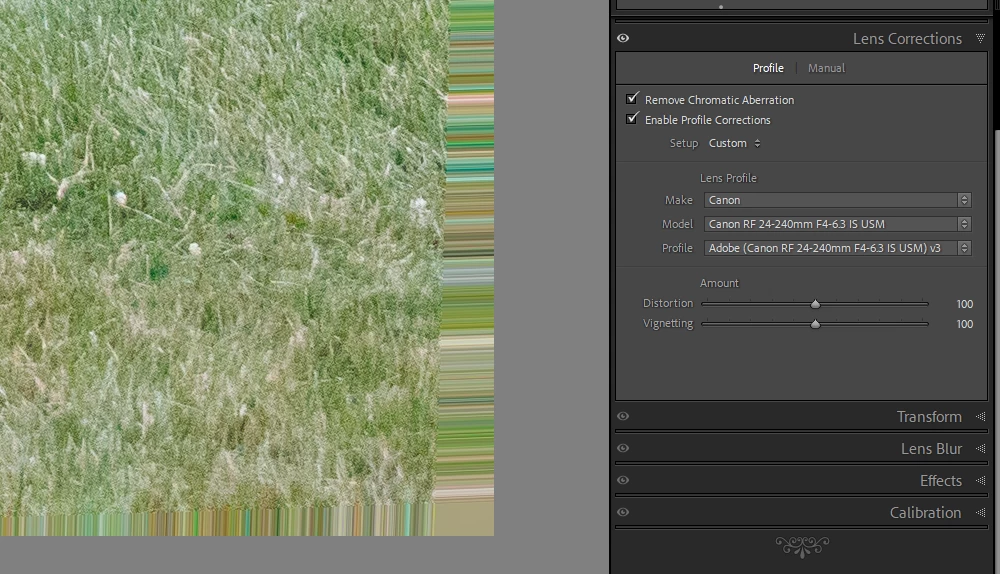
On the latest Lightroom Classic release version 13.5 there is a new lens profile (v3) for the Canon 24-240 lens. It has reintroduced the "bad borders" bug. Workaround is simply to select the older v2 profile.

Este tema ha sido cerrado para respuestas.

56 respuestas

Participant
September 19, 2024

ACR/Photoshop for MAC, has recently begun distorting the outer edges of my photos once I apply the auto lens corrections.  Here's an example.  Any suggestions or is this a known bug?  Thanks.

Participant
September 18, 2024

Hi Betreff

Thanks for responding to my post.  Adobe front line support acknowledged that tere are problems in Camera Raw 16 and that a new version will be available after the Adobe MAX event in mid-October.  Having experimented with the issue I believe that the border is an addition to the real image and not a distortion of it.  You are right, the files out of the camera are fine.  Opened with Apple’s Preview app of Canon’s Digital Photo Professional they are fine.  There is something in the RAW file from the 24-240 that is upsetting Adobe’s Camera Raw plug-in.  Curiously,  I’ve found that the issue disappears if the focal length is less than about 50mm,

Thanks again for your work-around.  I adjusted the <Distortion> adjustment to zero and that covered it!

m-datz
Participant
September 17, 2024

プロファイル (Canon RF 24-240mm F4-6.3 IS USM) v3 

写真を開くと4辺が不自然に拡大される

Participant
September 17, 2024

I want to share the answer & solution with all.


The "picture frame" or "borderline" around the photos is a known bug that came with the latest Adobe RAW profile update.

The good news is: ALL THE RAW FILES ARE OK 🙂
It´s NOT a defect of the sensor or picture.
It´s only the buggy Adobe RAW Filter that produces the errors.


Let´s see how long it takes until Adobe fixes that problem.

There is a workaround, too: You can switch to an old RAW Profile that will not show this errors


In Lightrrom:
1. Go to the "Lens Correction" / (German) "Entwickeln") window / Fenster
2. Click on "Lens Corrections" / "Obbjektivkorrekturen"
3. Profil: "Enable Profile Corrections" / "Profilkorrektur aktivieren"
4. Select "Profile": Adobe (Canon RF 24-240mm F4-6.3 IS USM) v2
And everything will be ok 🙂


Participant
September 17, 2024

I shoot RAW with a Canon R6 mkII and other Canon cameras.  WHen I use this one with a Canon RF 24-240mm f/4-6.3 at focal lenght settings greater than 50mm I get a border of short fine lines around the image. I'm running MacOS Sonoma 14.6.1.  Rolling back to CR plug-in v14 solves the issue.  It doesn't happen with any other of my Canon gear combinations.  First line support (Vincent) suggested I report this to you, and that it might be fixed in the next release.  I'm happy to supply sample RAW files if required.  Vincent has my details.

Christopher Head

christopher.head@ntlworld.com


Participant
September 14, 2024

I am using Lightroom Classic, but only because this issue was initially happening on Lightroom Cloud. The issue was that I have RAW images from a Canon R5 that are getting pixel tearing/stretching around the border when I import to my Windows machine, that did not happen when I previously imported them into a MacOS machine. My Windows machine has a separate graphics card so I was thinking that was the issue but even after disabling it to run on CPU mode only and re-importing, I still had the issue. I am also using RF Canon lenses which typically require that you use lens profile corrections in order to crop out the unsuable portions of the already very large images.

What I found out was that I have a newly updated version of Photoshop on my Windows machine compared to my Mac and it was applying a v3 profile to the RF 24-240mm F4-6.3 lens I have. When I would turn off the profile correction, everything was fine. Using V1 or V2 was fine as well so I settled for V2.

I don't know if some change was made on Canon's end or Adobe's but it seems there is a miscommunication on the profiles, or maybe I need to update my camera's firmware. Either way, I couldn't find anything about this and figured someone else might benefit from my insight at some point to check that after matching the Make and Model to your Profile Correction you check the Profile Version as well.

Participating Frequently
September 14, 2024

Camera: Canon R5, lens RF 24-240 mm.


There is an error on all 4 edges with automatic lens correction - colored lines at the correction point.

Participant
September 11, 2024

thank you a lot. saved my pictures 🙂 


Strange though it is till not fixed. 

Participant
September 11, 2024

Adobe Photoshop 25.12, Lightroom Classic 13.5.1 & Bridge 14.1.2 destroy images by adding a "pixel frame" around the images, when Canon RP shots are taken with a Canon Zoom RF 24-240mm F4-6.3 IS USM objective (others objectives not tested jet) - see pictures below.


The problem seems to be an incorrect RAW Filter for Canon RP / Canon Zoom RF 24-240mm F4-6.3 IS USM in the actual Adobe Camera RAW Filter version 16.5.1 and shows up since updating to the latest versions.


The problem occures e.g. when pictures are beening imported or synchronising in Lightroom.

Old Canon RP / Canon Zoom RF 24-240mm F4-6.3 IS USM pictures are not effected, as long as they are not beeing imported new. If you copy old pictures in a new directory and import them new into Lightrrom, the problem occurs, too.


The Canon image tool "Digital Photo Professional 4" (thank god) does not show any issues on old an actual Canon RP / Canon Zoom RF 24-240mm F4-6.3 IS USM photos.


So the problem seems to be the actual RAW Filter for Canon RP / Canon Zoom RF 24-240mm F4-6.3 IS USM


Participant
September 10, 2024

Yup, this is a known issue. Go into the develop module and under lens correction apply v2 instead of v3