
Participant
Nov 10, 2026 4:28 PM UTC
Investigating

P: CR 19.0 & PS 28.0: Automatically fills gaps/transparent section with pixels/stripes

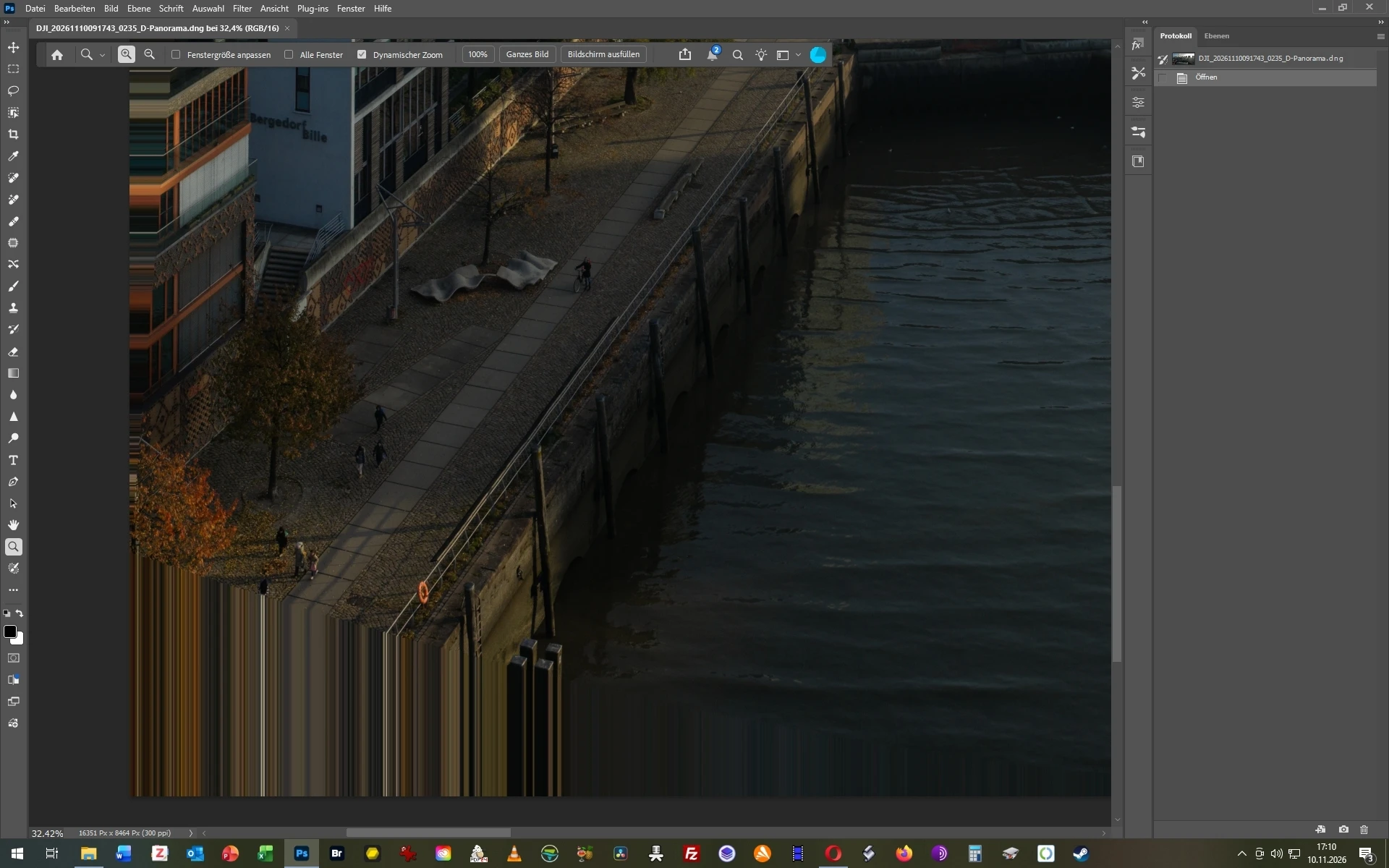
When I stich several images for a panorama in ACR, there is often a gap at the edges of the photos which is in ACR correctly displayed as a checker pattern. However, when I open these panoramas from ACR into PS it automatically fills these gaps with weird and unwanted stripes/pixels. This has begun to happen today. How can I turn that off again? 


    Pinned Reply By Sameer K

    We’ve logged this for the team to review. 

    Thanks!
    Sameer K

    26 replies

    Community Expert
    Nov 12, 2026 6:07 PM UTC

    Product: Adobe Lightroom Classic

    Version: 16.0

    Operating system: Windows 11 26H2

    Processor: Intel i7-8700K - 64GB RAM -

    RAM: 64 GB

    Graphics: NVidia Geforce RTX 3060 - 12GB


    Description of the issue

    After updating to Lightroom Classic 16 there’s a issue with sending images from Lightroom to Photoshop for further editing. On sending an image with transparent areas (for example after perspektive correction or scaling ) via Edit in Photoshop 2027 the transparent areas are filled with striped patterns.


    Steps to reproduce

    1. Do a perspective correction or a scaling in Lightroom' Transform section without "Contrain Crop" option. 
      Image with transparent areas in LrC


    2. Send the image via "Edit in Photoshop 2027" to Photoshop.


    Expected result

    The image should be send with transparent areas in Photoshop.

    Actual result

    The transparent areas of the image were filled with colored stripe pattern derived from the actual image content.

    Image with colored strip pattern in PS


    Additional information

    • The issue is reproducible with all images
    • Disabling GPU acceleration in Lightroom and Photoshop did not resolve the issue.
    • Doesn't work with file format .PSD or .TIFF (setting in Lightroom)
    • With Lightroom 15.x and Photoshop 27.x it works. Now the issue occurs now already on sending an image to Photoshop 27


    Translate
    My System: Intel i7-8700K - 64GB RAM - NVidia Geforce RTX 3060 - Windows 11 Pro 26H2 -- LR-Classic 16 - Photoshop 28 - Nik Collection 9 - PureRAW 6 - Topaz Photo AI
    Community Expert
    Nov 12, 2026 4:10 PM UTC

    Product: Adobe Lightroom Classic

    Version: 16.0

    Operating system: Windows 11 26H2

    Processor: Intel i7-8700K - 64GB RAM -

    RAM: 64 GB

    Graphics: NVidia Geforce RTX 3060 - 12GB


    Description of the issue

    On sending an image with transparent areas (for example after perspektive correction or scaling ) via Edit in Photoshop 2027 the transparent areas are filled with striped patterns.


    Steps to reproduce

    1. Do a perspective correction or a scaling in Lightroom' Transform section without "Contrain Crop" option. 
       
      Image with transparent areas in Lightroom Classic
    2. Send the image via "Edit in Photoshop 2027" to Photoshop.


    Expected result

    The image should be send with transparent areas in Photoshop.

    Actual result

    The transparent areas of the image were filled with colored stripe pattern derived from the actual image content.

    Image with striped pattern in Photoshop


    Additional information

    • The issue is reproducible with all images
    • Disabling GPU acceleration in Lightroom did not resolve the issue.
    • Doesn't work with file format .PSD or .TIFF (setting in Lightroom)
    • With Lightroom 15.x and Photoshop 27.x it works. Now the issue occurs now already on sending an image to Photoshop 27


    Translate
    My System: Intel i7-8700K - 64GB RAM - NVidia Geforce RTX 3060 - Windows 11 Pro 26H2 -- LR-Classic 16 - Photoshop 28 - Nik Collection 9 - PureRAW 6 - Topaz Photo AI
    Sameer K
    Community Manager
    Sameer KCommunity ManagerPinned
    Community Manager
    Nov 12, 2026 3:20 PM UTC

    We’ve logged this for the team to review. 

    Thanks!
    Sameer K

    Translate
    caladoAuthor
    Participant
    Nov 11, 2026 12:46 PM UTC

    It seems to be connected to the newest version of camera raw. Once I installed camera raw 18.7 (or lower) the issue disappeared. Adobe: please fix this bug, since I am paying for a subscription, I would like to use the newest version...

    Translate
    Sameer K
    Community Manager
    Community Manager
    Nov 11, 2026 1:28 PM UTC

    Hey, @calado. Welcome to the Photoshop Community. I'll need more info to help you figure this out. I've moved your post to Questions for now.


    Please share a sample set of images showing the issue, along with the system info from Photoshop Help > System Info. Copy and paste it into a text document, then upload and attach it here, or you can direct message me from my profile. Please specify whether this happens with newly stitched panorama images.


    Thanks!
    Sameer K
    (Type '@' and type my name to mention me when you reply)

    Translate