



johnrellis
Legend
June 24, 2025

P: (CR&LR) don't correctly display JPEG XLs created by Photoshop

  • June 24, 2025
  • 4 replies
  • 938 views

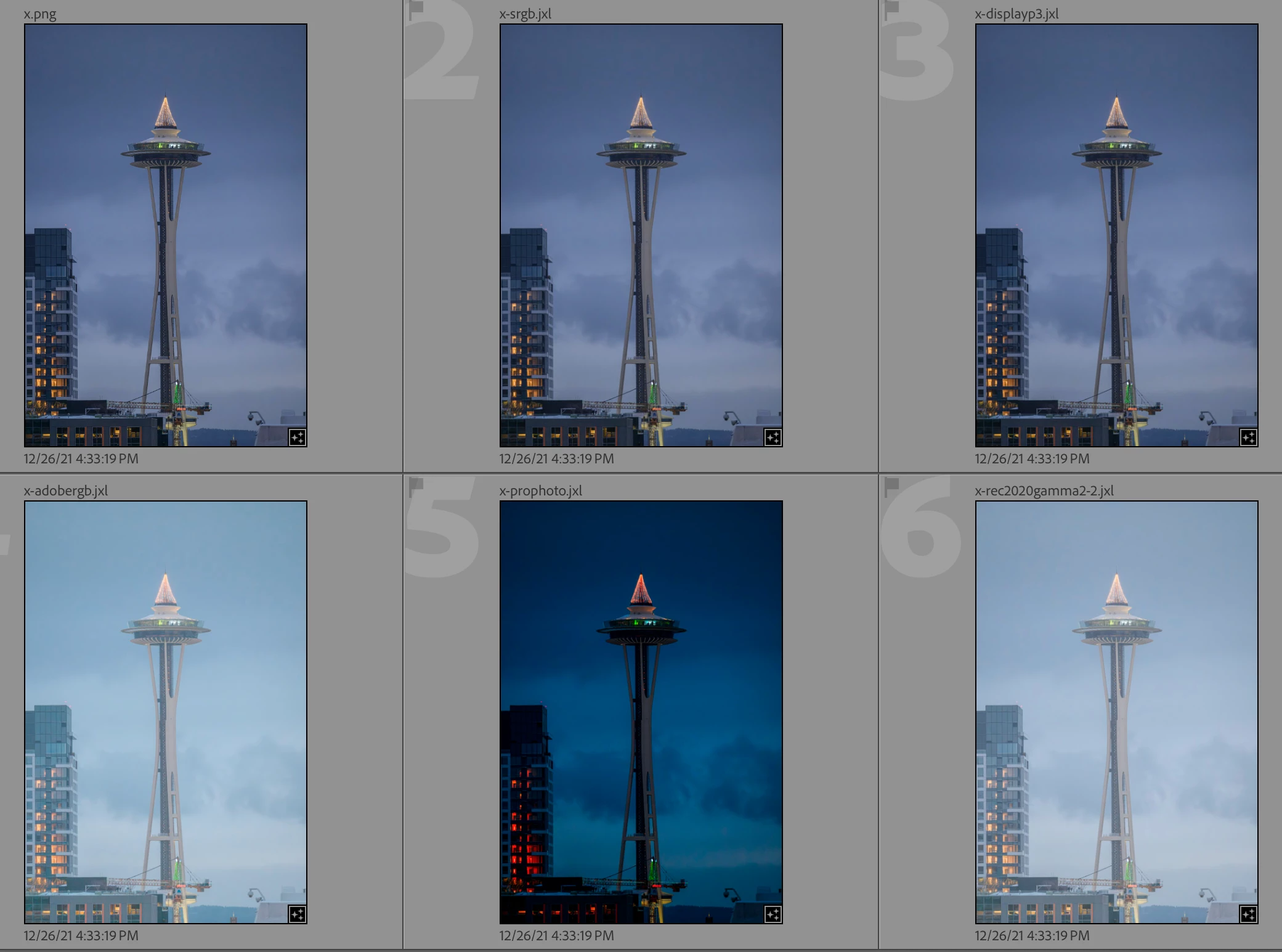
LR doesn't correctly display the colors of JPEG XL's created in various color spaces by Photoshop 26.8, though several other programs on Mac and Windows do. Since Photoshop and five other programs all display the .jxls identically, that strongly indicates a bug in LR.


Tested on LR 14.4 / PS 26.8 / Mac OS 15.5.


1. Download and open this catalog:https://www.dropbox.com/scl/fi/vjd3laedf2jffxrle602i/photoshop-jxl.2025-06-24.zip?rlkey=8zbxn5so4y35j7n9clf8hmls4&dl=0 


2. The catalog contains x.png, in the Prophoto RGB color space, plus five eponymous .jxl's created by selecting x.png, doing Edit In > Photoshop. In Photoshop, do Convert To Profile, select the desired profile, then Save As, JPEG XL, Embed Color Profile, Lossy, Quality 100.


The files and color spaces appear in LR:


x-srgb.jxl (correct)

x-displayp3.jxl (correct)

x-adobergb.jxl (incorrect)

x-prophoto.jxl (incorrect)

x-rec2020gamma2-2.jxl (incorrect)


appear as:
 

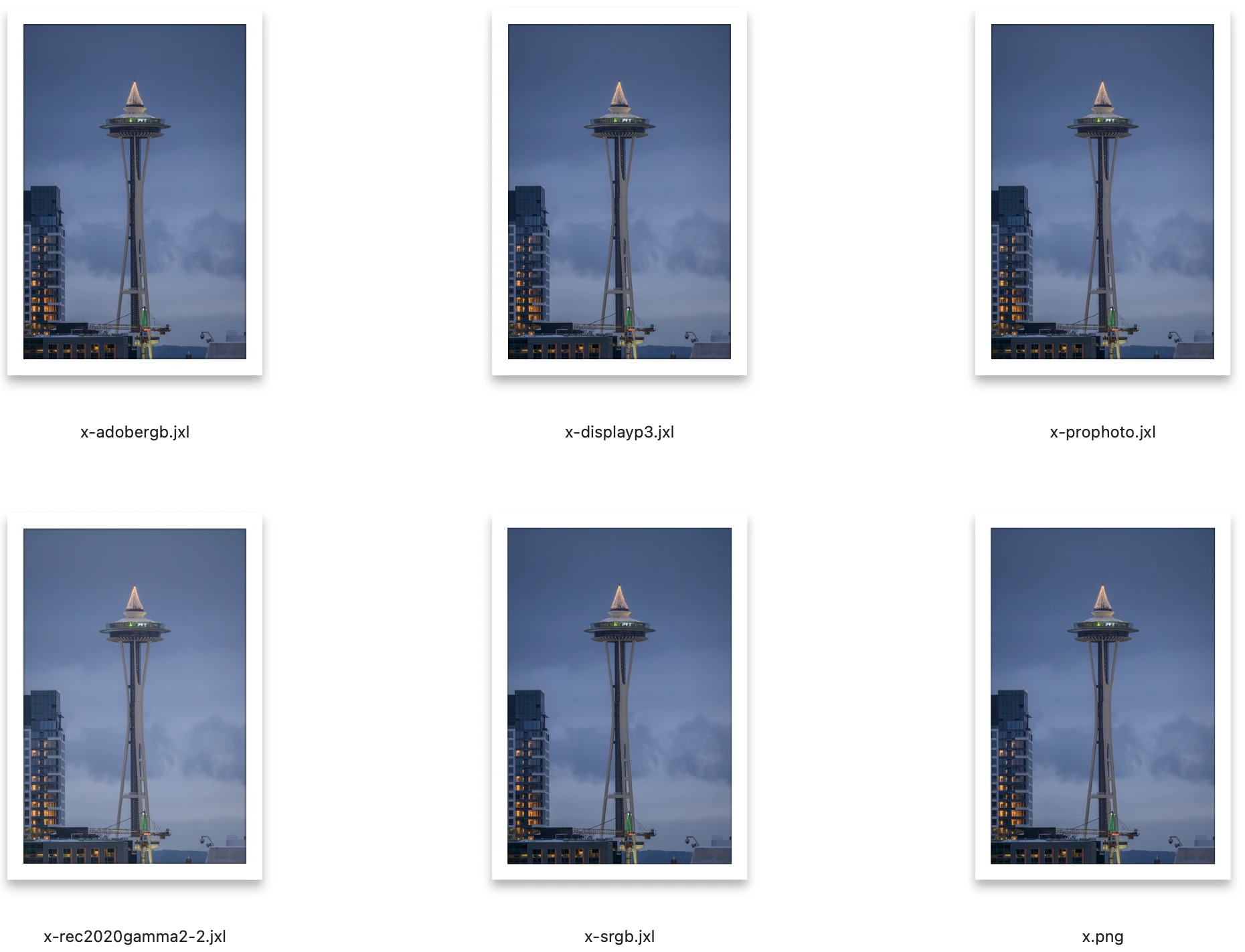
3. These programs all render the .jxls the same:


Mac: Photoshop 26.8, Preview, Finder, Pixea

Windows: Irfanview, Xnviewmp


For example, here's Finder:
 

4. The "jxlinfo" utility from the libjxl reference implementation shows that none of these files contain embedded previews. So that couldn't account for the differences.


4 replies

johnrellis
Legend
August 27, 2025

I confirmed that the bug recipe now behaves correctly in LR 14.5, thanks.

Rikk Flohr_Photography
Community Manager
Community Manager
August 13, 2025

Greetings all, 


A new update for the Adobe Photography products has been released.  The August update contains an update regarding this issue. 

If you do not see the update in your Creative Cloud Application, you can refresh it by pressing  [Ctrl/Cmd]+[Alt/Opt]+[ R ].

Note: It may take up to 24 hours for your update to be available in your Creative Cloud app.


Thank you for being so patient. 

Rikk Flohr: Adobe Photography Org
Rikk Flohr_Photography
Community Manager
Community Manager
June 25, 2025

Thanks for the report, @johnrellis  I've moved this to Camera Raw and filed the bug. 


Rikk Flohr: Adobe Photography Org
JohanElzenga
Community Expert
Community Expert
June 25, 2025

Seems to be a known issue: https://community.adobe.com/t5/lightroom-classic-discussions/p-color-artifacts-in-jpeg-xl-prophoto-rgb/td-p/14678954 Do you want me to merge your post with that thread?


-- Johan W. Elzenga
johnrellis
Legend
June 25, 2025

They're two different issues with different causes.


In the other report, LR creates artifacts in exported JPEG XLs, which the product team says is a limitation of the JPEG XL standard.


In this report, LR displays incorrect colors on imported JPEG XLs. This can't possibly be a limitation of the standard, since Photoshop and five other programs all display the images correctly.

Rikk Flohr_Photography
Community Manager
Community Manager
June 25, 2025

@johnrellis 

Are you able to preview these in Camera Raw? Does it behave similarly or preview correctly?

Rikk Flohr: Adobe Photography Org