


Participating Frequently
June 13, 2024
質問

P: Color artifacts in JPEG XL ProPhoto RGB

JPEG XL files with the ProPhoro RGB color space exported from Lightroom contain color compression artifacts. They appear in quality 100% and lower. Other color spaces do not have this problem.
 

Lightroom version 13.3.1

Windows 11 23H2 version 22631.3593

返信数 14

johnrellis
Legend
October 18, 2024

That report was just acknowledged by Adobe and its status set to Investigating:

https://community.adobe.com/t5/camera-raw-bugs/p-certain-raw-files-export-unusually-large-with-jpeg-xl/idi-p/14877200


(With the release of LR 14, it can take longer than normal to process incoming reports.) If you follow that thread, you'll get notified of any changes in status. Adobe rarely comments if/when an issue will be fixed, but they're very good at updating the status (whether they consider it a bug or feature request, if they need more information, when a fix is released).

reproo2773183
Inspiring
June 24, 2025

I've just done a little test with Photoshop 26.8

first I Exported a lossy 16bit AdobeRGB Jpeg XL from Lightroom to verify its still giving artifacts, which it was.

Next I opened in Photoshop a lossless 16bit ProPhoto Jpeg XL from Lightroom which does not have the artifacts.

Next I used Convert to Profile in Photoshop to Convert to AdobeRGB.

Next I Save As this to JPEG XL (embed profile AdobeRGB - yes) Lossy 100 16bit with all 4 checkboxes checked at the bottom.

Closed and Opened, no artifacts.


However the embedded Profile IS NOT AdobeRGB.

Its shown in the screengrab a long string of numbers starting D65.

I'm fairly confident this is a V4 icc.


Is the limiting factor the old V2 iccs?

johnrellis
Legend
June 24, 2025

"However the embedded Profile IS NOT AdobeRGB."


The "jxlinfo" utility distributed with the libjxl reference implementation shows the following for .jxls produced by Photoshop 26.8 from AdobeRGB images:

Color space: RGB, D65, Custom primaries: red(x=0.639997,y=0.329997),  green(x=0.210005,y=0.710005),  blue(x=0.149998,y=0.060004)gamma(0.454707) transfer function, rendering intent: Relative


These are the parameters of Adobe RGB (modulo round errors). I don't have access to the JPEG XL standard (for which the antediluvian ISO charges hundreds of dollars). But from casual reading, it appears that JPEG XL doesn't require a full ICC profile to be embedded in the file -- the parameters can be embedded instead.  The output above suggests that the file uses JPEG XL color-space representation rather than a full ICC profile.


reproo2773183
Inspiring
October 18, 2024

Thanks John, don't suppose there is any news from the investigating team.

johnrellis
Legend
October 17, 2024

"worryingly the file size is much smaller than Lightroom's (6.1MB vs 41MB)"


That's a LR bug that Adobe hasn't acknoweledged -- LR's JPEG XL exports are way too large compared to other apps:

https://community.adobe.com/t5/lightroom-classic-discussions/p-certain-raw-files-export-unusually-large-with-jpeg-xl/m-p/14877200


reproo2773183
Inspiring
October 17, 2024

Affinity Photo 2 can Develop to 16bit AdobeRGB then Export to Lossy Quality100 jxl, without artifacts, worryingly the file size is much smaller than Lightroom's (6.1MB vs 41MB) and also I couldn't find any Lossless option.

apf102
Known Participant
October 17, 2024

Same here. Have recently switched to Mac too and the issue happens there. Has anyone tried it on other software?

reproo2773183
Inspiring
October 17, 2024

I'm still seeing these Lightroom bugs (both the blocky artifacts and reverting to 8bit in the Export dialog) using the CC2025 release apps Lightroom Classic v14.0.1, ACR v17.0 Photoshop v26.0

Glenn McDowall
Participating Frequently
October 1, 2024

same behaviour for me with CR2, might suggest the bug is in the export.

johnrellis
Legend
September 25, 2024

"Have also noticed the JXL export defaults back to 8 bit however you set up the export"


Coincidentally, I just filed a bug report about that, having observed it working on another JXL issue:

https://community.adobe.com/t5/lightroom-classic-bugs/p-export-window-doesn-t-remember-previous-setting-for-jpeg-xl-bit-depth/idi-p/14880984

apf102
Known Participant
September 25, 2024

Hi. Apologies, I think I must have got the files confused. Tried to replicate with the JXL again but didn't get anything. HOWEVER, you can see some of the red artefacting when exported as JXL 16 bit, 90% quality and in the AdobeRGB Colour Space, which I think is what you saw too.


Have also noticed the JXL export defaults back to 8 bit however you set up the export (even when saved as a preset)

johnrellis
Legend
September 23, 2024

"I can make the artefacts appear if I export to JXL in Rec2020 16bit with quality set to 100%. "


Please share a sample NEF showing these artifacts, so Adobe has more to work with. My sample NEF shows no artifacts with Rec 2020 at either 90% or 100%:


Krzysztof Cisło
Participating Frequently
February 3, 2025

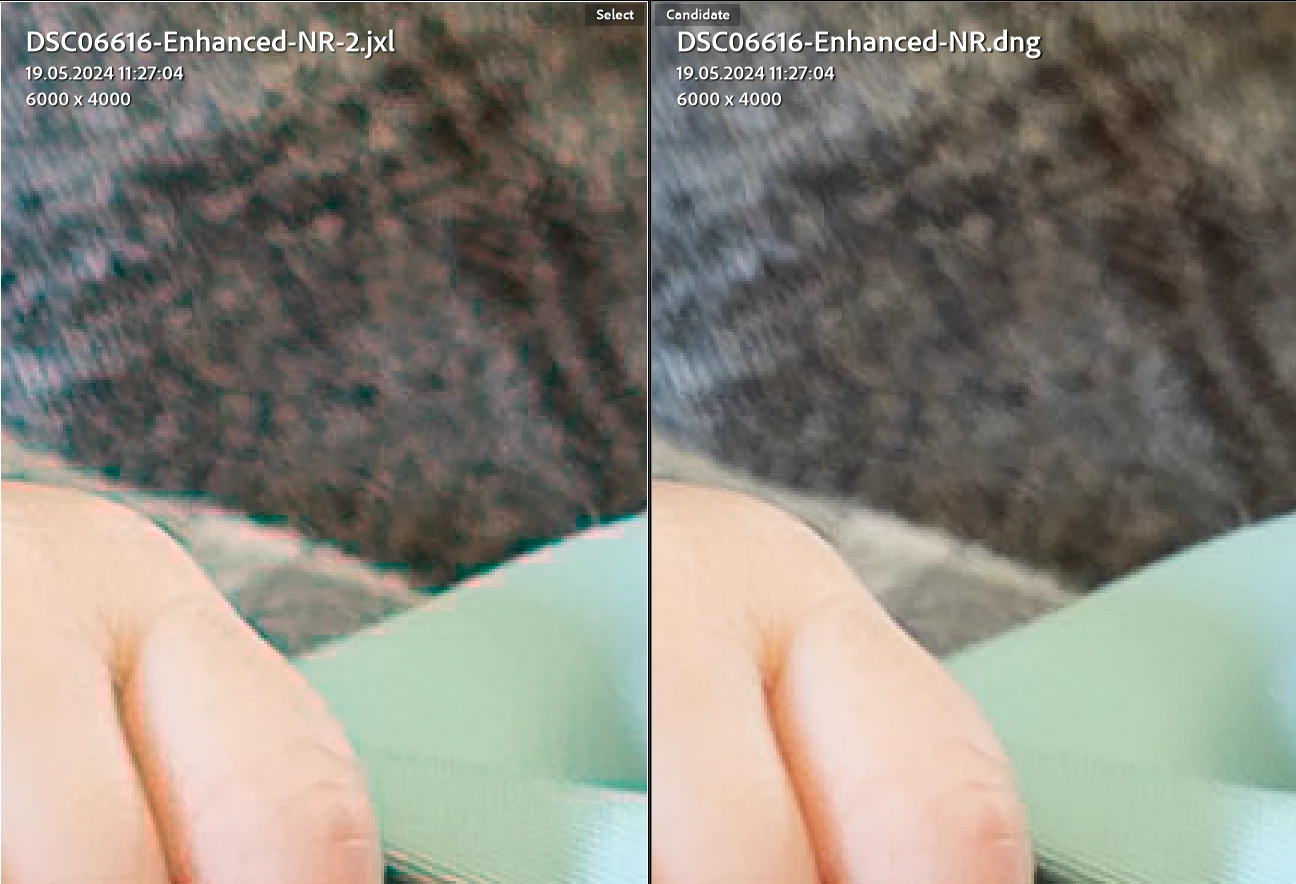
Are you sure? I checked and I don't see artifacts on 13.2. See below.
Current version 14.1.1 on the left and 13.2 on the right:

I used to use ProPhoto JPEG XL lossy (95%) as a replacement for flattened TIFs. They took up much less space while providing the same quality. I have a workaround. Since Adobe won't admit or fix this bug, I use the "unofficial" portable version 13.2 on the side to convert TIFs to JXLs.