
Participating Frequently
June 13, 2024
Question

P: Color artifacts in JPEG XL ProPhoto RGB

  • June 13, 2024
  • 14 replies
  • 10126 views

JPEG XL files with the ProPhoro RGB color space exported from Lightroom contain color compression artifacts. They appear in quality 100% and lower. Other color spaces do not have this problem.
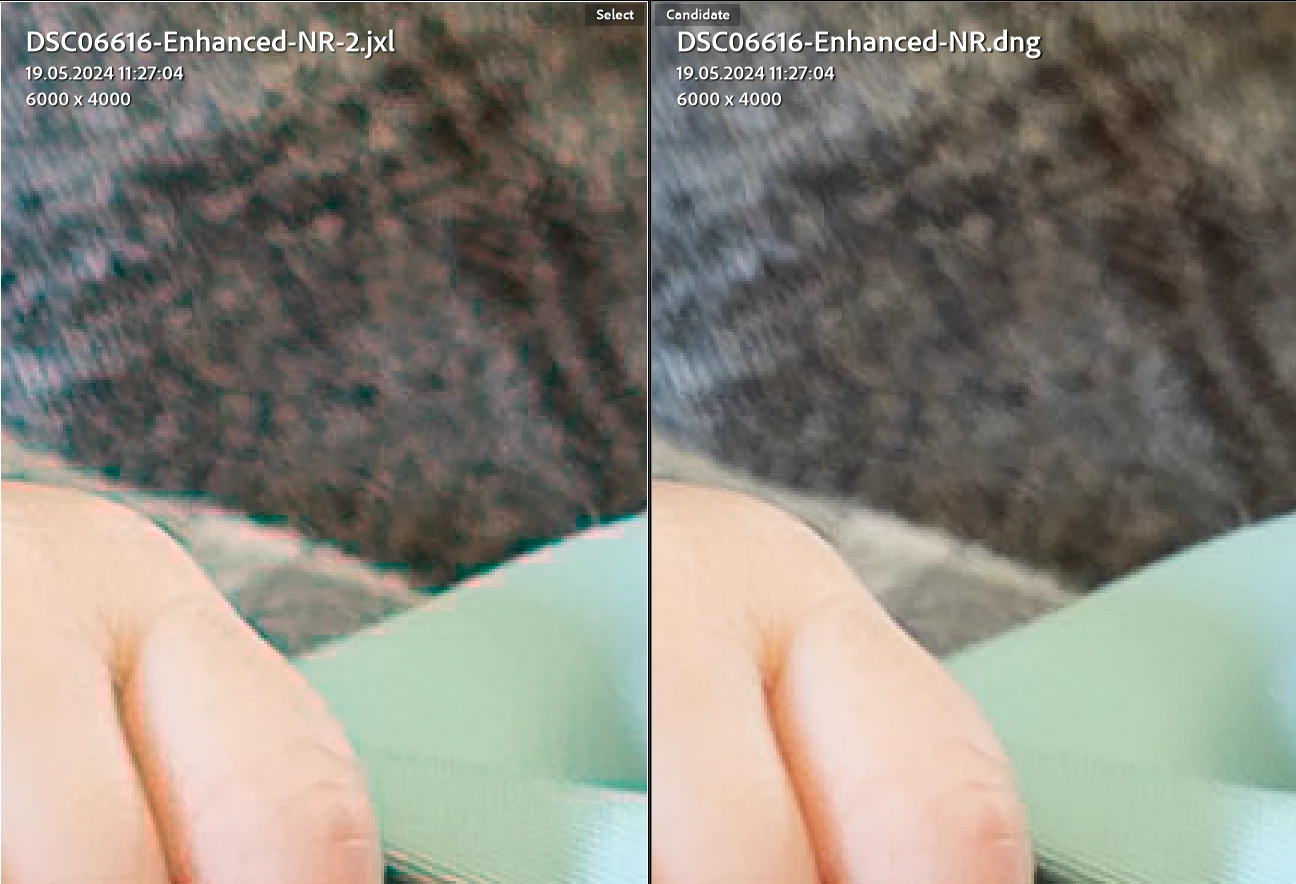
 

Lightroom version 13.3.1

Windows 11 23H2 version 22631.3593

14 replies

apf102
Known Participant
September 23, 2024

Thanks. Have replied on the other forum too.


RE the bug. I can make the artefacts appear if I export to JXL in Rec2020 16bit with quality set to 100%. It is only the uncompressed exports which seem to be fine. 8 bit also fine.

apf102
Known Participant
September 23, 2024

Weird artefacts with jpeg xl exports + advice on best export format

expectated behaviour - high quality jxl file

actual behaviour - file has blocky artefacts and weird colour shifts

Lr Classic  13.5.1 in Win 11 and Lr 9.5.1 on iPad 


Hi. Two quick questions.

1) Does anyone know why I am getting these weird red artefacts on my Jxl exports? This is viewed on Lr Cc on my iPad. Original file was a NEF of a film negative. It was converted in negative lab pro. You can see the NEF displays fine. If I export from the NEF to a jxl I get similar red artefacts, though less pronounced. Other formats are fine. The jxl settings were 16bit compressed at 100% quality in ProPhoto colour space from LR Classic on Pc.

2) this is a workflow question. I tend to import and convert film negatives in Lightroom Classic, but for various reasons I like to edit on my iPad. This means the best workflow is to create a positive image for editing on iPad and getting rid of the raw (I have the negative so no biggy). I had been exporting to sRGB JPEG but was getting weird results when printing and of course you lose a load of depth.. Tiffs are way too large to use. The plan was to use 16bit jxl maybe with ProPhoto colour space, which seems to be about 25mb, but am getting the issue described above.

Any ideas much welcomed!

johnrellis
Legend
September 23, 2024

Re the workflow question, see my suggestion for syncing the NEFs with LR Cloud and then LR Mobile on the Ipad:

https://www.lightroomqueen.com/community/threads/workflow-issues-with-jxl-and-lightroom-classic.51142/#post-1340444

johnrellis
Legend
September 23, 2024

Re color artifacts in JPEG XL ProPhoto RGB exports, Adobe has acknowledged this bug:

https://community.adobe.com/t5/lightroom-classic-bugs/p-color-artifacts-in-jpeg-xl-prophoto-rgb/idi-p/14678954


The color spaces Display P3 and Rec 2020 don't appear to have the problem.

Rick Spaulding -
Legend
June 27, 2024


Update:  Recommendations:

  • If using lossy compression, prefer using JXL-native color spaces such as sRGB, Display P3, or Rec 2020.
  • If you must use non-native color spaces such as Adobe RGB or ProPhoto, consider using Lossless (quality 13).
Known Participant
January 19, 2025

I'm seeing artifacts I've not seen before when exporting in the JPEG XL lossy format. (90%) quality)

These a red blocks (I think 8x8 pixels size) around a strong blue colored bird. 
See areas indicated by yellow areas on the picture below.
I compared it to TIFF and JPEG (90%) of identical of identical size (pixels), both are looking fine.
Increasing the JPEG XL quality to 100% doesn't solve it. Going to Lossless does.

When I started using JPEG XL, I have evaluated it and saw superior quality compared to JPEG of similar file size. These artifacts are new to me.

I'm using LR 14.1.1, Windows 11 computer.
See attached picture at 300% for easy vieweing. Unfortunately the artifacts are visible at 100% too.

Is this normal for JPEG XL? Have I overlooked it in the past? Is the contents of my picture so specific and causing this? is it a bug ? Are a few of the questions I have.
Can share the DNG file if you like.


johnrellis
Legend
January 22, 2025
quoteThat's a good question. There certainly haven't been any reports here about artifacts in Photo Merge DNGs since JPEG XL was introduced 1.5 years ago.  But I don't know much about JPEG XL (the ISO foolishly charges hundreds of dollars for the privilege to read the specs).  But the Photo Merge DNGs and exported JPEG XLs are much different beasts.


The DNGs produced by Photo Merge represent the merged photo as "linear raw", with the Bayer color-filter array pixels demosaiced into three separate RGB channels. But there's no change in the color space -- the values of the pixels are what comes from the camera's sensor (demosaiced).  Those three channels are then compressed with lossy JPEG XL compression.


But an exported JPEG XL contains pixels rendered by the Camera Raw engine into the selected color space and then compressed.  I don't know what it is about the JPEG XL standard that would cause these artifacts for some color spaces.

By @johnrellis


My Thoughts: I think "linear raw" is the sensor values, possibly "Linear Light" or "intensity", there are 3 values but none of this is RGB.

A "camera profile" (dcm) converts the Linear Light values to RGB (Display Code Values) eventually but I think there has to be an interim step or two involving CIExyz.

RGB values are meaningless without a Colour Profile (icc). Lightroom is always dealing with its Working Space and your monitor's profile. When it comes to Export; Lightroom does not need to consider the Monitor Profile?


I also don't know where the Adobe engineers are hitting this limitation with  "non native profiles". Perhaps its and HDR thing?

Its not likely to become any clearer since there are too many unknowns.


I can't remember which RGB Profiles are available to Affinity Photo when it Exports to JPEG XL but they are much smaller files and I've not seen any of these artifacts.


@reproo2773183: "I think "linear raw" is the sensor values, possibly "Linear Light" or "intensity", there are 3 values but none of this is RGB."


The term "RGB" has different meanings in different contexts, but it most definitely is used in the DNG spec to describe raw sensor values.


In the DNG spec, un-demosaiced sensor data from the camera's color filter arrays are stored in the DNG. This sensor data consists of red, green, and blue samples from the CFA, sometimes abbreviated as RGB. The spec variously calls these "native camera RGB values", "RGB camera values",  "reference camera native space values".  The values are in what the spec calls "camera color space", "camera native color space", "camera space", "same color space as the raw image data".


It's also common outside of the DNG spec to refer to color filter arrays samples as RGB:

https://en.wikipedia.org/wiki/Bayer_filter 


DNGs store the output from Denoise as de-moasaiced raw data to which the denoise algorithm has been applied, using an alternate raw representation the spec calls LinearRaw.  LinearRaw stores three "color planes" (channels) of red, green, and blue samples, in the same color space as the CFA representation ("camera color space").


It is the job of DNG camera profiles to map RGB values in the camera color space to the ICC color connection space and then to particular color profiles such as Prophoto RGB or Adobe RGB.


johnrellis
Legend
June 14, 2024

I see similar artifacts when exporting to JXL with these options in LR 13.3.1 / Mac OS 14.5:


Prophoto, 100%, 16 bits/component

Adobe RGB, 100%, 16 bits/component


I don't see the artifacts with these options:


Display P3, 100%, 16 bits/component

Rec 2020, 100%, 16 bits/component

Prophoto, Lossless, 16 bits/component 


You can download the original DNG and exported JXLs from here -- the files are perspicuously named:

https://www.dropbox.com/s/93agakaa94zsns6/export-jxl-artifacts.2024-06-13.zip?dl=0


johnrellis
Legend
June 14, 2024

@Rikk Flohr: Photography@Rick Spaulding -, please consider moving to bugs. I've uploaded a sample file that exhibits the problem (see above).