Known Participant
March 24, 2024

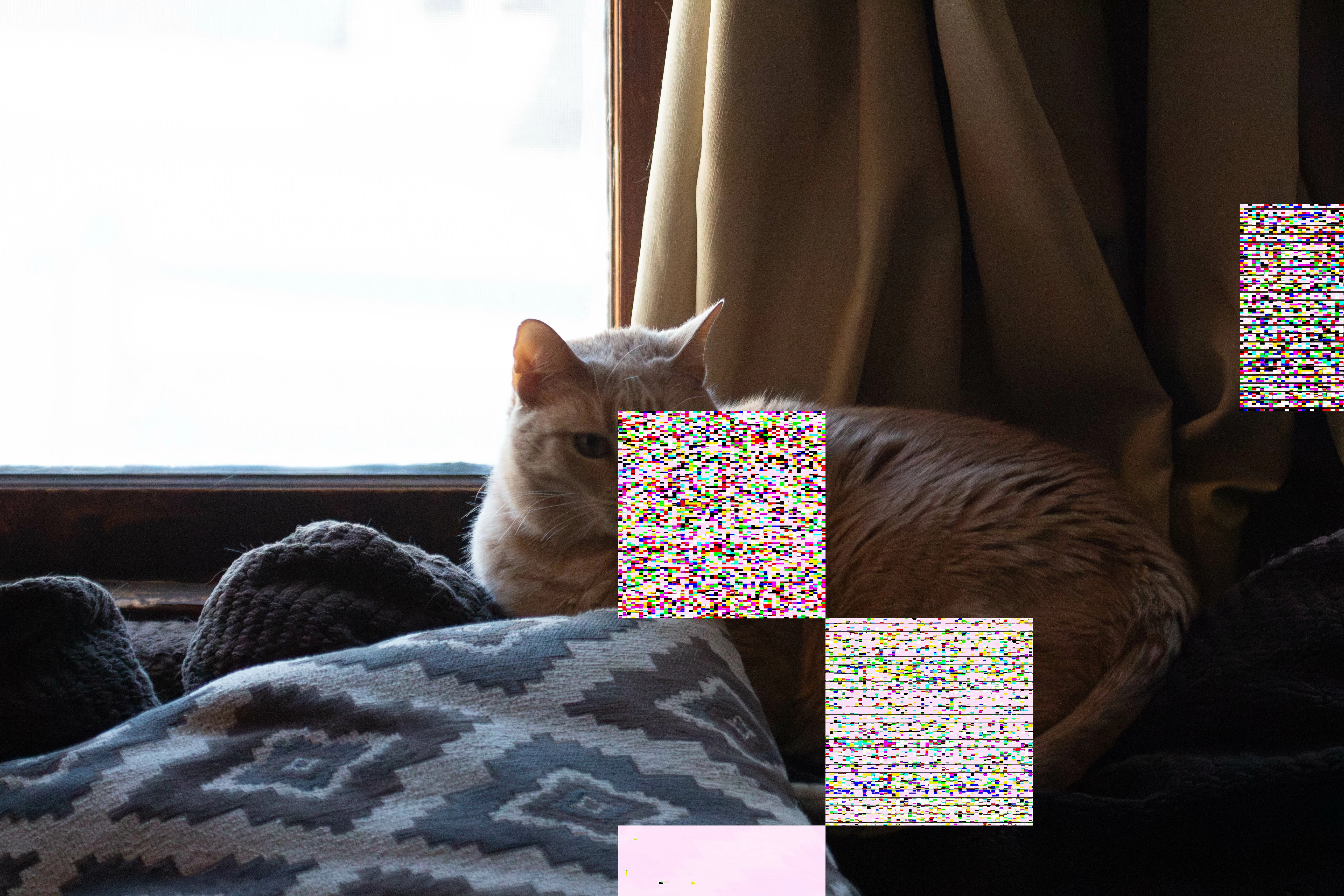
P: Denoise - large artifacts with AMD Graphics Card

  • March 24, 2024
  • 41 replies
  • 7541 views

When I use Denoise on RAW images, the images are putting strange squares on the DNG once it is created.  this was after the latest update on both mac and adobe lightroom.  I've spent HOURS on adobe customer service, don't know how to fix this.  I love that feature.
This topic has been closed for replies.

41 replies

Known Participant
September 28, 2024

OS 15 is working!  Affirmative on my end as well... Hopefully updates will not cause this type of thing again.  Denoise!

Participant
September 28, 2024

Yes, I can confirm, the denoise feature on Lightroom Classic works just fine under Sequoia 15.0 and the latest update from Adobe. And it seems to me that the denoise performs even better now (in terms of image quality). Happy denoising to you all! 

Participating Frequently
September 28, 2024

Oh, yes, its working! MacOS 15 brought the solution! Happy denoising!

Participant
September 28, 2024

Bonjour à tous,

Il semblerait que la MAJ vers macOS Sequoia 15.0 résout le problème.
Bonne journée.

Participating Frequently
September 12, 2024

Just updated to MacOS 14.6.1: No changes, the bug ist still there...

Participating Frequently
August 24, 2024

Recently updated to LRC 13.5 and attached images show the issue. Never had this issue or any in previous versions. Tried on 3 images and same thing occurred. Not useable obviously, but no idea what to do now.

Community Expert
August 24, 2024

Can you give ore info on your hardware and your camera? Do a system info in classic for the first. If you have an older intel Mac with a radeon GPU card that might be the issue as there is a GPU driver issue causing artifacts in images. I've also seen some mentions of people with the same card on windows having issues.

Participant
August 23, 2024

Other members suggest going into Lightroom preferences and turn off graphics acceleration. I had the same issue. It does get rid of the problem but somewhat slower processing with it off.

Participant
August 23, 2024

Bonjour, lorsque j'utilise la nouvelle fonction de réduction automatique du bruit à l'aide de l'intelligence artificielle, les versions DNG qui sont générées présentent des carreaux blancs. Certains partent avec la gomme, d'autres pas, mais en tout cas c'est très décevant et cela représente une grosse perte de temps. Quelqu-un sait comment y rémédier? Merci

Participant
August 23, 2024

Je précise que ce problème apparaît dans Lightroom classic

Participant
July 26, 2024

I restarted LR and turned off Graphics Acceleration and problem hasn't returned after 4 tries. Seems slower processing but could be expectations. Thanks for suggestions.

Legend
July 25, 2024

There is a known issue with AMD cards on Intel Macs and Sonoma 14.4/14.5. It is intermittent and most commonly shows up in Camera RAW/Lightroom. Try restarting and/or disabling graphics acceleration.