Known Participant
March 24, 2024

P: Denoise - large artifacts with AMD Graphics Card

  • March 24, 2024
  • 41 replies
  • 7541 views

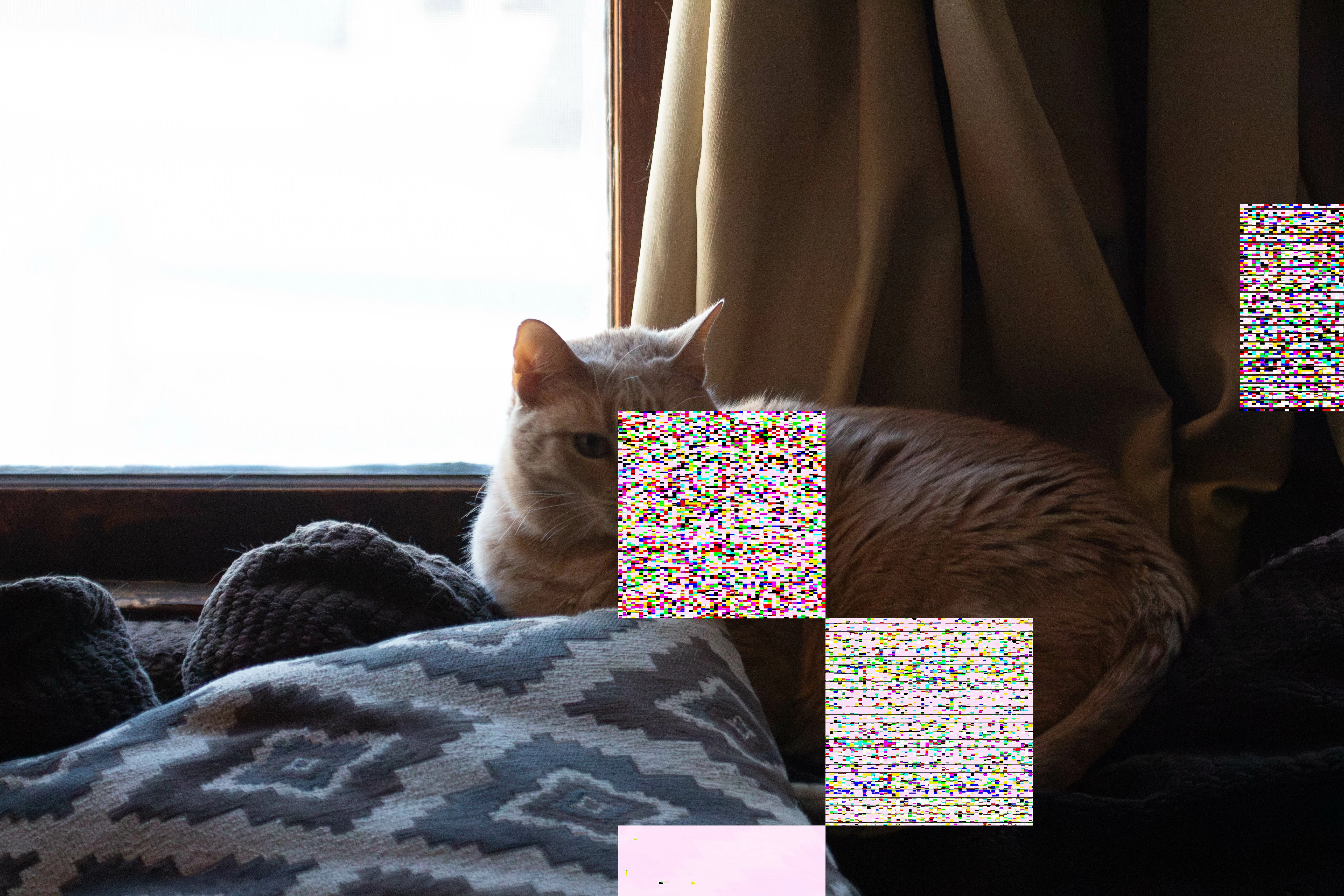
When I use Denoise on RAW images, the images are putting strange squares on the DNG once it is created.  this was after the latest update on both mac and adobe lightroom.  I've spent HOURS on adobe customer service, don't know how to fix this.  I love that feature.
This topic has been closed for replies.

41 replies

Participant
July 25, 2024

I have LR Classic 13.4 On iMac running OS 14.5, 64gb Ram. When I run Denoise it's leaving one or two squares on image. It used to be occassional not more persistent. At times the square have been colored. Any thoughts ? Thanks

Participant
July 25, 2024

Bonjour,

J'ai exactement le même soucis et c'est trés gênant. Je dois faire la réduction de bruit plusieurs fois et puis d'un coup on ne sait pas pourquoi ça marche.

J'espère que vous pourrez nous apporter une solution.


J'ai également un Imac

Processeur : 3,8GHz Intel Core i7 8 coeurs

Graphisme : AMD Radeon Pro 5500 XT 8Go

Mémoire 128Go 2667 MHz DDR4


Voici les paramêtres :

Version Lightroom Classic: 13.4 [ 202406181129-60d181b7 ]
Licence: Creative Cloud
Paramètre de langue: fr-FR
Système d'exploitation : Mac OS 14
Version : 14.5.0 [23F79]
Architecture de l'application : x64
Nombre de processeurs logiques: 16
Vitesse du processeur : 3,8Ghz
Version SQLite: 3.36.0
Mémoire intégrée : 131 072,0 Mo
Mémoire GPU dédiée utilisée par Lightroom: 7 799,2Mo / 8 176,0Mo (95%)
Mémoire réelle disponible pour Lightroom : 131 072,0 Mo
Mémoire réelle utilisée par Lightroom : 7 904,0 Mo (6,0%)
Mémoire virtuelle utilisée par Lightroom : 63 759,0 Mo
Taille de la mémoire cache : 935,9Mo
Version interne de Camera Raw: 16.4 [ 1897 ]
Nombre maximal de liens utilisé par Camera Raw : 5
Optimisation SIMD de Camera Raw : SSE2,AVX,AVX2
Mémoire virtuelle de Camera Raw: 1483Mo / 65535Mo (2%)
Mémoire réelle de Camera Raw: 1718Mo / 131072Mo (1%)

Cache1:
Final1- RAM:248,0MB, VRAM:0,0MB, FLP_2506-Avec accentuation-Bruit-4.dng
Final2- RAM:37,0MB, VRAM:0,0MB, 8D079669-2F80-41A0-B7BC-0224AB67ABBB.dng
Final3- RAM:37,0MB, VRAM:0,0MB, F190AF05-9F03-47E1-B660-C37F1AC60D34.dng
Final4- RAM:37,0MB, VRAM:0,0MB, 6E90194A-8304-45AA-B9E8-661D5A7B494E.dng
Preview5- RAM:22,0MB, VRAM:0,0MB, FLP_2506-Avec accentuation-Bruit-2.dng
Preview6- RAM:22,0MB, VRAM:0,0MB, FLP_2506-Avec accentuation-Bruit-3.dng
Final7- RAM:1 194,0MB, VRAM:3 260,0MB, FLP_2506.CR2
Final8- RAM:248,0MB, VRAM:0,0MB, FLP_2507.CR2
Final9- RAM:37,0MB, VRAM:0,0MB, EEA6B50F-181D-4426-AD9F-AF3485426A42.dng
Preview10- RAM:22,0MB, VRAM:0,0MB, FLP_2506-Avec accentuation-Bruit.dng
NT- RAM:1 904,0MB, VRAM:3 260,0MB, Combined:5 164,0MB

Cache2:
m:935,9Mo, n:2 229,8Mo

U-main: 79,0Mo

Taille d’aperçu standard: 1024 pixels
Affichages : 1) 5120x2880

Informations relatives au processeur graphique :
Metal: AMD Radeon Pro 5500 XT
État initial: GPU pour l'exportation pris en charge par défaut
Préférence utilisateur: Auto

Dossier de l'application : /Applications/Adobe Lightroom Classic
Chemin d'accès à la bibliothèque : /Users/flphotographie/Pictures/Lightroom/Lightroom Catalog-v13.lrcat
Dossier des paramètres : /Users/flphotographie/Library/Application Support/Adobe/Lightroom

Modules installés :
1) Adobe Stock
2) Flickr
3) Loupedeck2
4) Module externe d'importateur Aperture/iPhoto
5) Module externe de prise de vue en mode connecté Nikon

Marqueurs Config.lua:


Merci pour votre retour.

Participating Frequently
July 14, 2024

Yo Rikk,

Curious where the fix of the artifact issue stands, or if Adobe closed the file, because my kit (3.6 GHz 10-Core Intel Core i9, AMD Radeon Pro 5500 XT 8 GB, LR 13.4, CR 16.4) continues to serve garbage when NR is activated, plus a massive overexposure of the original image. 


Known Participant
June 1, 2024

Tried eveything you mentioned long ago, no success, and as subscriber I chose to let them know every step.  Thank you for your time.

johnrellis
Legend
May 31, 2024

@SSGT_BARNES@stephaniepepper, and @christofferg58637189 reported here using AMD 5000-series graphics processors on Mac OS 14.4.1.  Mac OS 14.4.1 released buggy graphics drivers for the AMD 5000 series that produces other bad symptoms as well:

https://community.adobe.com/t5/lightroom-classic-bugs/p-gpu-develop-edit-view-amp-export-artifacts-after-14-4-1-update-amd-only-affects-cr-lrc-amp-lrd/idi-p/14563606


No one in that thread has reported that Mac OS 14.5 fixes the problem. Adobe has said in that other thread they're working with Apple on the issue. AMD has to fix the driver and then Apple has to include it in the next Mac OS release.


For those other symptoms, restarting LR or the computer often makes them go away for a while, and setting Preferences > Performance > Use Graphics Processor to Off makes them go away permanently (though sometimes slowing down LR significantly).  


But unfortunately, LR's AI commands (denoise, masking, lens blur, remove) ignore that setting, and Adobe inexplicably refuses to have the AI commands obey it. 


Known Participant
May 31, 2024

@Rikk Flohr: Photography Just uploadad the last adobe raw update, artifacts are still appearing.

Participating Frequently
May 27, 2024

Cold comfort to know others have these issues with the latest LR & CR updates.


AI denoise problems herald the onset of planned obsolescence for Intel Macs, but at this point not everyone will kick their hardware to the curb. So there might be hope for a fix before we hear a familiar tune: "Sorry folks, either a new box or suck it up."

Legend
May 22, 2024

Both Adobe and (presumably) AMD/nVidia/Intel/Apple/Microsoft are aware of artifacting problems. Everyone just has to be patient.

Known Participant
May 22, 2024

I put the newupdate to lightroom today and the same problem still persists.  I used the same funtion in Photoshop, and it does the same artifacting.  This seems like the RAW team needs to investigate further.  Please advise @Rikk Flohr: Inactive 

Participant
May 4, 2024

I've had an Adobe person walk me through a variety of possible fixes, and the end result was: nothing fixed it, it still happens, and I got an email saying what Rikk Flohr said below: a ticket has been opened on this issue. His post is 4/5, the person I worked with around the 15th, yet didn't say anyone else was having this issue.  Another thing: with this update, where the AI Denoise came into play, I noticed the image files download from my R5 all seemed grainier than they've ever been before. Especially flash photos (interior architechural).

Legend
April 22, 2024

I suspect the problem on my machine was VRAM running low.