


The Art of Retouching
Inspiring
March 19, 2019

P: Fuji X-T3 Some images can not make Adjustments

  • March 19, 2019
  • 13 replies
  • 235 views

Lightroom 8.2 Supported camera Fuji X-T3 has some images come up with exclamation points saying:

"Lightroom has encountered problems reading this photo. You will not be able to make adjustments to the photo."

It's odd, from one image to the same in the same shoot it fluctuates between what is readable, and what isn't. I'd say file corruption, but they open fine in Adobe Camera Raw 11.2

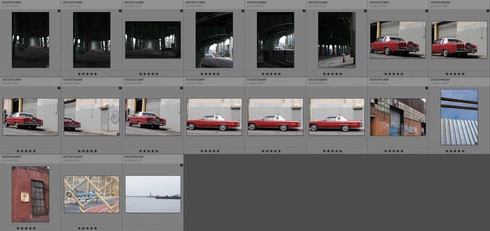
I've checked file permissions, tried on multiple Mac/PC machines. Everything seems normal. Attached screenshot is just example of how some images read/write fine and others have that black bullet with an exclamation point in it.
This topic has been closed for replies.

13 replies

Rikk Flohr_Photography
Community Manager
Community Manager
May 14, 2019
Lightroom Classic 8.3 was released today and contained a fix for this issue. Please update to 8.3 and verify that you are no longer seeing the issue. Thank you!
Rikk Flohr: Adobe Photography Org
The Art of Retouching
Inspiring
March 21, 2019
Thank you. Client reports that camera continues to do this regularly. At her last shoot, half the RAW images are not able to be worked on in Lightroom. But as I previously reported, works fine with other methods.

Client also said she met another Photographer with a Fuji camera, and he returned it because of the same issues.
Sunil_Bhaskaran
Community Manager
Community Manager
March 21, 2019
I am able to reproduce it on a Win machine.
Thanks for reporting. Our team is investigating.
I will update you regarding the same.

Thanks,
Sunil
The Art of Retouching
Inspiring
March 21, 2019
Yeah, still going on my PC, Mac, and 3rd Mac. So, I don't know. As you were the only person to stick with me, I guess I'll have to tell the client that I have no idea. I just hate doing that, as I reach the answer 99.9% of the time. This one just perplexes me.
johnrellis
Legend
March 21, 2019
"I can't believe this isn't a more widespread issue."

It smells like an infrequent, intermittent bug, perhaps a race condition, the worst kind to track down. I initially saw the symptoms with your photos, but then they stopped.  
The Art of Retouching
Inspiring
March 21, 2019
I had 20.0.3, but I updated for you. Didn't make a difference. Still the same issue. I can't believe this isn't a more widespread issue.

Adobe Photoshop Version: 20.0.4 20190227.r.76 2019/02/27: 1205725  x64
Number of Launches: 118
Operating System: Windows 10 64-bit
Version: 10 or greater 10.0.17763.379
System architecture: Intel CPU Family:6, Model:14, Stepping:9 with MMX, SSE Integer, SSE FP, SSE2, SSE3, SSE4.1, SSE4.2, AVX, AVX2, HyperThreading
Physical processor count: 4
Logical processor count: 8
Processor speed: 4200 MHz
Built-in memory: 65466 MB
Free memory: 41987 MB
johnrellis
Legend
March 20, 2019
In Photoshop, do Help > System Info and double-check you're on 20.0.4 / Camera Raw 11.2.  Updating Photoshop shouldn't affect LR in the slightest, but on my computer, the problem went away right after I updated Photoshop (which could be coincidence).
The Art of Retouching
Inspiring
March 20, 2019
For my PC (fully updated) it's:

Lightroom Classic version: 8.2 [ 1204643 ]
License: Creative Cloud
Language setting: en
Operating system: Windows 10 - Business Edition
Version: 10.0.17763
Application architecture: x64
System architecture: x64
Logical processor count: 8
Processor speed: 4.2 GHz
Built-in memory: 65466.3 MB

For my Mac it's:

Lightroom Classic version: 8.2 [ 1204643 ]
License: Creative Cloud
Language setting: en-US
Operating system: Mac OS 10
Version: 10.13.6 [17G65]
Application architecture: x64
Logical processor count: 8
Processor speed: 2.0 GHz
Built-in memory: 12,288.0 MB

And I can't see thumbnails on either OS. And yes, as I said, Photoshop, ACR and Capture One see them just fine.


johnrellis
Legend
March 20, 2019
Strange.

I saw similar symptoms with your file DSCF0714.RAF.  Importing it into my LR 8.2 / Mac OS 10.14.3 produced this:


But I successfully opened it in Photoshop CC. I noticed my Photoshop CC was out of date, so I updated it to 20.0.4 / Camera Raw 11.2 (which in theory shouldn't affect LR either way).

Now I can't reproduce those symptoms in LR -- it successfully imports that file and others that you uploaded, building previews without issue.  Strange.

Please copy/paste here the first ten lines from LR's Help > System Info so we can see the precise version you're running. (The Creative Cloud doesn't always correctly do updates.)
The Art of Retouching
Inspiring
March 19, 2019
Oh, sure. The images are from my client. Her Mac Mojave can't use them (or see thumbnails in finder), and my PC has the same LR error she did. Capture One also works fine.

https://www.dropbox.com/sh/rux09gtdqnkcavh/AAD8zTL6cRkr_lbA4H5HWRY3a?dl=0