


Max_Ramuschi
Known Participant
December 27, 2013

P: ICC Table Profiles clipped shadows under OSX

  • December 27, 2013
  • 166 replies
  • 3958 views

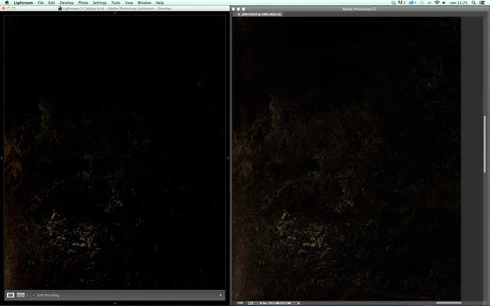
Hi, I've just found a really bad issue occurring in Lr 5 (but also in all other Lightroom versions) under Mac OSX 10.9 with a calibrated monitor: dark shadows (from a value of 20 to 0) are all clipped (pure black with no detail and no textures) while the histogram remains ok, indicating NO clipped shadows at all. This issue afflics also ACR.

Photoshop for now is the only software under MAC that reproduces dark shadows correctly: Library Module shows a bit darker and shifted shadows than Ps but acceptable, Develop Module is really bad showing brutally clipped shadows (but you work in the Develop Module right?!).

The same problem occurred also in OSX 10.8 but it was related only to LUT profiles, creating a Matrix based profile problems were solved.

Now the issue occurs with both Matrix and LUT profiles, v2 and v4. There's no apparent way to make Lr working right.

Under Windows no problems at all: Bridge, Photoshop, ACR, Lr (Library Module and Develop Module) show the same correct NOT clipped shadows.

I tested 8 different Mac running 10.9 with different GPU, different monitors, different profiling Softwares (Color Eyes Display Pro, Eizo Color Navigator, BasICC Color, i1 Profiler). Same results.
I tried to change the gamma value (2.2, sRGB, L*) problems remain. I tried to change ICC version (v2, v4) problems reamain. I tried to change profile type (LUT, MATRIX) problems remain.

How can a photographer work professionally on RAW images if shadows are bad reproduced?

Why Photoshop can reproduce shadows correctly while Lr isn't able to do that?

Why this happens only on a Mac enviroment?

Is Lr based on ColorSync (that can't handle profiles correctly) while Ps isn't (because it can handle and it has no problem)?

Please Adobe, FIX IT for all professional photographers, we can’t use Lr for serious works under Mac.

Max Ramuschi
Adobe Certified Expert

p.s.: Added a 100% Crop screenshots that shows the problem, some photos are even worse...
This topic has been closed for replies.

166 replies

Community Expert
October 18, 2014
Good to hear it is open again. It was never fixed but for a while appeared to be an apple bug but it is now getting clear that it is a Lightroom bug that only gets triggered in Macericks and Yosemite. Apple fixed it in their own apps but Lightroom never got it right. Every other app except Safari is doing shadows right now.
Inspiring
October 18, 2014
Thank you Kelly.
Kelly Castro
Adobe Employee
Adobe Employee
October 18, 2014
I apologize for the slow response to this thread. We had an open bug on this, but it was closed as a third party compatibility issue that was reportedly fixed with the release of 10.9.2. I will reopen the bug and try to get some answers for those of you still experiencing the problem.
Inspiring
October 17, 2014
Today Mac OS X Yosemite has been released. And the problems are still here: clipped shadows. For commercial images I'm using Capture One now, because my clients have high demands and shadow areas must be absolutely perfect (well controlled).
Switching on the soft proofing is too much hassle for me, so Capture One does the job with consistent shadows.
I hope Lightroom 5.7 or 6 will fix the issue, so I can also use Lightroom for my commercial work again.
Max_Ramuschi
Known Participant
October 13, 2014
I think this is a major issue though few people noticed it.

But can you imagine a landscape photographer who takes a lot of nightscapes with a great amount of shadows and bare visible details? 50% of the photo will change from Library to Develop to Ps. Not a consistent and professional workflow at all.
Max_Ramuschi
Known Participant
October 13, 2014
Engineers are aware of this since Lightroom 5.2. The issue is easly reproducible, but nothing has been done.
Participating Frequently
October 10, 2014
Thank you for your reply, Chris.

Do you get to know someone working on Lightroom, or in the Adobe development team?

I think this is something to have some Lr Engineer aware of.

Thanks again
Inspiring
October 10, 2014
I don't work on LightRoom, I just asked a few questions to clarify the nature of the problem.
Participating Frequently
October 9, 2014
Any chance to have at least an answer by Adobe? It seems they love the approach "best answer is silence".

Never seen such support, frankly speaking. Really frustrating.
Participating Frequently
October 7, 2014
Chris,

I appreciate you have removed my second post because it was referring to this issue.

The problem is: we are asking for support, and no one seems picking up.
What does "official representative" exactly mean? Because if you are the SPOC of this issue, at least a simple "we are investigating, we will let you know soon" would be great.

Of course, I appreciate any kind of support you will be able to provide.

Thank you
Andrea