


Max_Ramuschi
Known Participant
December 27, 2013

P: ICC Table Profiles clipped shadows under OSX

  • December 27, 2013
  • 166 replies
  • 3958 views

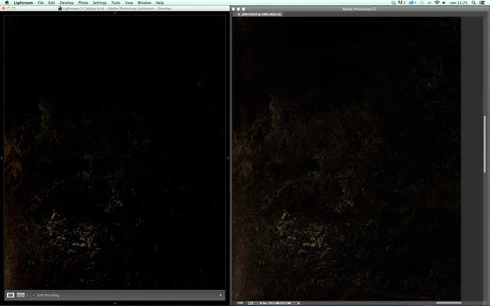
Hi, I've just found a really bad issue occurring in Lr 5 (but also in all other Lightroom versions) under Mac OSX 10.9 with a calibrated monitor: dark shadows (from a value of 20 to 0) are all clipped (pure black with no detail and no textures) while the histogram remains ok, indicating NO clipped shadows at all. This issue afflics also ACR.

Photoshop for now is the only software under MAC that reproduces dark shadows correctly: Library Module shows a bit darker and shifted shadows than Ps but acceptable, Develop Module is really bad showing brutally clipped shadows (but you work in the Develop Module right?!).

The same problem occurred also in OSX 10.8 but it was related only to LUT profiles, creating a Matrix based profile problems were solved.

Now the issue occurs with both Matrix and LUT profiles, v2 and v4. There's no apparent way to make Lr working right.

Under Windows no problems at all: Bridge, Photoshop, ACR, Lr (Library Module and Develop Module) show the same correct NOT clipped shadows.

I tested 8 different Mac running 10.9 with different GPU, different monitors, different profiling Softwares (Color Eyes Display Pro, Eizo Color Navigator, BasICC Color, i1 Profiler). Same results.
I tried to change the gamma value (2.2, sRGB, L*) problems remain. I tried to change ICC version (v2, v4) problems reamain. I tried to change profile type (LUT, MATRIX) problems remain.

How can a photographer work professionally on RAW images if shadows are bad reproduced?

Why Photoshop can reproduce shadows correctly while Lr isn't able to do that?

Why this happens only on a Mac enviroment?

Is Lr based on ColorSync (that can't handle profiles correctly) while Ps isn't (because it can handle and it has no problem)?

Please Adobe, FIX IT for all professional photographers, we can’t use Lr for serious works under Mac.

Max Ramuschi
Adobe Certified Expert

p.s.: Added a 100% Crop screenshots that shows the problem, some photos are even worse...
This topic has been closed for replies.

166 replies

Participating Frequently
October 6, 2014
Hi All,

I've also the same issue, Mavericks 10.9.5 / Lr 5.6.

Any chance to have Adobe more involved on this? I suspect the normal behavior doesn't include Library and Develop Modules with these differences in terms of shadows management. If it's matter of pointing to the right routines, I think this is something Adobe can fix without any support by Apple. Am I wrong?

Chris, any chance to have this fixed?

Thank you
Andrea
Participating Frequently
October 6, 2014
Hi All,

I've also the same issue, Mavericks 10.9.5 / Lr 5.6.

Any chance to have Adobe more involved on this? I suspect the normal behavior doesn't include Library and Develop Modules with these differences in terms of shadows management. If it's matter of pointing to the right routines, I think this is something Adobe can fix without any support by Apple. Am I wrong?

Thank you
Andrea
Inspiring
October 5, 2014
I have a same problem.
But when I use Soft proofing in lightroom, raw images from lightroom show almost same with developed images in photoshop.
The problem is Tiff or Jpeg, It should be same in lightroom and photoshop. but it isn't.
I think Adobe had a big mistake. because when I use soft proofing with Tiff or Jpeg, I can see same tone and colour with photoshop.
I use Mac OS X 10.9.5, Lightroom 5.6, PhotoshopCC 2014, NEC LCD2490 with Spectraview2.
Community Expert
September 19, 2014
Strangely 10.9.5 has fixed the problem for all apps (Aperture, preview, iPhoto, etc.) except for Lightroom, which still shows the dark shadows problem. All the other apps showed the issue before. Apple must have fixed something but Lightroom is not playing nice with it.
Inspiring
August 23, 2014
Massimiliano, I'm working on a late 2013 Retina MBPro with Mavericks 10.4 (uncalibrated).
I tried to replicate your findings but with different results.
When I open the test image you provided in Preview, Safari and Photoshop CC 2014 shadows are very very badly clipped (same with old CC and CS6).
The same image shows very good shadows in Lightroom 5.6's Library module and only minor clipping to the point of being almost intelligible in the Develop module.
That's is exactly the opposite of what you're experiencing in Photoshop, isn't it?
Moreover, If I use Lightroom's "Edit in" function to edit in PS, using Lightroom adjustments, the image viewed in PS shows improved shadows.
Max_Ramuschi
Known Participant
August 1, 2014
10.8 did it right only for Matrix based profiles. LUT ones showed same behaviour. The only thing we can hope is that Adobe will make Lr indipendent from Osx color management.
Community Expert
August 1, 2014
Good to know. I haven't had time to test yosemite yet. Really annoying 10.8 did this right. I submitted bug reports to Apple but they are not getting fixed. P.S the way to get Lightroom Develop to display correctly is to turn on soft proofing and proof to a wide space such as adobeRGB. The shadows will be more or less correct again. My guess is that this forces Lightroom develop to use Adobe's color management routines instead of relying on Apple's ColorSync libraries.
Max_Ramuschi
Known Participant
August 1, 2014
So it is... And the bad news are: Yosemite does the same thing, I've been testing the beta 1. Really bad.
Community Expert
August 1, 2014
This is a bug in Apple's color management routines introduced in Mavericks. It still hasn't been fixed. I haven't found any calibration software that doesn't show this problem. Even the built in profile shows the problem. Photoshop is immune but not Lightroom, iPhoto, Aperture, preview, etc. Pretty bad.
Max_Ramuschi
Known Participant
December 29, 2013
I've already updated everything.