


Max_Ramuschi
Known Participant
December 27, 2013

P: ICC Table Profiles clipped shadows under OSX

  • December 27, 2013
  • 166 replies
  • 3958 views

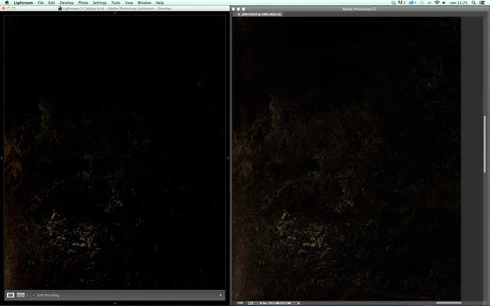
Hi, I've just found a really bad issue occurring in Lr 5 (but also in all other Lightroom versions) under Mac OSX 10.9 with a calibrated monitor: dark shadows (from a value of 20 to 0) are all clipped (pure black with no detail and no textures) while the histogram remains ok, indicating NO clipped shadows at all. This issue afflics also ACR.

Photoshop for now is the only software under MAC that reproduces dark shadows correctly: Library Module shows a bit darker and shifted shadows than Ps but acceptable, Develop Module is really bad showing brutally clipped shadows (but you work in the Develop Module right?!).

The same problem occurred also in OSX 10.8 but it was related only to LUT profiles, creating a Matrix based profile problems were solved.

Now the issue occurs with both Matrix and LUT profiles, v2 and v4. There's no apparent way to make Lr working right.

Under Windows no problems at all: Bridge, Photoshop, ACR, Lr (Library Module and Develop Module) show the same correct NOT clipped shadows.

I tested 8 different Mac running 10.9 with different GPU, different monitors, different profiling Softwares (Color Eyes Display Pro, Eizo Color Navigator, BasICC Color, i1 Profiler). Same results.
I tried to change the gamma value (2.2, sRGB, L*) problems remain. I tried to change ICC version (v2, v4) problems reamain. I tried to change profile type (LUT, MATRIX) problems remain.

How can a photographer work professionally on RAW images if shadows are bad reproduced?

Why Photoshop can reproduce shadows correctly while Lr isn't able to do that?

Why this happens only on a Mac enviroment?

Is Lr based on ColorSync (that can't handle profiles correctly) while Ps isn't (because it can handle and it has no problem)?

Please Adobe, FIX IT for all professional photographers, we can’t use Lr for serious works under Mac.

Max Ramuschi
Adobe Certified Expert

p.s.: Added a 100% Crop screenshots that shows the problem, some photos are even worse...
This topic has been closed for replies.

166 replies

Participating Frequently
December 29, 2013
It appears Mavericks requires updated monitor calibration software:

http://nativedigital.co.uk/site/2013/...

...but still no 10/bit/color support!
Max_Ramuschi
Known Participant
December 29, 2013
WOW thanks I have a CG243W too....
Victoria Bampton LR Queen
Community Expert
Community Expert
December 29, 2013
i1 Display Pro! I'll try the EIZO software tomorrow. (Getting late here now)

One more experiment we could try... I could send you my profile - it wouldn't be accurate for your monitor of course, but it might be interesting to see if it displays the same in LR/PS on your machine with that profile. Drop me an email via my website (just google me) if you want to give it a shot!
Victoria - The Lightroom Queen
Max_Ramuschi
Known Participant
December 29, 2013
There is a fresh update for Color Navigator... let my try. Fingers crossed.
Max_Ramuschi
Known Participant
December 29, 2013
Oh my...the same I tested, the GPU is the same... Really I don't understand. How can your mac work correcltly when every mac I tested showed up the issue?

Which calibrator? Currently I'm using i1 Display Pro with Eizo Color Navigator 6.4.6 (Mavericks compatible).
Victoria Bampton LR Queen
Community Expert
Community Expert
December 29, 2013
That machine's a 15" retina MacBook Pro
Victoria - The Lightroom Queen
Max_Ramuschi
Known Participant
December 29, 2013
I try to create just now an L* profile on my eizo....

Please tell me which graphic card are you using on your mac. If your basic (included in OSX) profile doesn't cause problems, it might be a Graphic Driver issue, beacause mine does.
Max_Ramuschi
Known Participant
December 29, 2013
Please note also that the difference in shadows between Library Module and Develop Module shows up with the standard OSX included profile (with the Retina LCD screen included profile as well).
Victoria Bampton LR Queen
Community Expert
Community Expert
December 29, 2013
Yep, I'm looking at exactly the same spot as you Max. I went back and checked it against your screenshot.

I'll carry on experimenting with other software to see if I can reproduce it.
Victoria - The Lightroom Queen
Max_Ramuschi
Known Participant
December 29, 2013
It sounds strange. Are you looking at the shadow zone on the right? You must look at the part of image showed in the first example.

I tried calibrating with Spider 4 and i1 Display Pro using i1 Profiler, BasICColor, Coloreyes Display Pro 1.6 and Eizo Color Navigator 6.4.6 (only for my Eizo).

The problem is the same on 8 Macs (mine included). It shows up on the Eizo as on the apple LCD screen and iMac. Every colleague I consulted has the same problem...

Note that the same calibrating hardware and software doesn't cause problems on Windows...it can't be an hardware related issue.