


Max_Ramuschi
Known Participant
December 27, 2013

P: ICC Table Profiles clipped shadows under OSX

  • December 27, 2013
  • 166 replies
  • 3911 views

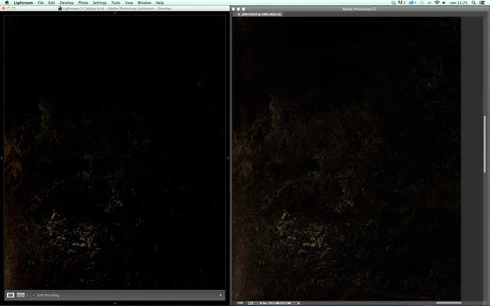
Hi, I've just found a really bad issue occurring in Lr 5 (but also in all other Lightroom versions) under Mac OSX 10.9 with a calibrated monitor: dark shadows (from a value of 20 to 0) are all clipped (pure black with no detail and no textures) while the histogram remains ok, indicating NO clipped shadows at all. This issue afflics also ACR.

Photoshop for now is the only software under MAC that reproduces dark shadows correctly: Library Module shows a bit darker and shifted shadows than Ps but acceptable, Develop Module is really bad showing brutally clipped shadows (but you work in the Develop Module right?!).

The same problem occurred also in OSX 10.8 but it was related only to LUT profiles, creating a Matrix based profile problems were solved.

Now the issue occurs with both Matrix and LUT profiles, v2 and v4. There's no apparent way to make Lr working right.

Under Windows no problems at all: Bridge, Photoshop, ACR, Lr (Library Module and Develop Module) show the same correct NOT clipped shadows.

I tested 8 different Mac running 10.9 with different GPU, different monitors, different profiling Softwares (Color Eyes Display Pro, Eizo Color Navigator, BasICC Color, i1 Profiler). Same results.
I tried to change the gamma value (2.2, sRGB, L*) problems remain. I tried to change ICC version (v2, v4) problems reamain. I tried to change profile type (LUT, MATRIX) problems remain.

How can a photographer work professionally on RAW images if shadows are bad reproduced?

Why Photoshop can reproduce shadows correctly while Lr isn't able to do that?

Why this happens only on a Mac enviroment?

Is Lr based on ColorSync (that can't handle profiles correctly) while Ps isn't (because it can handle and it has no problem)?

Please Adobe, FIX IT for all professional photographers, we can’t use Lr for serious works under Mac.

Max Ramuschi
Adobe Certified Expert

p.s.: Added a 100% Crop screenshots that shows the problem, some photos are even worse...
This topic has been closed for replies.

166 replies

Inspiring
December 14, 2015
please try using Prophoto as workingspace in Photoshop. You will probably then not se any difference between LR and Photoshop anymore. The problem is Eizo ColorEdge monitor in CAL modus have wider colorgamut than Adobe98, and LR show all these extra colors, and contrast get higher too. If your workingspace in Photoshop are Adobe98, the image will look a little bit duller than LR

the white area are ordinary Eizo monitor profile (CAL mode)created with Color Navigator, the color area are Adobe98
Max_Ramuschi
Known Participant
October 10, 2015
no, Adobe should turn on black point compensation in Lightroom develop module.
Max_Ramuschi
Known Participant
October 10, 2015
Lightroom CC 2015.2, still shadows bug present: when GPU is turned on Develop Module doesn't apply black point compensation and Eizo users are experiencing black clipped shardows in Windows.

Hello Adobe? Is there anybody there? I remind you that there was no issue in Lightroom CC. The problem has been introduced in Lightroom cc 2015 and it's still present in 2015.2.

Please fix it.
Inspiring
September 23, 2015
OSX is not possible to reproduce proper blacks in Lightroom on my machine. I have tu turn GPU acceleration off and use the softproof-function.
Inspiring
September 23, 2015
The Problem still exists when GPU acceleration is tuned on. This is why even Photoshop shows clipped shadows when using Liquify with GPU acceleration turned on.
Inspiring
September 3, 2015
yes, if I turn OFF black point compensation in PS, I got the same "clipped shadows" as in all modules in LR. Well, do we have to turn it OFF?
http://www.digitaldog.net/files/Black...
Max_Ramuschi
Known Participant
July 1, 2015
An important update: the issue described in this thread affects only Eizo users, because Color Navigator (the only software that can manage Eizo Display's internal LUT) creates ICC profiles which need "black point compensation" to work properly. If the software color management engine can't apply the black point compensation, the shadows are bad rendered.

Today no OS can do this (OSX nor Windows), no internet browsers and probably neither Adobe Camera RAW 9.1 (with GPU on) nor Lightroom 2015.1 (with GPU on) can.

Is it possible to enable the "black point compensation" Lightroom Develop Module?
Max_Ramuschi
Known Participant
June 22, 2015
I switched to Windows platform to skip the bug, but now I can't use Lr CC 2015 with GPU on because of the same issue I was experiencing on OSX.

Please Eric, find the bug and solve it! At least on Windows where everything was working perfectly until CC 2015!
Max_Ramuschi
Known Participant
June 22, 2015
Really bad news: after updating to Lightroom CC 2015 the same issue does happen also on Windows platform if I turn on GPU Acceleration.

Lightroom (on Windows) with GPU off shows perfect shadows with Eizo table-based profiles in all modules.
Lightroom (on Windows) with GPU on shows clipped shadows in the Develop module, all other modules are perfect.

Lightroom (on OSX) with GPU off shows clipped shadows in all mosules with Eizo table-based profiles.
Lightroom (on OSX) with GPU on shows perfect shadows in Develop module, clipped shadows are in all other modules.

I REALLY don't know what's wrong with LR and ICC table-based profiles, now this issue shows up also on Windows. After three years since the bug first appeared on OSX, no one has fixed it...

I think it's time to fix it. Please.
Participating Frequently
June 1, 2015
I would like to add something, now after following this thread for more than a year and through a number of lightroom versions.

To me this occurrence is more visible on certain cameras.
I compare my raw files between a Canon 6D and a Canon EOS M and it much more prominent on the files from the EOS M.

On those files the clipping in the shadows is huge when in library, obviously this is only visible on photos with little light.

I hoped this problm was gone, but last week I picked up my EOS M the first time in a while and I had a shock!

Please fix this. It useless to browse through any of my low-light photos and actually knowing whats good and whats not.