


Max_Ramuschi
Known Participant
December 27, 2013

P: ICC Table Profiles clipped shadows under OSX

  • December 27, 2013
  • 166 replies
  • 3911 views

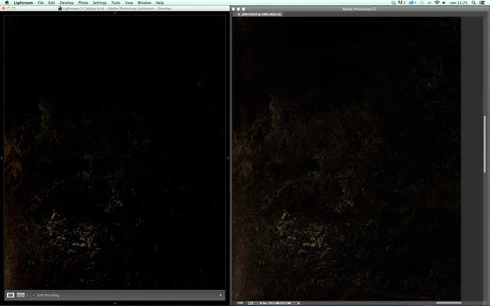
Hi, I've just found a really bad issue occurring in Lr 5 (but also in all other Lightroom versions) under Mac OSX 10.9 with a calibrated monitor: dark shadows (from a value of 20 to 0) are all clipped (pure black with no detail and no textures) while the histogram remains ok, indicating NO clipped shadows at all. This issue afflics also ACR.

Photoshop for now is the only software under MAC that reproduces dark shadows correctly: Library Module shows a bit darker and shifted shadows than Ps but acceptable, Develop Module is really bad showing brutally clipped shadows (but you work in the Develop Module right?!).

The same problem occurred also in OSX 10.8 but it was related only to LUT profiles, creating a Matrix based profile problems were solved.

Now the issue occurs with both Matrix and LUT profiles, v2 and v4. There's no apparent way to make Lr working right.

Under Windows no problems at all: Bridge, Photoshop, ACR, Lr (Library Module and Develop Module) show the same correct NOT clipped shadows.

I tested 8 different Mac running 10.9 with different GPU, different monitors, different profiling Softwares (Color Eyes Display Pro, Eizo Color Navigator, BasICC Color, i1 Profiler). Same results.
I tried to change the gamma value (2.2, sRGB, L*) problems remain. I tried to change ICC version (v2, v4) problems reamain. I tried to change profile type (LUT, MATRIX) problems remain.

How can a photographer work professionally on RAW images if shadows are bad reproduced?

Why Photoshop can reproduce shadows correctly while Lr isn't able to do that?

Why this happens only on a Mac enviroment?

Is Lr based on ColorSync (that can't handle profiles correctly) while Ps isn't (because it can handle and it has no problem)?

Please Adobe, FIX IT for all professional photographers, we can’t use Lr for serious works under Mac.

Max Ramuschi
Adobe Certified Expert

p.s.: Added a 100% Crop screenshots that shows the problem, some photos are even worse...
This topic has been closed for replies.

166 replies

Max_Ramuschi
Known Participant
April 23, 2015
No...
ssprengel
Inspiring
April 22, 2015
LR 6/CC was released Tuesday, and the more recent replies are talking about what is happening in LR 6/CC not LR 5.
ssprengel
Inspiring
April 22, 2015
The non-Develop modules are using computed previews. What happens if you recompute Standard and 1:1 previews for the clipped-shadows photos, do things look different?
Max_Ramuschi
Known Participant
April 22, 2015
After some testing, here's what I see:

on OSX 10.10.3 if you turn off GPU acceleration, everything is like in LR 5, Eizo table based ICC profiles are useless due to clipped shadows.
If you turn GPU acceleration on, the Develop module is working fine: perfect shadows just like Photoshop.

BUT every other module is still showing clipped dark shadows (Library, Slideshow etc), so if you have to show some photos to a client you can't due to this problem.

on Windows: everything is perfect, as usual.

I can't understand why Adobe can't make Lightroom totally IDEPENDENT from Colorsync like the Bridge is. I can't stand anymore working with those problems (more than three years has passed since the first time the bug had been reported to Adobe). Why the Bridge is perfect (a free program that sucks) while Lr is not? Why can't Lr be used by professionists who use pro monitors with pro table ICC profiles on Mac platforms?

Max
Max_Ramuschi
Known Participant
April 22, 2015
Hello Eric, here's what I see:

on OSX 10.10.3 if you turn off GPU acceleration, everything is like in LR 5, Eizo table based ICC profiles are useless due to clipped shadows.
If you turn GPU acceleration on, the Develop module is working fine: perfect shadows just like Photoshop.

BUT every other module is still showing clipped dark shadows (Library, Slideshow etc), so if you have to show some photos to a client you can't due to this problem.

on Windows: everything is perfect, as usual.

I can't understand why you can't make Lightroom totally IDEPENDENT from Colorsync like the Bridge is. I can't stand anymore working with those problems (more than three years has passed since the first time the bug had been reported to Adobe).

Max
Participating Frequently
April 22, 2015
All,

maybe Lr 6 will include this improvement?

Please let me know

Andrea
Inspiring
April 22, 2015
Yes, GPU acceleration is enabled

Graphics Processor Info:
AMD Radeon HD 7950 OpenGL Engine

Check OpenGL support: Passed
Vendor: ATI Technologies Inc.
Version: 4.1 ATI-1.30.5
Renderer: AMD Radeon HD 7950 OpenGL Engine
LanguageVersion: 4.10
MadManChan2000
Adobe Employee
Adobe Employee
April 22, 2015
Thanks to all of you for reporting your findings.  Out of curiosity, are you testing Develop with the GPU acceleration option enabled in the Lr preferences?  

Thanks,
Eric
Community Expert
April 22, 2015
Apple themselves still hasn't fixed a very similar problem in Safari introduced at Mac OS X 10.9: http://lagemaat.blogspot.com/2015/03/... and http://lagemaat.blogspot.com/2014/09/...
Max_Ramuschi
Known Participant
April 22, 2015
I can't understand what's wrong between EIZO Lut profiles and Colorsync (and Lightroom 5 and Library module of CC version). Hope Library will manage color profiles like Bridge does as soon as possible. At least, now we can work correctly in Develop module.