


Max_Ramuschi
Known Participant
December 27, 2013

P: ICC Table Profiles clipped shadows under OSX

  • December 27, 2013
  • 166 replies
  • 3911 views

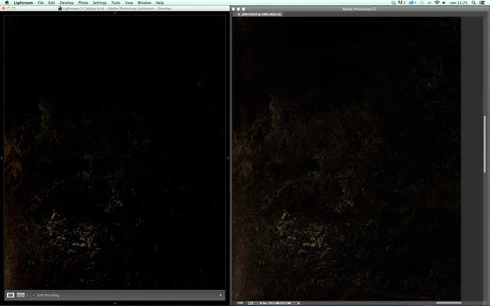
Hi, I've just found a really bad issue occurring in Lr 5 (but also in all other Lightroom versions) under Mac OSX 10.9 with a calibrated monitor: dark shadows (from a value of 20 to 0) are all clipped (pure black with no detail and no textures) while the histogram remains ok, indicating NO clipped shadows at all. This issue afflics also ACR.

Photoshop for now is the only software under MAC that reproduces dark shadows correctly: Library Module shows a bit darker and shifted shadows than Ps but acceptable, Develop Module is really bad showing brutally clipped shadows (but you work in the Develop Module right?!).

The same problem occurred also in OSX 10.8 but it was related only to LUT profiles, creating a Matrix based profile problems were solved.

Now the issue occurs with both Matrix and LUT profiles, v2 and v4. There's no apparent way to make Lr working right.

Under Windows no problems at all: Bridge, Photoshop, ACR, Lr (Library Module and Develop Module) show the same correct NOT clipped shadows.

I tested 8 different Mac running 10.9 with different GPU, different monitors, different profiling Softwares (Color Eyes Display Pro, Eizo Color Navigator, BasICC Color, i1 Profiler). Same results.
I tried to change the gamma value (2.2, sRGB, L*) problems remain. I tried to change ICC version (v2, v4) problems reamain. I tried to change profile type (LUT, MATRIX) problems remain.

How can a photographer work professionally on RAW images if shadows are bad reproduced?

Why Photoshop can reproduce shadows correctly while Lr isn't able to do that?

Why this happens only on a Mac enviroment?

Is Lr based on ColorSync (that can't handle profiles correctly) while Ps isn't (because it can handle and it has no problem)?

Please Adobe, FIX IT for all professional photographers, we can’t use Lr for serious works under Mac.

Max Ramuschi
Adobe Certified Expert

p.s.: Added a 100% Crop screenshots that shows the problem, some photos are even worse...
This topic has been closed for replies.

166 replies

Participating Frequently
December 2, 2014
I can confirm, issue not fixed on NEC Spectraview and table profiles. Please fix asap. Thank you very much
Max_Ramuschi
Known Participant
December 2, 2014
To be more precise: Photoshop, Bridge and ACR (now ACR seems to be ok!) show correct shadows with table profiles, but Lightroom is still showing clipped shadows.
Max_Ramuschi
Known Participant
December 2, 2014
The issue is easily reproducible on every Mac with every table based profile, created with every profiling software. Assuming that now Library and Develop show the same shadows (this bug is fixed), you have to compare Lightroom and Photoshop to see the shadows difference. Before wiriting here that the bug has not been fixed, I retested carefully it on several Apple machines: same results with all. I used Eizo Color Navigator on my desktop Mac, and i1 Profiler on the other laptop computers. The issue is clearly evident on both my Eizo display (with Color Navigator table profile) and the LCD screen of laptops computer (with X-rite table profile). These computers have default OSX configurations. The same issue is showing on OSX 10.8, 10.9 and 10.10. If you want I can send you two table profiles (one created with EIzo and the other created with X-Rite software) and a test image.
MadManChan2000
Adobe Employee
Adobe Employee
December 2, 2014
I'm not sure what's going on here.  I had one of the profiles with table-based gamma curve.  I tested that pretty carefully (as well as the polynomial-based gamma curve) with Lr 5.7, and did not see any meaningful visual difference on my system between the two cases.  I used the DigitalColor Meter on the Mac (useful system utility) to conduct color readouts, to be sure  (sometimes eyes can be fooled, even trained ones ...).  

It is possible there is some other system configuration or setup that I'm not replicating here, that is essential to reproducing the issue, when table-based profiles are concerned.
Inspiring
December 1, 2014
thank you Ramushi for still mention this problem, its not solved. Im using Color Navigator and Eizo OS X 10.10.1
Legend
December 1, 2014
Can you share one of the profiles you're having trouble with?
Max_Ramuschi
Known Participant
December 1, 2014
You're probably using a table gamma based profile, like me, and the fix isn't working for us. Adobe has still a lot of work to do to make Lr work properly.
Max_Ramuschi
Known Participant
December 1, 2014
Fix doesn't work for table gamma based profiles. Ligtroom is still unusable for users who work with professional monitors which use these kind of profiles (eizo color edge and Nec Spectraview).
Max_Ramuschi
Known Participant
December 1, 2014
Fix does not work for table gamma profiles.
Max_Ramuschi
Known Participant
December 1, 2014
Not fixed for me: fixed only for matrix based profiles, table gamma profiles (used by pro monitors like Eizo Color Edge and NEC Spectraview) are still showing clipped shadows.