


P: ICC Table Profiles clipped shadows under OSX
Hi, I've just found a really bad issue occurring in Lr 5 (but also in all other Lightroom versions) under Mac OSX 10.9 with a calibrated monitor: dark shadows (from a value of 20 to 0) are all clipped (pure black with no detail and no textures) while the histogram remains ok, indicating NO clipped shadows at all. This issue afflics also ACR.
Photoshop for now is the only software under MAC that reproduces dark shadows correctly: Library Module shows a bit darker and shifted shadows than Ps but acceptable, Develop Module is really bad showing brutally clipped shadows (but you work in the Develop Module right?!).
The same problem occurred also in OSX 10.8 but it was related only to LUT profiles, creating a Matrix based profile problems were solved.
Now the issue occurs with both Matrix and LUT profiles, v2 and v4. There's no apparent way to make Lr working right.
Under Windows no problems at all: Bridge, Photoshop, ACR, Lr (Library Module and Develop Module) show the same correct NOT clipped shadows.
I tested 8 different Mac running 10.9 with different GPU, different monitors, different profiling Softwares (Color Eyes Display Pro, Eizo Color Navigator, BasICC Color, i1 Profiler). Same results.
I tried to change the gamma value (2.2, sRGB, L*) problems remain. I tried to change ICC version (v2, v4) problems reamain. I tried to change profile type (LUT, MATRIX) problems remain.
How can a photographer work professionally on RAW images if shadows are bad reproduced?
Why Photoshop can reproduce shadows correctly while Lr isn't able to do that?
Why this happens only on a Mac enviroment?
Is Lr based on ColorSync (that can't handle profiles correctly) while Ps isn't (because it can handle and it has no problem)?
Please Adobe, FIX IT for all professional photographers, we can’t use Lr for serious works under Mac.
Max Ramuschi
Adobe Certified Expert
p.s.: Added a 100% Crop screenshots that shows the problem, some photos are even worse... 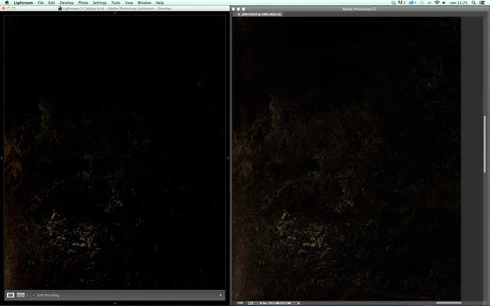
 AdChoices