
Participating Frequently
June 18, 2020

P: Lightroom Classic: "Open as layers in Photoshop" function broken after update

  • June 18, 2020
  • 86 replies
  • 4733 views

I edit about 30 images per day by selecting the below command, within Lightroom Classic (recently updated):


PHOTO > EDIT IN > OPEN AS LAYERS IN PHOTOSHOP (also recently updated)


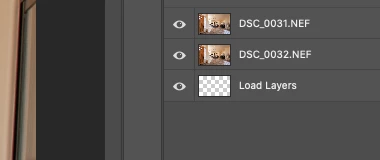
But after the most recent update of PS and LrC I have reliability lost this ability.  If I select 5 images in LrC and try to do the above, only about 1-2 images appear in my layered PS file as a layer, then a blank "LOAD LAYERS" layer appears (see attached) and one more image will open in a separate PS file and not a part of the layered file - then the import quits.


After I am done editing the layered file and when I save it - it will automatically save and load the modified layered file in LrC - which it does not do anymore. I was able to get it to work properly  couple times, but it always ends up giving me this problem about 80% of the time.


Obviously the only work around is for me to copy and past each layer individually and then manually save the file and import into my LrC catalog - which makes the process of editing images very inefficient when doing dozens of these edits per day.


I'm on a Macbook Pro, latest install of LrC and PS / most recent Catalina & have uninstalled/re-installed PS - again, I have edited hundreds of images like this prior to the recent updates and never had an issue so obviously it have something to do with the update, at least for me.


andrew
This topic has been closed for replies.

86 replies

Inspiring
September 18, 2020

I have been having the same problem since early July.  Loading multiple layers into PS from LR works ~1/2 the time.  Stalls as other have reported although sometimes early on and sometimes later in the process.  Have tried everything above to no avail!

Inspiring
September 2, 2020
Has anyone found a version of PS and LR that will still allow for multiple layers to be stacked in Photoshop without these issues?

I am an astro photographer and usually stack images for star trails but when I select 30 images only 1-2 will load or Photoshop will automatically close on me.
Inspiring
August 27, 2020


Using current version of Lightroom Classic (v9.4) on MacOS Catalina, I can no longer select multiple photos and 'edit in photoshop as layers...'.   Photoshop 2020 (21.2.2) will open, and typically I will get the first image loaded as a layer (with correct title/label), a second layer will be empty and simply be titled 'load layer', and then instead of an additional layer, I may get one more photo open in a different Tab, as a background layer.  Any additional photos that were selected in Lightroom seem to be completely ignored.  Usually, I will select 2-4 photos that I am editing together as layers (i.e. focus stacking for example), but now, its a workflow disaster.   
TheDigitalDog
Inspiring
August 26, 2020
It's been officially reported so stay tuned.
Author “Color Management for Photographers" & "Photoshop CC Color Management/pluralsight"
Bob Somrak
Legend
August 26, 2020
Thanks for your update Andrew.  Its definitely random.  If it fails I just close the files in Photoshop and try again and then it sometimes works on exactly the same selection.  Tough bug to track probably.
M4 Pro Mac Mini. 48GB
TheDigitalDog
Inspiring
August 26, 2020
I'm now seeing the same issue where only two images will open no matter how many selected, one as a layer, one without. 
Edit In PS OK, but as layers, not. 
Author “Color Management for Photographers" & "Photoshop CC Color Management/pluralsight"
TheDigitalDog
Inspiring
August 14, 2020
Well it's not a bug on this end and it isn't a bug for all and that's one reason it is taking so long to fix IF the fix indeed is on Adobe's side. 
Author “Color Management for Photographers" & "Photoshop CC Color Management/pluralsight"
Bob Somrak
Legend
August 14, 2020
Hopefully they will also finally fix the LONG term bug of not all the files not opening when using "Edit in Adobe Photoshop .........."   
M4 Pro Mac Mini. 48GB
Participating Frequently
August 13, 2020
I heard from Adobe and they confirmed it is a bug in LR and will be fixed in the next release.  That is OK for me as I can use the previous version of PS. 
Inspiring
August 13, 2020
I am having this same problem.  The only solution I have found is to go to Photoshop and use the command under scripts load files as stack.  Works fine.  The latest update to Lightroom is when I started having this problem.  As described by others using open as layers in Photoshop, opens 3 or so and leaves a "load layers" layer and then opens one more in a separate window and then stops.