
Participating Frequently
June 18, 2020

P: Lightroom Classic: "Open as layers in Photoshop" function broken after update

  • June 18, 2020
  • 86 replies
  • 4733 views

I edit about 30 images per day by selecting the below command, within Lightroom Classic (recently updated):


PHOTO > EDIT IN > OPEN AS LAYERS IN PHOTOSHOP (also recently updated)


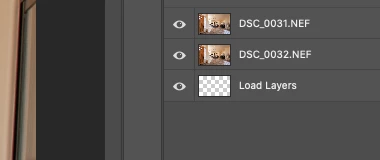
But after the most recent update of PS and LrC I have reliability lost this ability.  If I select 5 images in LrC and try to do the above, only about 1-2 images appear in my layered PS file as a layer, then a blank "LOAD LAYERS" layer appears (see attached) and one more image will open in a separate PS file and not a part of the layered file - then the import quits.


After I am done editing the layered file and when I save it - it will automatically save and load the modified layered file in LrC - which it does not do anymore. I was able to get it to work properly  couple times, but it always ends up giving me this problem about 80% of the time.


Obviously the only work around is for me to copy and past each layer individually and then manually save the file and import into my LrC catalog - which makes the process of editing images very inefficient when doing dozens of these edits per day.


I'm on a Macbook Pro, latest install of LrC and PS / most recent Catalina & have uninstalled/re-installed PS - again, I have edited hundreds of images like this prior to the recent updates and never had an issue so obviously it have something to do with the update, at least for me.


andrew
This topic has been closed for replies.

86 replies

Inspiring
June 30, 2020
I, too, am having this problem. Only trying to open (edit in as layers) 4 photos. Hangs on the 2nd or 3rd one. Have tried multiple times. Got it to work 1 time, but hasn't since. Have closed & reopened both Lightroom and Photoshop repeatedly. Tried opening PS first, LR first. No difference. Tried edit in PS one photo at a time, 1st one opened fine, 2nd one seems to open but the PS progress bar hangs. Clicking the progress bar's Cancel button does nothing. Close the image, the stuck progress bar remains. Have to close PS to clear it.

TIFF and zip compression aren't set, so not the problem.

I'm on a mid-2012 MacBook Air 8mb running Mojave. Slow, yes, fans crank up often in LR, but this worked just fine before the most recent updates.
Participating Frequently
June 29, 2020
Got it, thx
TheDigitalDog
Inspiring
June 29, 2020
Where do I find this option?

Preferences>External Editor. When you select a TIFF, you have an option for ZIP compression or None. 
Also consider doing the same IF you export a TIFF then have it imported back to the catalog, ditto for Photoshop preferences if the same. IOW, you probably want compression OFF anywhere you save a TIFF that may land back in LR. 
Author “Color Management for Photographers" & "Photoshop CC Color Management/pluralsight"
Participating Frequently
June 29, 2020
Where do I find this option?
Bob Somrak
Legend
June 29, 2020
If you are using Edit-In with compressed TIFF, read my last post above.  Turning compression OFF worked for me to improve the situation.
M4 Pro Mac Mini. 48GB
Participating Frequently
June 29, 2020
Glad to know i'm not the only one...
Bob Somrak
Legend
June 28, 2020
Rikk
See my comment below.  I seems the Tiff Compression that was fixed in 9.3 is causing this issue for me.  I turned it OFF and I now it works more often when doing Open as Layers.
M4 Pro Mac Mini. 48GB
Bob Somrak
Legend
June 28, 2020
BTW, I forgot to mention that I works a LOT better and more ofter if I have Photoshop already loaded.  I also use TIFF as my Edit In preference and if I leave Compression OFF than it works.  Must be a bug in the Fix of the TIFF compression.
M4 Pro Mac Mini. 48GB
Bob Somrak
Legend
June 28, 2020
It was bad enough that the LONG term bug of "Open In Photoshop" sometimes opening only a portion of the files has never been fixed but now they have broken Open As Layers and this is even a worse problem.  
M4 Pro Mac Mini. 48GB
Participating Frequently
June 19, 2020
Thanks! I'll give that a try when I get a chance.  It seems that after a full system restart with the original pre-updated applications I am getting a much better rate of export success.