


Inspiring
October 10, 2017

P: Panasonic FZ80/82 white balance problem

  • October 10, 2017
  • 17 replies
  • 1043 views

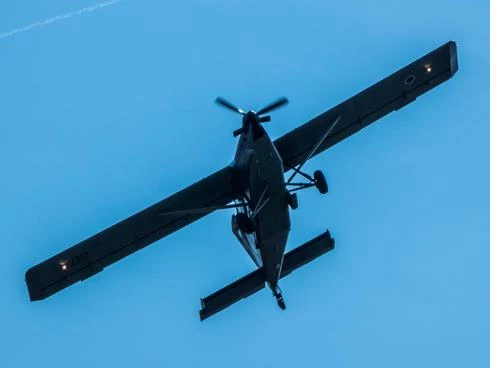
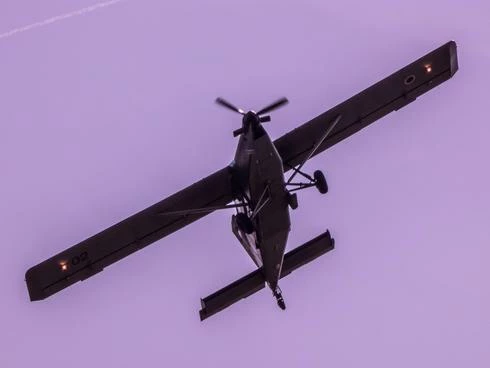
I found out that the presets for WB for Panasonic FZ80/82 are very inacurate and tend to tint pink/purple and green sometimes. Daylight setting is reported as 3300K instead of 5600K and so on. Is it possible to correct that? The first photo is camera WB, the second one Lightroom daylight settings.
This topic has been closed for replies.

17 replies

Inspiring
October 11, 2017
Thanks for that fast reaction
Todd Shaner
Legend
October 11, 2017
Thanks guys, I don't think there's any need for further analysis. I suggest using the LR 'As Shot' WB setting until Adobe corrects the camera profiles.
Todd Shaner
Legend
October 11, 2017
The issue appears to be due to incorrect WB settings in the LR camera profiles. Using the DNG Profile Editor with the below settings the Daylight  'As Shot' camera setting is virtually identical to the LR WB Daylight setting.

Inspiring
October 11, 2017
If somebody would like to play more, here are some more RAW examples (same shot with different WB in camera), https://wetransfer.com/downloads/1c25890836cf2a23cc87b6d16dec2e7a20171011152612/bfe99e2d60a30bcb3d9ce7b47d657ac220171011152612/c6e47b .  And one more example, Daylight in camera left, Daylight in LR.

ssprengel
Inspiring
October 11, 2017

WB numbers are computed in terms of the camera profile so one software product will not have the same numbers as another as each has their own camera profile specific to their own software's rendering engine. 

The issue, here, is that the Adobe built-in WB of Daylight (at least) seems too magenta and may be off in other ways. 

The Forbidden link is because the previous page the link is clicked on (the http referrer) has to be the review page not a direct link from these forum pages.

You can get to those sample RAW images near the bottom of the samples gallery:

http://www.photographyblog.com/reviews/panasonic_lumix_dmc_fz82_review/sample_images/

Inspiring
October 11, 2017
After a short reading, I consider that what you say regarding the user habits seem to be correct. I would add that  most people shoot in JPEG with Auto WB. And, after that kind of setting combination there is practically nothing to do to improve the results. Specially on the WB
...
About the link you give to load an other image, I get message "403 Forbidden" So I can't load your files. I would really like to test this new picture. Can't you send it by WeTransfer at my mail address md.brainois@gmail.com This would better work

About your camera, don't you have  possibility to put a user calibration (ICC profile)in it.
 
When you say: "The Panasonic DC-FZ82 RW2 files are in the range of Temp 3000 to 4000 and Tint -40 to -30."  Is it when choosing the LR Daylight WB setting? or in an other setting type?

Here are the figures I get with your very first image: (considering that I am having calibrated screens and I didn't change the calibration)

                                                         LR                                                                        DxO DOP
                                WB ORIGINAL      WB set at DAYLIGHT           WB ORIGINAL      WB set at DAYLIGHT
Temperature            3200                                5500                                    5200                          4695                                 
Tint                                 -39                                   +10                                           0                               -9

What very strange is that in WB ORIGINAL (I mean the RAW file without any changing) LR doesn't give the same figures as DXO DOP
After putting the WB at Daylight setting, we obtain almost a good result from both software. There we do have a question of software interpretation. Because when, for instance,  setting the same figures in both software we have perfectly the same result.

You seem to tell me that you are shooting in RAW with the WB setting fixed at "normal day light" on your camera. Is the correct? Can't you set it to Auto WB?

Are you shooting mainly in RAW?

If yes the I suggest you set definitively you web balance at "Automatic Web Balance" if this kind of setting exist one your camera.
Todd Shaner
Legend
October 11, 2017
To my opinion there is no bug nor "estimation error" in any software I/you used.
Michel, please see my reply below. You can download a Panasonic DC-FZ82 RW2 raw file that better demonstrates the issue here:

http://img.photographyblog.com/reviews/panasonic_lumix_dmc_fz82/sample_images/panasonic_lumix_dmc_fz...

A normal LR Daylight WB setting should be in the range of Temp 5000 to 6000 and Tint -10 to +10. The Panasonic DC-FZ82 RW2 files are in the range of Temp 3000 to 4000 and Tint -40 to -30. This is due to an issue with the camera profiles and nothing to do with 'Auto' WB, which is a separate issue affecting ALL camera models.

Todd Shaner
Legend
October 11, 2017
Two thing bother me, first, nobody else reported that issue before and second, tried with RAW Therapee, same problem, as I already mentioned. Looks like all other are happy with JPEG from camera :).
Alan, most people are probably using the 'As Shot' WB setting and not the 'Daylight' setting so they wouldn't see the issue. Those that did see it (purple WB hue) never bothered to report it. There appears to be an issue with the WB settings in Panasonic DC-FZ82 camera profiles. The JPEG is unaffected because the WB is applied in-camera to the file.
Inspiring
October 11, 2017
Firstly, I downloaded your pictures And tried it in different App.
But very first question: what did you used as WB settings on your camera (Auto Setting?)?

I tried with LR the auto WB balance you used. And effectively this doesn't give a good result. But, you must consider that there is not one neutral grey point (surface) to let the auto WB balance work correctly. There for, the next question is: how does the WB Auto do determine it's "neutral grey" reference to make it's job correctly? I personally do not know what are the rules within the LR "Auto WB" routine. But I will be surprised if these routine doesn't work like this.  And this must be the situation for every "auto WB" routines from different software.

To my opinion there is no bug nor "estimation error" in any software I/you used.

Your picture analyse is simple: Take a look at the histogram RGB.  RGB values are almost difficult to handle.  Image it self is taken against day light, out of the plane there is no other element than a blue sky. The plane is understood as being in shadow. Globally considered, there are two "colors" on your picture. Blue and black (that is no color). There no one cent of any neutral grey in it.   


Conclusion: No auto WB balance would give you good result.

Then I tried to improve manually your raw picture (I didn't tried on JPEG. It's almost impossible to get better result) on different applications: I mean: LR, PS, RAW Therapee and last but not least DxO DOP.

DxO DOP gave me the best results by working on:
- WB  settings, I set it on Natural Day Light
- Than on the tones: modifying the black, shadow
- Than using the tool ClearView

And finally I got the result you can se here after. To my personal advice this one of the best result one can get out of this original picture. For sure, agreement on the result depend on each of us taste and purpose 


Inspiring
October 11, 2017
Two thing bother me, first, nobody else reported that issue before and second, tried with RAW Therapee, same problem, as I already mentioned. Looks like all other are happy with JPEG from camera :).