


Participant
June 18, 2020

P: Radial filter renders incorrectly

  • June 18, 2020
  • 35 replies
  • 1561 views

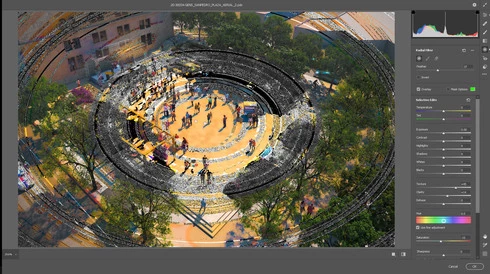
The latest update in camera raw is creating a bug in the radial filter. Is there a way I can fix this? 
I opened a file that I've created using a radial filter by color inside the camera raw (this camera raw was applied to a smart object) and as a surprise, I found strange circles in the image. I already updated my graphic card driver and turn off GPU use for camera raw but this hasn't worked. 

Any advice will be greatly appreciated. 
This topic has been closed for replies.

35 replies

Inspiring
December 2, 2020

Tengo el mismo problema con Camara Raw 12.4

Inspiring
November 26, 2020

Same problem here, 22.0.1, ACR 13.0.2

IIRC it worked well the version before

Inspiring
November 26, 2020

Photoshop CC 22.0.1, ACR 13.0.2, having the same issue. With my workflow I usually have to restart photoshop twice on one photo.

Worked fine in a previous version

Inspiring
November 26, 2020

I have still the same problem with the radial filter (photoshop cc version 22.0.1.,  camera raw version 13.0.2.644).

Inspiring
November 26, 2020

I have still the same problem with the radial filter (photoshop cc version 22.0.1.).

Inspiring
November 20, 2020

Yeap! It's still happening. Updated to 22.0.1 and it's still happening 😞

Participant
November 19, 2020

Unfortunately this bug still persist even in the newest version of Photoshop 22.0.1 and Camera Raw 13.0.2 😞 ... quite disappointed Adobe is still solving this according me serious bug...

Inspiring
November 16, 2020

I have this exact same problem. Still exist with the latest update. The problem did appear first time since I updated from version 21.1.2. Reverting to that might help. Earlier there was a mention that built in graphic card might cause this, but I do not have any build in graphics cards. Only Nvidia Quadro P4000. All drivers up to date. If I disable GPU it keeps happening. I really hope this thing is fixed soon, it is a major annoyance since I use camera raw daily basis in my work.

Participant
November 13, 2020

I took a picture of my cat, and I started messing with it in photoshop.


link to the recording:

https://youtu.be/P4ArChR3oN0

radial filter broke at 2:30

link to all files:

https://drive.google.com/drive/folders/15auxVFF8p5JH0ru1Gf4EoponkwADjmtw?usp=sharing

Rikk Flohr_Photography
Community Manager
Community Manager
November 10, 2020

Can you send us the DNG of this file or a raw with XMP sidecar? It needs to have the edits including this failing radial gradient intact. 

Rikk Flohr: Adobe Photography Org