


Participant
June 18, 2020

P: Radial filter renders incorrectly

  • June 18, 2020
  • 35 replies
  • 1561 views

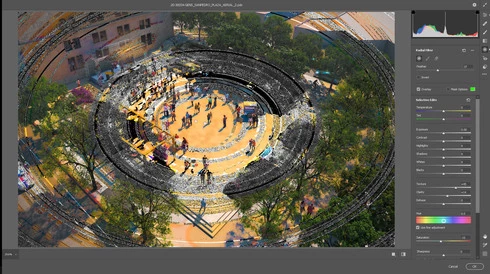
The latest update in camera raw is creating a bug in the radial filter. Is there a way I can fix this? 
I opened a file that I've created using a radial filter by color inside the camera raw (this camera raw was applied to a smart object) and as a surprise, I found strange circles in the image. I already updated my graphic card driver and turn off GPU use for camera raw but this hasn't worked. 

Any advice will be greatly appreciated. 
This topic has been closed for replies.

35 replies

Participant
November 10, 2020
The issue is still there
Camera raw: 13.02
Photoshop: 22.0
Participant
October 26, 2020

Participant
October 25, 2020

So after the update I have the same problem with the radial filter ... :-((((

Participant
October 21, 2020

And it is NOT!

It seems that I had fixed the problem for me with installing ACR12.4 (downloaded from Adobe website) two weeks ago. Since than the problem does not occure once more.

Now with all the Updates just now it was back again. Filter works outside but not inside the circle. Changing the "smoothness" (?) ("Weiche Kante" in German) brings back that bad behaviour. Seems like restart works a while...

😞

Rikk Flohr_Photography
Community Manager
Community Manager
October 20, 2020

Greetings,


Updates for the Adobe Photography Products were officially released on 10.20.2020 that include fixes for this issue. Please install the most recent update and confirm that your issue is now fixed. Please let us know if you encounter any issues.


Thank you for your patience.

Rikk Flohr: Adobe Photography Org
Participant
September 30, 2020

The Problem isn`t Photoshop, it`s Camera Raw 12.4.
Version 12.2.1 works without problems with all PS Versions

Participant
September 26, 2020
I have the same problem. With activated 1080TI and without.
I don't have these problems with version 19 of Photoshop CC
 
Participant
September 25, 2020

Hi folks, hi Adobe team,


I knew this problem too but couldn't reproduce this.


In my work I use two very different systems. Both on latest Adobe versions. My PC running under Win 10 pro uses a Nvidia GTX 1050Ti while my Notebook running under Win 10 home uses the internal Intel 620.


On both systems the problem occurs not ever but in random situations.


Tonight I could reproduce the failure several times and with the same file.


In my workflow I normally use LR to import pictures directly from the SD-card, to manage the files, priorize them, do some major edits like cropping, turning, brightnes...then the better ones are passed to PS to do more editing.


Radial/cirular filter seldom come to work in LR. Most of the time it takes part in PS/ACR. Therefore I recognized the problem only once while passing a pic from LR to PS and very mostly when I used it in PS/ACR. But this evening I used it in exactly ONE of 20 pics while doing my work. This one got the Filter in LR while all the others till then got none.


I experimented arround, took scrennshots and saved several states of PSD-files. Maybe they will help the adobe staff to solve the problem?


The problem occurs in both ways.


Using circular filter in LR works while export to PS showed the problem.


Export from LR without usage of circular filter in LR works fine. The pic showed up in PS without the problem. But the problem occurs with the usage of the filter in ACR (not smart filter).


In both - LR and PS - the same ACR 12.4 is used.


Quitting both applications, waiting a few seconds to end all services, restarting SOMETIMES helps - but not ever. The same happens wirth restarting the machine.


I try to install an older ACR-version now - and wonder if this will work...


Adobe, I can provide my screenshots and PSD-files to you, if you want...


Cheers and good luck to all


Frank

Inspiring
August 23, 2020
Same problem. 

Solved the issues:
Saving the file as .tiff worked for me with Cache lvl 4. .dng and psd files did not work. 
Changing the cache lvl to 6 it works with .psd and .dng 


Ps:Adobe Photoshop Version: 21.2.2 20200807.r.289 2020/08/07: 287d0d87ec  x64
Lr: version: 9.4 [ 202008061458-dbb2971e ]
Win 10: Version: 10 or greater 10.0.18362.959
32gb ram,lot of disk space. gfx2070 

Image is not available


Image is not available

Inspiring
August 9, 2020