


Participant
June 18, 2020

P: Radial filter renders incorrectly

  • June 18, 2020
  • 35 replies
  • 1561 views

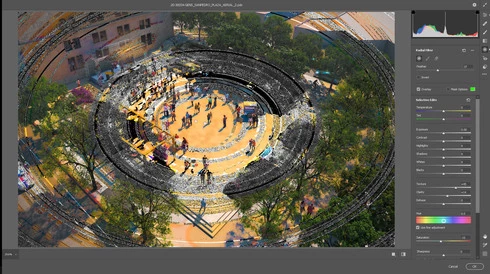
The latest update in camera raw is creating a bug in the radial filter. Is there a way I can fix this? 
I opened a file that I've created using a radial filter by color inside the camera raw (this camera raw was applied to a smart object) and as a surprise, I found strange circles in the image. I already updated my graphic card driver and turn off GPU use for camera raw but this hasn't worked. 

Any advice will be greatly appreciated. 
This topic has been closed for replies.

35 replies

Inspiring
August 9, 2020
How do you revert to previous version please?
Inspiring
August 7, 2020
Same problem here and I tried increasing cache levels and cache but still intermittent problem.  I reverted to previous version of ACR and it works fine.
Inspiring
July 30, 2020
I have the same problem. The above suggestion does not work

Inspiring
July 20, 2020
Have just tried the "Cache to 6" advice and unfortunately doesnt work... 
Daniel Laan
Participant
July 14, 2020
The two cards here are his Quadro K3000M and integrated graphics in the Intel CPU. Had such a setup myself in the past and had no problems running a previous version of PS. On an entirely different setup, running a GTX 1080 and an AMD CPU, I have the same problem as the OP. 
In short, I doubt it's hardware-related, but related to the PS update.
A temporary fix is down this page, although an update is in order.
Daniel Laan
Participant
July 14, 2020
Yes, that is a workaround that actually works. 
Go to Preferences under Edit, then point to the Performance tab or menu item.
Increase Cache Levels under History & Cache to 6 and hit OK. Restart Photoshop. 
Inspiring
July 7, 2020
Hello, I encountered the same problem as you, and a priori I resolved it by passing the memory cache of Ps to level 6.

Inspiring
June 24, 2020
I have the same problem too. A workaround is to convert the psd to a tiff
Inspiring
June 23, 2020
Having exact the same problem. 
FrecasAuthor
Participant
June 20, 2020
Jeffrey, I tried your advice and all the steps in the troubleshoot GPU graphics page but none of them work, unfortunately.