


Participant
June 18, 2020

P: Radial filter renders incorrectly

  • June 18, 2020
  • 35 replies
  • 1561 views

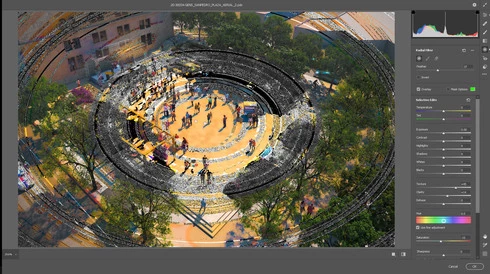
The latest update in camera raw is creating a bug in the radial filter. Is there a way I can fix this? 
I opened a file that I've created using a radial filter by color inside the camera raw (this camera raw was applied to a smart object) and as a surprise, I found strange circles in the image. I already updated my graphic card driver and turn off GPU use for camera raw but this hasn't worked. 

Any advice will be greatly appreciated. 
This topic has been closed for replies.

35 replies

Known Participant
June 19, 2020
I also get those artifacts from time to time, when I use ACR as a smartfilter. Unfortunately not always reproducable. I ́m on Win 10 1809 with a GTX 970. 
Legend
June 19, 2020
I think your computer is getting confused between the two cards in your system. 1) update your NVIDIA driver, then 2) see section 7 for dealing with multiple cards by setting Photoshop to use the NVIDIA card:

https://helpx.adobe.com/photoshop/kb/troubleshoot-gpu-graphics-card.html#GPUandgraphicsdrivertrouble...
FrecasAuthor
Participant
June 19, 2020

FrecasAuthor
Participant
June 18, 2020

Legend
June 18, 2020
It may help if we could see your Photoshop System Info. Launch Photoshop, and select Help >System Info...and copy/paste the text in a reply.