


duncanbirnie
Participant
April 14, 2018

P: Sony a7III Camera Profiles are Broken

  • April 14, 2018
  • 25 replies
  • 690 views

Hello! Never had a need to post here so hope this is the right place.

I'm the proud owner of Sony's new a7III, so I've been shooting a lot recently putting it through it's paces. Lightroom finally got support for the camera with v7.3, so I've been digging through my RAWs. Very happy except I did notice a few odd artefacts on a few shots, but nothing that caused too much concern... UNTIL NOW!!

Basically, it seems that either my versions of the Camera Profiles or indeed Lightroom's overall are broken. At first I thought it could be to do with compressed vs. uncompressed RAW, but Sony's own RAW viewing software does not exhibit these issues. OBSERVE!

Exhibit A:
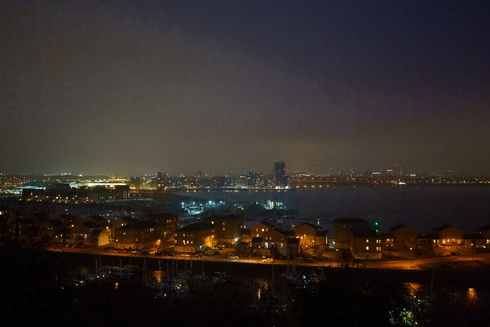
This is unprocessed in Lightroom with the Camera Standard profile applied.

Exhibit B:
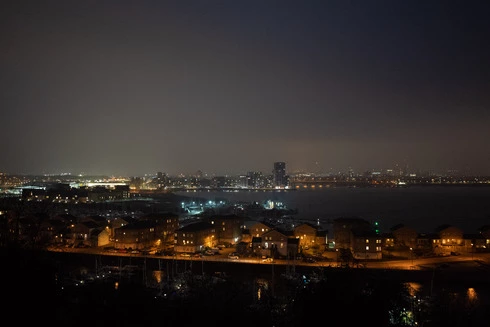
This is the same shot using the Adobe Color profile. 

All the horrendous image noise/compression/whatever has gone, and the detail and smooth gradients are fine, the same as Sony's software. So, not a camera or RAW issue and this persists across all the profiles marked as Camera Matching... but does not exist in any of Adobe's profiles.

A ploy to try and persuade me to use Adobe colour profiles?! Maybe! But I thought you should be aware of it as clearly, something isn't being processed right by the Camera Matching profiles. I also went back to some of the images I'd spotted artefacts in... they were all fixed by using the Adobe profiles not the Camera Matching ones.

I appreciate it's early days with the new profile system, but if there's anything anyone can suggest I'd be very grateful. Hopefully it's an issue only I'm experiencing, otherwise there's a lot of other unhappy a7III Lightroom users right now!

FYI, I have reinstalled both Lightroom and Photoshop before posting here, and this happens on images of a variety of ISOs and noise levels... it's a software thing and I was just using this night image because of the transition from light pollution to sky (and it's the worst I've seen it). Also, this happens in Photoshop with Camera RAW using the same profiles.

Thanks,
Duncan

25 replies

Rikk Flohr_Photography
Community Manager
Community Manager
February 1, 2024

@Andrei Stance  You’ve posted to an ancient thread. It is highly unlikely that the issue described in this thread, though not impossible, is the same one you are currently experiencing. Rather than resurrect an old thread that is seemingly similar, you are better off posting to a new thread with fresh, complete information, including system information, a complete description of the problem, and step-by-step instructions for reproduction. 


If the issue is the same, we will merge you back into the appropriate location. 


Thank you!


Rikk Flohr: Adobe Photography Org
Participating Frequently
February 1, 2024

It's 2023 and I'm having the exact same issue on my Sony a7IV. Why is this happening? I thought it was fixed.

Inspiring
June 21, 2018
Yes, it certainly was a pain in the butt, but it's fixed now. The noise/gradient issue is gone. Colors are also pretty much spot on as far as I can tell. There's still an "issue" (not a bug, but just a discrepancy) with exposure/shadow/higlights/whites/blacks somehow that still doesn't match the Sony Edit output og even the jpg out of camera, but the camera matching profiles are better than the Adobe profiles in my opinion. Or should I say, at least more true to the way Sony Edit renders them, and I vastly prefer that generally.
Inspiring
June 21, 2018
Good to hear! Thanks for confirming.
Inspiring
June 21, 2018
Thank you, I installed it 10 minutes ago and it seems that everything is working as intended.
Inspiring
June 21, 2018
The fix for this issue was in Camera Raw 10.4 and Lightroom Classic 7.4, released earlier this week on 6/18. Please check it out and let us know if it is resolved for you. Thanks!
Inspiring
June 21, 2018
Thanks for pointing out this issue, I just bought the A7III and was worried that there was some sort of a problem with my camera. I have noticed that it happens especially in the bokeh part of the picture, as demonstrated in the attached pics.

Camera profiles give me much better colors than the Adobe ones, so this is really a big problem for me. Does anyone have any alternatives to get better colors, until the fix is out?


Adobe Vivid


Camera Vivid
MadManChan2000
Adobe Employee
Adobe Employee
May 18, 2018
Steve, the issue with the harsh edges in OOF areas is for the A7 III, not the A7R III.
ssprengel
Inspiring
May 18, 2018
The fix wasn't in the x.x.1 version that was rushed out to fix some other issues, but you would hope it'll be in the x.4 version whenever that is due.  Usually there are a few months between the .x releases, because they're adding new cameras, new lenses and perhaps new functionality.  This isn't something they'd rush out a fix for just for itself, because the work around is to stay away from the camera-match profiles.
Inspiring
May 18, 2018
When will the correction of this luggage come out ?? Already passed a whole month!