


Participating Frequently
December 9, 2016

P: User interface is mostly white/blank in Full Screen Mode

  • December 9, 2016
  • 28 replies
  • 2772 views

Hi

When I'm in full screen mode in Camera Raw filter in Photoshop CC when first click almost entire window is going to blank (see attached screenshot), and it gets back to normal when I press K for Adjustment Brush
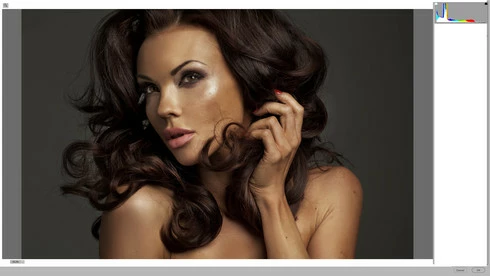


I had the same issue with my old Mac Pro and earlier Photoshop (OS X 10.7), but now I'm running on iMac 27, AMD Radeon HD 6970M 1024 MB, 24 GB RAM.. OS X 10.11.3
It happens almost all the time 😕😕

Any ideas?

Andy

This topic has been closed for replies.

28 replies

Rikk Flohr_Photography
Community Manager
Community Manager
June 16, 2020
Version 12.3, an update to Camera Raw, went live on June 15, 2020 and contains a fix for this issue. Please install the update and respond back if it does not cure the issue for you. Thank you for your patience!
Rikk Flohr: Adobe Photography Org
Known Participant
October 30, 2019
I am experiencing this problem currently. I have just installed CameraRaw_11_4_1_mac, and using PS 20.0.7. Mac OS 10.12.6.
I thought this issues was going to be resolved, according to Jeffrey Tranberry, "3 years ago".

Participating Frequently
November 2, 2017
This issue had resolved with subsequent updates. However it is back with a vengeance with the 2018 install. It happens almost every time that I take a raw file from LR to photoshop as a smart object and then double click it to edit the smart object in ACR - the UI goes white the moment any slider is touched
Participating Frequently
February 16, 2017
Looking forward to that update - thanks for your help
Legend
February 16, 2017
No. I don't think messing with Lightroom plug-ins will help. Chris says the issue is known and the ACR team is working on for a forthcoming update.
Participating Frequently
February 15, 2017
Yes that helps does make the UI usable - the text does appear. I am however opening the files into photoshop from Lightroom - do you think I need to disable the plug ins from Lightroom as well?
I must say I am certainly impressed at the speed of your responses - thanks
Legend
February 15, 2017
Does the workaround that Chris posted above work to restore the UI? "A work around is to press K key twice or press the F twice to switch the ACR Filter out/into full screen mode."
Participating Frequently
February 15, 2017
My apologies - the problem is still there even with the plug ins disabled at photoshop startup. The first image I tried was ok however the very next image the same problem. I close photoshop and reopen it again holding the shift key & disabling the plug ins but the problem is still there. the UI goes white on editing a smart object
Legend
February 15, 2017
If that makes your problem go away, it's likely you have a bad Nik plug-in. You can find the offending plug-in and remove it: https://helpx.adobe.com/photoshop/kb/plug-ins-photoshop-troubleshooting.html
Participating Frequently
February 15, 2017
(Reply for Jeffrey Tranberry, Sr. Product Manager, Digital Imaging on my merged thread which is no longer open to replies:) Yes - if I launch photoshop holding the shift key and disabling third party plug ins then this issue does go away. But is that the only work around?