


Participating Frequently
December 9, 2016

P: User interface is mostly white/blank in Full Screen Mode

  • December 9, 2016
  • 28 replies
  • 2772 views

Hi

When I'm in full screen mode in Camera Raw filter in Photoshop CC when first click almost entire window is going to blank (see attached screenshot), and it gets back to normal when I press K for Adjustment Brush
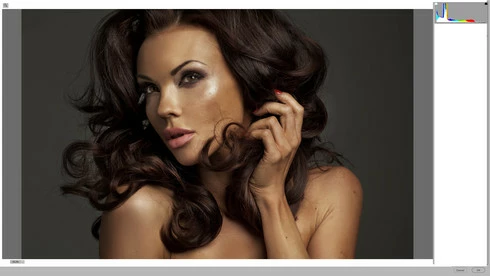


I had the same issue with my old Mac Pro and earlier Photoshop (OS X 10.7), but now I'm running on iMac 27, AMD Radeon HD 6970M 1024 MB, 24 GB RAM.. OS X 10.11.3
It happens almost all the time 😕😕

Any ideas?

Andy

This topic has been closed for replies.

28 replies

ttphoto151000
Participant
February 15, 2017


I am experiencing an issue with Photoshop CC 2014 smart objects camera raw window on OS X Yosemite 10.10.1. When I double click on the smart object icon in the layers panel to open the smart object in Camera Raw and attempt to adjust a few settings, the Camera Raw window goes white. I can no longer see the image and the adjustment icons only show if I move my mouse over that part of the window. It only seems to happen on files that I am working on, not files that I have saved and re-opened. Could this be a memory or video card issue?
Participating Frequently
February 7, 2017
I have the same problem. Happens every time. Switching to another open window and back also resolves it but is very frustrating. 
Participating Frequently
December 13, 2016
It looks like you have a better solution 😄 Thanks for that tip!
ccastleb
Adobe Employee
Adobe Employee
December 13, 2016
Using the K key is one option, as is using F twice to switch the ACR Filter out/into full screen mode. That works for me anyway and it redraws the entire window correctly.

Regards,

- Chris
Participating Frequently
December 13, 2016
Thank you for the info 🙂
It is faster to hit K key twice and most of the tools will be visible and usable 🙂
It would be great to have full GPU support in ACR filter, but if not, just that bug fix would be great 🙂

Thank you very, very much for your great support as well as for that fantastic plugin, it saves me tons of time, when working with portraits 🙂

Have a great day ahead! 🙂
ccastleb
Adobe Employee
Adobe Employee
December 13, 2016
For your reference the bug is CR-4197168.

Seems you can temporarily work around it by taking ACR out of and back into full screen mode after the redraw issue occurs.
Participating Frequently
December 13, 2016
Thank you too 🙂 Fingers crossed for to fix it 🙂
ccastleb
Adobe Employee
Adobe Employee
December 13, 2016
OK. The video helped and I can reproduce the bug. I will forward this onto my colleagues most familiar with the implementation for further investigation.

A work around is to press K key twice or press the F twice to switch the ACR Filter out/into full screen mode.

Thank you!
Participating Frequently
December 13, 2016
Just in case here is a full screen recording: https://www.dropbox.com/s/h421cuu3l1kxuhz/acrfullscreenmodebug.mov?dl=0

I mentioned that I had the same bug on my old intel mac pro 1.1, OS X 10.7 and previous version of Photoshop.. (I can't check it now, because it's broken..), but anyway, Thank you 🙂
ccastleb
Adobe Employee
Adobe Employee
December 13, 2016
Thanks for the information. I am unable to reproduce this on my 5K iMac. I don't have the same GPU card and I am running under 10.12 so not quite the same environment. I will attempt to locate similar hardware internally, but no guarantees I will be successful. Stay tuned.