


Participating Frequently
December 9, 2016

P: User interface is mostly white/blank in Full Screen Mode

  • December 9, 2016
  • 28 replies
  • 2772 views

Hi

When I'm in full screen mode in Camera Raw filter in Photoshop CC when first click almost entire window is going to blank (see attached screenshot), and it gets back to normal when I press K for Adjustment Brush
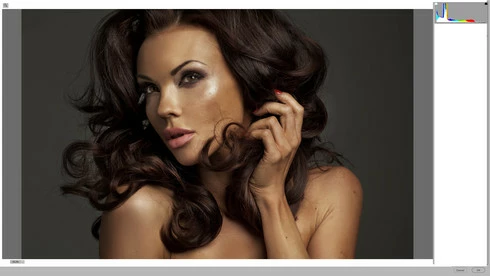


I had the same issue with my old Mac Pro and earlier Photoshop (OS X 10.7), but now I'm running on iMac 27, AMD Radeon HD 6970M 1024 MB, 24 GB RAM.. OS X 10.11.3
It happens almost all the time 😕😕

Any ideas?

Andy

This topic has been closed for replies.

28 replies

Participating Frequently
December 13, 2016
Yes, everything is uptodate.. ACR is 9.8.0.692, PS 2017.0.1
Participating Frequently
December 13, 2016
Correct.. when I disable GPU option, then I will restart Photoshop, then I'm unable to reproduce this bug..

But, when I turn on GPU plugin, then restart Photoshop, then I'm able to reproduce this bug all the time..

What I discovered few minutes ago is that.. I'm able to reproduce this bug under two circumstances.. first of all Photoshop must to be in full screen mode (hit F key once, what I usually do), then Camera Raw filter must to be in full screen mode as well)..

If Photoshop is not in full screen mode, then I open Camera RAW filter everything is just fine..
ccastleb
Adobe Employee
Adobe Employee
December 13, 2016
Also, are you running the most current Photoshop CC (2017) and/or the current ACR 9.8 plugin?
ccastleb
Adobe Employee
Adobe Employee
December 13, 2016
For the sake of clarity, do you mean that when disabling the GPU acceleration in ACR preferences, you are unable to reproduce the bug?
Participating Frequently
December 12, 2016
OK, after Photoshop restart with GPU plugin disabled I'm unable to reproduce that bug..
Then I turned on this plugin once again.. after a while still I were unable to reproduce this bug.. But after Photoshop restart I have the same bug once again..
ccastleb
Adobe Employee
Adobe Employee
December 12, 2016
Thanks for the clarification.

Are you able to reproduce this with GPU acceleration disabled in ACR?

Photoshop> Preferences> Camera Raw...

Uncheck "Use Graphics Processor"
Participating Frequently
December 12, 2016
Hi Chris, thank you very much for your replay.. I have to say that I never heard about that plugin... and of course it isn't installed on my machine, so something else must cause the issue..I have two plugins installed, one of them is Suitcase Fusion a font manager from Extensis.. second one is a export plugin from Zepelin.

Best Regards
A.
ccastleb
Adobe Employee
Adobe Employee
December 12, 2016
Hi Andy,

We have seen similar issues when users have the Google NIK plugins installed. If you have them installed, you may want to disable or temporarily uninstall them to confirm whether that is the cause of this issue.

Regards,

- Chris