


Participant
October 16, 2024

Substance Plugin for Blender (Code_Response.toolkit_already_started)

  • October 16, 2024
  • 7 replies
  • 1052 views

Hi Adobe Rep + Community,


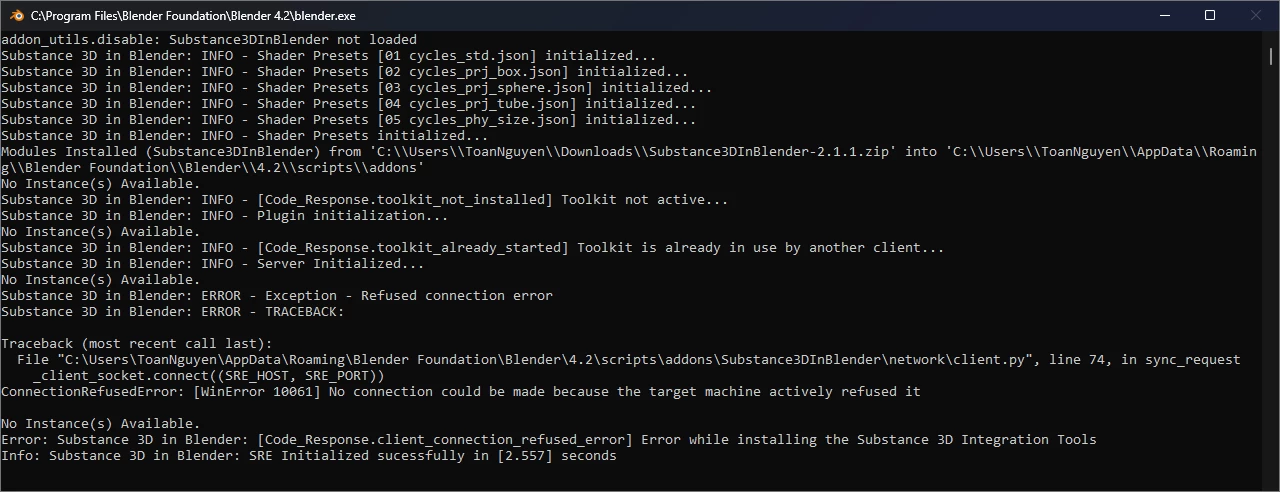
I can't get the Adobe Substance Plugin for Blender working. I am using the Blender v4.2.2 LTS on Windows 11 (23H2) with the latest Substance3DInBlender and Substance3DIntegrationTools, v2.1.1.


I don't have the Substance Plugin installed for any other 3D package. Is there anything else I can do to troubleshoot this bug?


This is the screenshot of the installation:
 

Thank you,

Toan

7 replies

Adobe Employee
January 6, 2025

Hi, thanks for the update! Glad you were able to troubleshoot the issue with local settings.

@NOBODY�_20249548 If you are having a similar issue, can you please share the output of your console error as shown above so we can diagnose your issue as well? Preferably in a new thread to keep this clean 🙂 

Participant
December 26, 2024

Hello! What is the specific method? I really don’t know much about the code! Thank u!

Participant
December 6, 2024

@Aldo_3D 


After shelving this issue as not fixable, I did some digging in the Python code and realized some of my local settings were the culprit.


TL;DR: terminal output was causing SRE_ToolkitManager.is_running method to return true, so it thought SRE was running, but it wasn't. If you have a custom terminal that echo's any message, this might cause you to have this error as well.


I have a registry setting for Windows terminal to echo commands of my custom shortcut aliases, which was causing the class SRE_ToolkitManger is_running method to falsely return True. The file is Substance3DInBlender\toolkit\manager.py.


In the is_running method, instead of checking the stdout of the wmic command, I changed it to check the process ID differently, so I could have my aliases and the Substance addon working.


Problem solved. I am posting this hoping that it helps someone else out.

Participant
October 22, 2024

Hi @Aldo_3D,


Thanks for the instructions. With Blender fully closed, I tried the wmic command and the result was: "No Instance(s) Available."

To test this further, in the addon settings I enabled "Automatically start the Substance Remote Engine".


I wrote this batch script that would for-loop the command:

@echo off
for /L %%i in (1,1,100) do (
    wmic process where name="substance_remote_engine.exe" get ProcessId
)


When starting Blender it doesn't show a trace of SRE running.


For PC specs, I have a Dell Alienware R16 with 64GB RAM and RTX 4090. When running this test, my RAM usage was around 33%.


Anything else I can try?

Adobe Employee
October 22, 2024

Hi @Toan38949676uleg , thank you for thoroughly checking the steps. It's important to rule that issue out before looking further.

Looking at the code, the line reading "Toolkit is already in use" would only appear in the scenario that the remote engine is running. Since you already verified that it is not visible in Task Manger, it is possible that the OS is still in the process of closing it after you restart Blender which is possible if the CPU is under heavy use or OS memory is saturated. I'm sharing this OS command you can try to verify that the remote engine is indeed fully closed. Can you please try fully closing Blender, opening Command Prompt, and entering the following?


wmic process where name="substance_remote_engine.exe" get ProcessId


The SRE not running will result in: 

No instance(s) Available


If the SRE is running, you will see:

ProcessId:
#######


Please share the result here.


Best,
Aldo

Participant
October 16, 2024

Hi @7945514,


Nice to meet you! I tried the steps you provided, and no luck. I made sure Blender was closed, deleted the Substance3DIntegrationTools folder, made sure Substance Remote Engine was not running, also re-downloaded the IntegrationTools, and re-tried installing the Integration Tools from the addons.


For the sake of clarity, I have never seen a Substance Remote Engine process running in Task Manager. I have checked Processes Tab> Background processes, Users Tab > My User, and Details Tab. I have checked for substance_remote_engine.exe and sre.exe, but I have never seen any instance running.

I have also tried temporarily disabling Windows Firewall, installed a fresh install of Blender, and removed the AppData\Roaming\Blender Foundation folder.


Anything else I can try?

Adobe Employee
October 16, 2024

Hi @Toan38949676uleg , thanks for reaching out. This can happen some times when the Tools do not install correctly. First with Blender closed, ensure that the Substance remote engine is not running in the task manager. Then try to use it again. If that fails, maually remove the Substance3DIntegrationTools folder from the following directory:


 C:\Users\(username)\AppData\Roaming\Adobe


After that, please try to re-install the intregration tools from the blender add-on menu. If the issue persists, please share another screen shot of the log.


Best,

Aldo