


Participant
November 8, 2023

Unity Substance3D Plugin (Memory Leaks and Editor rendering Performance)

  • November 8, 2023
  • 7 replies
  • 465 views

The editor takes a very long time to load the assets for a larger project. I have 75 sbsar files in the project and if I select just one of these files it takes between 1 and 5 minutes for the editor to respond again. Crashes can also occur due to memory leaks.
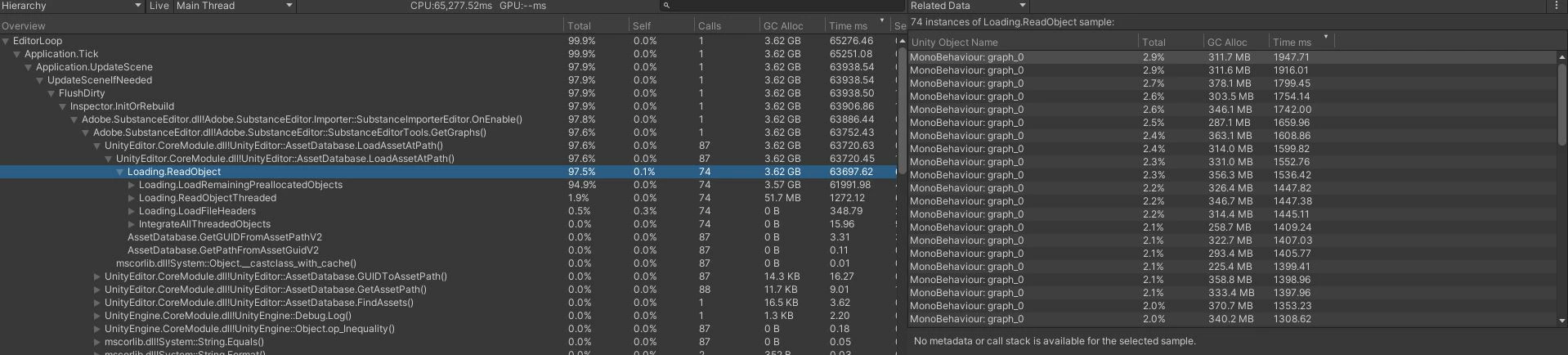


This is because the SubstanceEditorTools.cs::GetGraphs() function loads all the graphs in the project and then checks whether they match the SBSAR file. Since the graphs are usually created in the same folder with the same name and then a postfix for the graph name, I have implemented a workaround for myself that only loads graphs that are in the same folder and whose folder name contains the name of the SBSAR file.

7 replies

Community Manager
December 19, 2023

Good to hear that it helped! 

Participant
December 19, 2023

Hi,


i only changed the getGraphs() Function in SubstanceEditorTools.cs


        public static List<SubstanceGraphSO> GetGraphs(this SubstanceFileSO fileSO)
        {
            var result = new List<SubstanceGraphSO>();

            var path = AssetDatabase.GetAssetPath(fileSO);
            var currentDirectory = Path.GetDirectoryName(path);
            var subFolders = Directory.GetDirectories(Path.GetDirectoryName(path));
            var fileName = fileSO.name;
            var potentialFolders = System.Array.FindAll<string>(subFolders, s => s.Contains(fileName));


            //string[] guids = AssetDatabase.FindAssets(string.Format("t:{0}", typeof(SubstanceGraphSO)));
            string[] guids = AssetDatabase.FindAssets(string.Format("t:{0}", typeof(SubstanceGraphSO)), potentialFolders);

            for (int i = 0; i < guids.Length; i++)
            {
                string assetPath = AssetDatabase.GUIDToAssetPath(guids[i]);
                SubstanceGraphSO graph = AssetDatabase.LoadAssetAtPath<SubstanceGraphSO>(assetPath);

                if (graph != null)
                {
                    var filePath = AssetDatabase.GetAssetPath(graph.RawData);

                    if (filePath.Equals(path, System.StringComparison.OrdinalIgnoreCase))
                    {
                        result.Add(graph);
                    }
                }
            }

            return result;
        }

I have a huge AssetDatabase, that helped me


STFUnity
Participant
December 18, 2023

I don't know what OP did about avoiding the hang time error, but I made a slight modification to the Update() method in the SubstanceEditorEngine.cs wherein it only runs

if (Selection.activeObject is SubstanceGraphSO || Selection.activeObject is SubstanceFileSO) {
   //Update code...
}


This preserves the inspector pane view and its unpacking from the native SubstanceFileSO object without interfering with other script compilations or causing a reload of the entire substance database every time the domain is reloaded. I'd rather the check be "if the prior selected object was a substance file" instead, but I'm just trying to get back to work without deleting the substances lol

STFUnity
Participant
December 18, 2023

Also, SubstanceEditorEngine.cs has a typo on line 142 it looks like, in the Teardown method I'm seeing a callback added instead of removed

Likely inconsequential for this problem though it's right next to the Update callback I'm having issues with:

        /// <summary>
        /// Shutdown substance engine.
        /// </summary>
        private void TearDown()
        {
            _isLoaded = false;
            EditorApplication.update -= Update;
            EditorApplication.quitting -= OnQuit;
            Undo.undoRedoPerformed -= UndoCallback;
            EditorApplication.playModeStateChanged += PlaymodeStateChanged; //there's a typo here, it should be -=
            Engine.Shutdown();
        }
STFUnity
Participant
December 17, 2023

For the record, the first time my Unity Editor started getting slow about it, I was able to delete my library and get back to speed - but since the second time, I've tried completely redownloading the entire repo and quarantining the prior version, reboots, library deletes, doing all of those in different orders. No luck.

STFUnity
Participant
December 17, 2023

Yea I'm having a similar problem in Unity 2022.3.13f1 wherein I initially had a collaborator upload a couple hundred substances in his library - the first time I received the download over Unity Version Control my computer spent some time writing its own version of the graphs he'd already rendered.. I had to commit back 1500 files that were "changed" according to Version Control but really there wasn't anything new about them, never touched or even viewed them.

Then after adding a new unrelated package to the project, I started getting the same thing, any time I recompile my scripts [15-20 seconds typical for my project currently] I have to wait an extra minute and 45 seconds for Adobe.SubstanceEditor.SubstanceEditorEngine.Update "Waiting for user code in Adobe.SubstanceEditor.dll to finish executing".

Love the substances but this is killing me on the other side of trying to make a game and test things I'm in the middle of coding. I don't touch or edit the substances so there's no reason to update every single one of them every time I make an unrelated script change.

Community Manager
November 30, 2023

Hi, thank you for reporting this issue. We've addressed a memory leak in Unity v3.10, and this version will be in production shortly. This fix should potentially address the problem you've described above. Additionally, we have noted and prioritized the specific issue you reported for a thorough investigation of the memory leaks.