


rachelcenter
Legend
Sep 8, 2025 4:10 PM UTC
Open for Voting

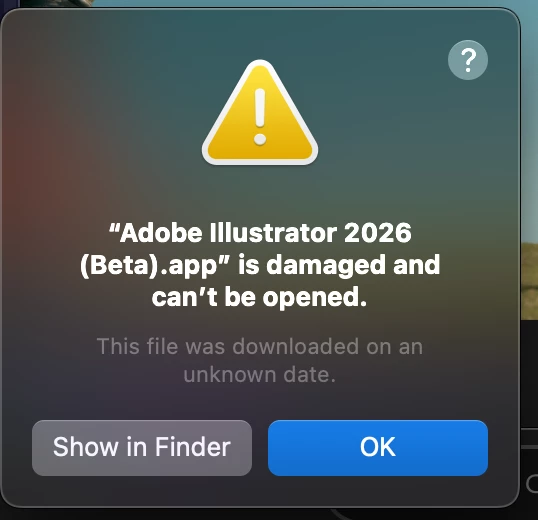
I just updated illustrator beta and it wont open and it says its damaged.

I just updated illustrator beta and it wont open and it says its damaged. So I uninstalled and reinstalled from scratch and got the same thing. MacOS Sequoia 15.6.1
 

13 replies

rachelcenter
Legend
Oct 23, 2025 3:40 PM UTC

@Smriti Capoor still having issue. I should be able to open it natively without any workarounds. And that is not the case. Can you guys fix this please?

Translate
rachelcenter
Legend
Oct 23, 2025 3:39 PM UTC

I'm still having this issue. When I try to open it, it says its damaged @jamieclarke can this be fixed?

Translate
Nite-Stian
Community Expert
Community Expert
Oct 23, 2025 3:33 PM UTC

This worked for me. I deleted the app folder after uninstalling.

Translate
Smriti Capoor
Community Manager
Sep 19, 2025 5:01 AM UTC

@Justin Acosta you can try the steps of deleting the folders once to see if it works that way or have you tried that already?

Translate
Smriti, Product Marketing, Adobe Illustrator
Smriti Capoor
Community Manager
Sep 19, 2025 5:00 AM UTC

Hello @Justin Acosta I have raised this to the team again. Thank you for reporting this.

Translate
Smriti, Product Marketing, Adobe Illustrator
Participant
Sep 18, 2025 11:16 PM UTC

Has anyone had luck fixing this? I've had the same issues for weeks now. It was working fine until I updated the app to to v30 and I get the same error message as above. I've uninstalled and reinstalled both v30 and v29.9, restarted my iMac, used the Adobe Cleaner Tool to uninstall and nothing is working whatsoever.

Translate
Monika Gause
Community Expert
Community Expert
Sep 12, 2025 12:21 PM UTC

I experienced the same and uninstalling/reinstalling helped. Afterwards the thing worked.

Translate
rachelcenter
Legend
Sep 12, 2025 11:51 AM UTC

pretty sure thats what i did the first time and didnt have to delete the folder because it disappears on its own and that didnt work the first time. The file is damaged plain and simple. unless adobe finally reuploaded a version that isnt damaged any more?

Translate
Smriti Capoor
Community Manager
Sep 12, 2025 4:57 AM UTC

Hello @rachelcenter and @Sven Venstre can you please also try the following steps:


  • Uninstall the Beta build and delete the Beta folder from the Applications folder
  • Once done, check for updates in the Creative Cloud App
  • Install the latest Beta build
Translate
Smriti, Product Marketing, Adobe Illustrator
Smriti Capoor
Community Manager
Sep 11, 2025 6:02 PM UTC

Hello @rachelcenter & @Sven Venstre thank you for reporting this. I've reported this to the team. Will get back to you as soon as I hear anything.

Translate
Smriti, Product Marketing, Adobe Illustrator