

johnrellis
Legend
June 29, 2026

P: LrC v15.4 & later Assisted Culling red-x reject badges persist on filmstrip thumbnails

  • June 29, 2026
  • 6 replies
  • 42 views

The red-x Reject badges persist on thumbnails in the filmstrip even when all the Select and Reject checkboxes in Assisted Culling are unchecked.  To reproduce on LR 15.4.1 / Mac OS 26.4.1:


1. Download and open the attached catalog.


2. In the Assisted Culling panel, uncheck all the checkboxes. Observe that the red-x badges still appear on the filmstrip thumbnails:
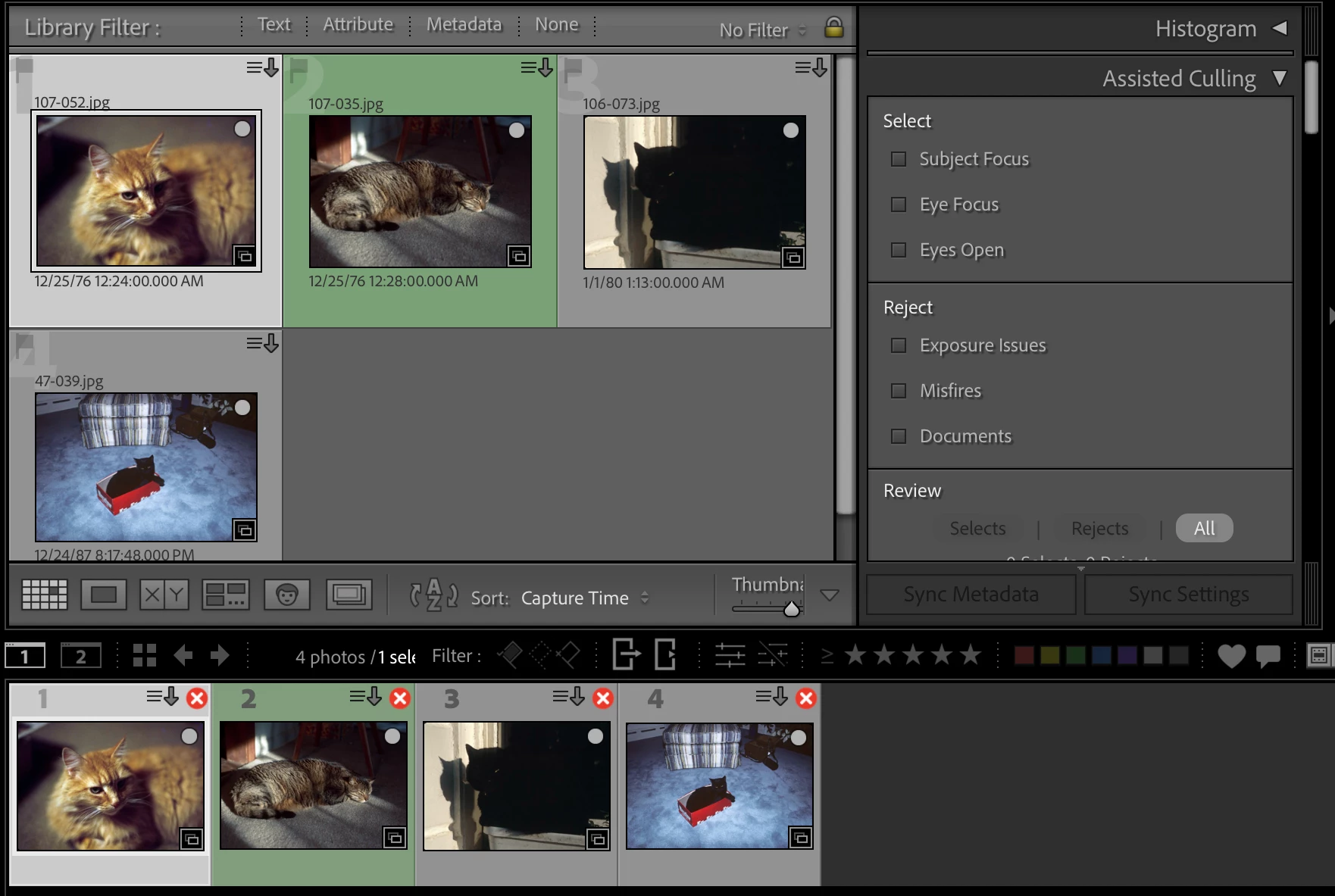


I haven’t discovered any way to make them disappear, including by deleting the Helper.lrdata file.

    Pinned Reply By Sameer K

    Thanks for creating a report on this. I shared this with the team, and we’ve also identified this as a bug with the folllowing workaround: 

    • Collapse the Assisted Culling Panel in Right side. This should make the badges go away.

    Thanks!
    Sameer K

    6 replies

    Known Participant
    June 30, 2026

    Collapsing the Assisted Culling panel does NOT remove the red glyph with the white X in the corner of many issues.  It doesn’t show up in the library module but it show up in the film strip at the bottom of the screen.  It is really annoying.  I have Assisted Culling turned off in the Catalog Settings and the Assisted Culling panel turned off in the side panel.  Mac OS Tahoe 26.5.2

    johnrellis
    Legend
    June 30, 2026

    [View this post in your web browser. It contains formatting and images that don't appear in email.]


    @Sameer K Collapse the Assisted Culling Panel in Right side. This should make the badges go away.


    Duh, so simple and obvious.  Thanks for calling that out.

    okscarfone
    Participating Frequently
    June 30, 2026

    Thanks, Sameer. That workaround successfully cleared the glyphs for me! 🙌

    For the engineering ticket, note this specific UI state progression for my use case in case it helps identify where the bug is taking place:

    • Pre-Update: The Assisted Culling panel was completely deactivated, as I don’t use it.

    • Post-Update: Badges rendered immediately on all filmstrip images in the catalog, despite the deactivated state.

    • Resolution Sequence: I had to activate the panel, collapse it to clear the badges, and then deactivate it again.

    • Stability: The UI remains clean after returning to the deactivated state.

    Sameer K
    Community Manager
    Community Manager
    June 30, 2026

    Thanks for creating a report on this. I shared this with the team, and we’ve also identified this as a bug with the folllowing workaround: 

    • Collapse the Assisted Culling Panel in Right side. This should make the badges go away.

    Thanks!
    Sameer K

    okscarfone
    Participating Frequently
    June 29, 2026

    Unfortunately, Assisted Culling doesn't seem to be the root cause in my case, as I have it completely disabled. The behavior also differs from a standard rejection marker. While your example shows the red X correctly placed in the main Library Grid, my grid is entirely clean; the error glyph is exclusively overlaying every single thumbnail down in the Filmstrip.


    However, your note prompted a test. When I actively turned Assisted Culling on by selecting “Subject Focus,” both the Filmstrip and Library Grid suddenly behaved exactly as expected. This strongly points to a UI rendering error that triggers specifically when Assisted Culling is deactivated.


    I've attached a screenshot below so you can see the clean grid sitting directly above the flagged filmstrip.


    johnrellis
    Legend
    June 29, 2026

    [View this post in your web browser. It contains formatting and images that don't appear in email.]


    @okscarfone my grid is entirely clean; the error glyph is exclusively overlaying every single thumbnail down in the Filmstrip.


    Those are the symptoms of the bug I reported just a bit before your post:

    https://community.adobe.com/questions-675/lrc-15-4-red-cross-symbol-with-the-white-x-on-thumbnails-1629438?postid=7695118#post7695118


    Once the filmstrip is poisoned by Assisted Culling, I don’t know of any way of removing the red X’s.

    okscarfone
    Participating Frequently
    June 28, 2026

    I’m having the same issue. Here’s a quick bug report:
     

    Spurious Red 'X' Glyph in Filmstrip (LrC 15.4.1)

    Trigger: Updated to LrC 15.4.1 today. Catalog opened immediately displaying the error.

    Symptom: A red circle with a white 'X' glyph overlays all image thumbnails. Hovering yields no tooltip or error string.

    Scope & Isolation Vectors:

    • Library Filmstrip: Error glyph present on all images.

    • Library Grid (Main Window): Normal. No error glyphs.

    • Develop Module: Normal. No error glyphs. Editing functions perfectly.

    • Print Module: Normal. No error glyphs.

    Environment & Diagnostics:

    • Storage: Network Attached Storage (NAS).

    • Link Status: Fully connected. "Show in Finder" works flawlessly.

    • Assessment: This appears to be a localized UI rendering bug in the Library filmstrip, not a broken link or catalog corruption.

    okscarfone
    Participating Frequently
    June 28, 2026

    Forgot to add to Environment & Diagnostics:

    • Operating System: Mac OS Tahoe 26.5.1