



P: (macOS) LrC 15.5.1: Exporting a portrait video at Quality: Max chooses the wrong target resolution
Exporting a portrait video at Quality: Max (up to 4K) chooses a target resolution that is much less than 4K, with a lower frame rate than the source.
To reproduce on LR 15.5.1 / Mac OS 26.6.2:
1. Open the attached catalog.
2. Select the video Portrait.mov and do File > Export.
3. In the Video section, select Quality: Max (up to 4K) and observe that the Source resolution is 2160 x 3840, 60 FPS (correct), but the target resolution is 1920 x 1080, 30 FPS (incorrect) -- it should be 3840 x 2160 (or similar horizontal 4K resolution), 60 FPS:
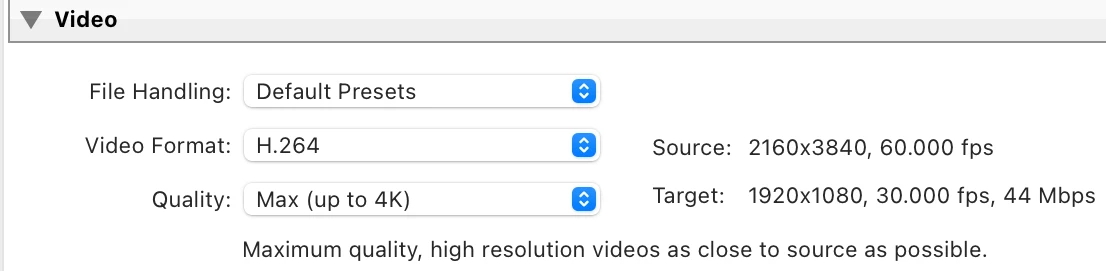
4. Do the export and observe that the resolution of the output is indeed 1920 x 1080, 30 FPS (incorrect), with the portrait video inserted as letterbox (black borders on the left and right). The exported video should be 3840 x 2160, 60 FPS (or similar horizontal 4K resolution), with the video inserted as letterbox.
5. Select Landscape.mp4 and export it with Quality: Max, and observe the Source resolution is 3840 x 2160, 60 FPS and the Target resolution is 3840 x 2160, 60 FPS (correct):
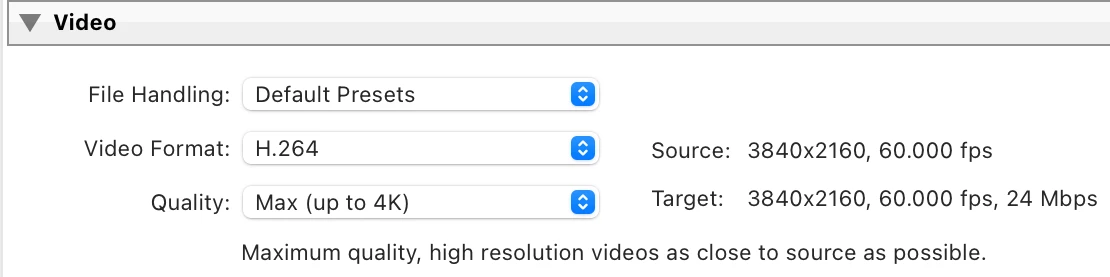
6. Do the export and observe the exported video is 3840 x 2160, 60 FPS (correct).
 AdChoices