



Lightroom Classic 16 (macOS) – Generative Remove Mask Overlay Appears Partially Clipped
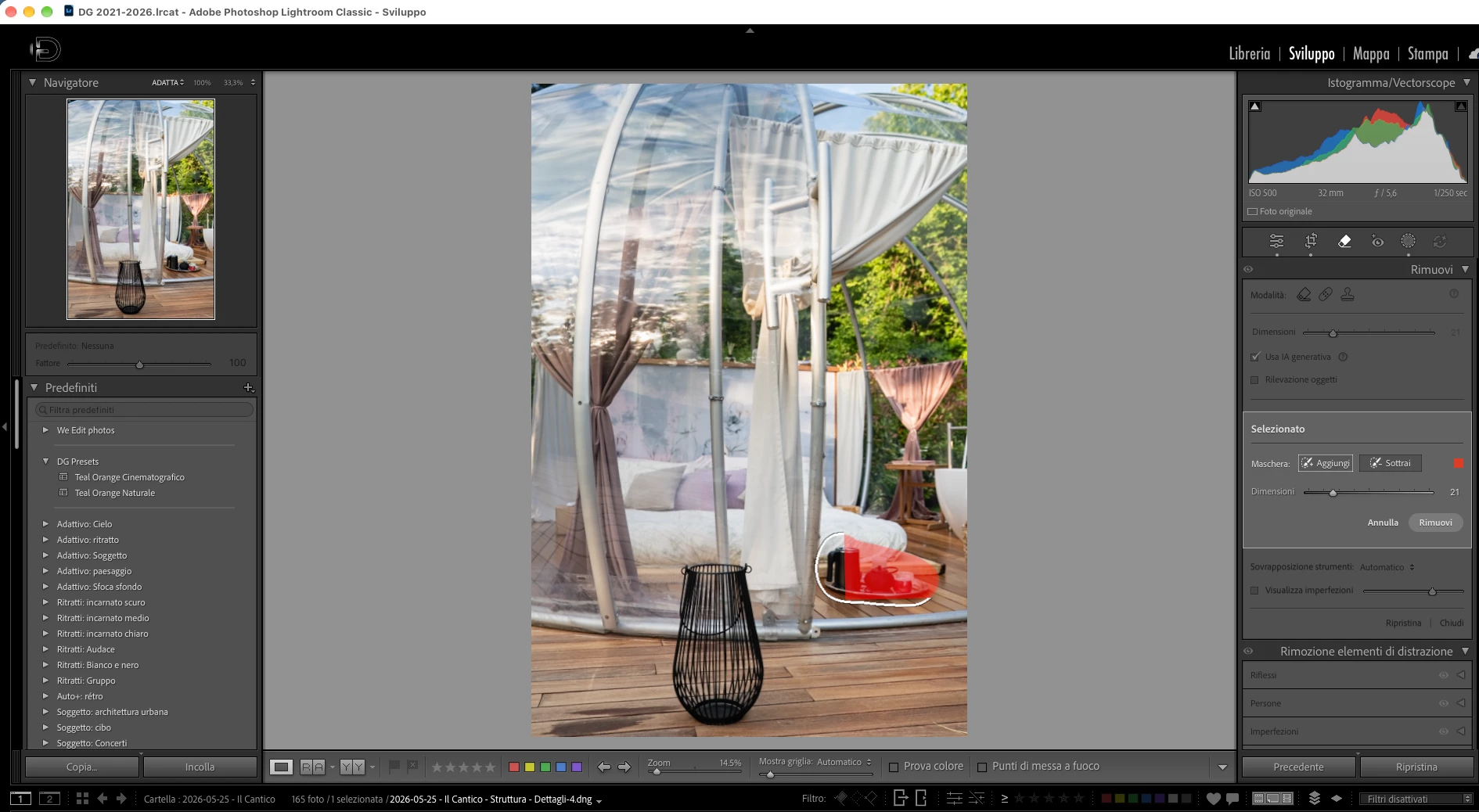
In Lightroom Classic 16, the red mask overlay displayed while using the Remove tool with Generative AI enabled appears partially clipped or incomplete.
When brushing over an object to remove it, the red overlay does not visually cover the entire selected area, even though the selection itself is correctly processed and the object is completely removed.
This is a consistent and reproducible issue that occurs every time I use the tool.
The same behavior did not occur in Lightroom Classic 15.6.
Lightroom Classic Version Number
Lightroom Classic 16.0 (macOS)
OS Version Number
macOS — exact version to be added.
Camera Model
Nikon D850
Step-by-step Reproduction Instructions
-
Open a photograph in the Develop module.
-
Press Q to activate the Remove tool.
-
Select the Remove mode (eraser icon).
-
Enable Use Generative AI.
-
Leave Object Detection disabled.
-
Brush over an object to remove it, observing the red mask overlay.
-
Notice that the red overlay appears partially clipped or incomplete.
-
Apply the removal.
Expected Result
The red mask overlay should accurately and completely represent the area selected for removal, as it did in Lightroom Classic 15.6.
Actual Result
The red mask overlay is partially clipped and does not accurately represent the entire selected area.
However, once the removal is applied, the selected object is correctly and completely removed.
The issue therefore appears to affect only the visual representation of the selection mask, rather than the actual removal process.
Additional Information
-
The issue occurs consistently.
-
It was not present in Lightroom Classic 15.6.
-
Screenshots are attached to illustrate the incomplete mask overlay and the Remove tool settings.
 AdChoices