



Lightroom Classic 16 (only macOS") – Print Templates Do Not Preserve "Managed by Printer" Color Profile
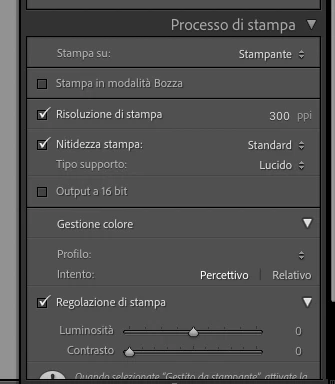
I am reporting a longstanding and reproducible issue in Lightroom Classic for macOS concerning the Print module and the way color management settings are saved in user-created print templates.
This problem was already present in previous versions of Lightroom Classic and still persists in version 16.
When selecting "Managed by Printer" under Print Job > Color Management > Profile, the setting is immediately lost after updating an existing print template.
The Profile field becomes completely blank.
Steps to reproduce
-
Open Lightroom Classic 16 on macOS and switch to the Print module.
-
Select an existing user-created print template.
-
Under Print Job > Color Management > Profile, select "Managed by Printer".
-
Right-click the selected template in the Template Browser and choose "Update with Current Settings".
-
Check the Color Management > Profile field.
Actual behavior
The Profile field becomes completely blank immediately after updating the template.
"Managed by Printer" remains available in the dropdown menu and can be manually selected again, but the setting is not preserved.
Expected behavior
Lightroom Classic should retain the selected color management setting when updating or saving a print template, including the "Managed by Printer" option.
Platform-specific behavior
I have personally tested this behavior on two different computers:
-
macOS: Lightroom Classic 16 fails to preserve the "Managed by Printer" setting when updating a print template.
-
Windows: I performed the same test on a friend's computer running Lightroom Classic, and the setting was correctly preserved.
This suggests that the issue may be related to the macOS implementation of the Print module, although further testing would be needed to confirm this.
Previous versions and related Adobe Community discussions
This is not a newly introduced bug. I have experienced the same issue in earlier versions of Lightroom Classic.
Before submitting this report, I searched the Adobe Community and found several discussions describing identical or closely related behavior:
1. Print presets don't save profile (October 2020)
https://community.adobe.com/questions-675/print-presets-don-t-save-profile-950312
This discussion describes an almost identical issue on macOS: updating a print template causes the selected color profile to disappear.
2. Print template not recording Color Management Profile (August 2024)
Another user reports that the Profile field becomes blank when creating or updating print templates, including when "Managed by Printer" is selected.
3. Custom color profile selection in the Print module is not preserved (May 2026)
This more recent discussion describes a related issue involving color profile settings not being retained in the Print module.
These reports indicate that similar color profile persistence issues have been discussed for several years.
Despite multiple Lightroom Classic updates, the behavior I am reporting remains reproducible in version 16 on macOS.
I could not identify an existing active Bug Report specifically covering this behavior, which is why I am submitting this report.
Environment
-
Application: Adobe Lightroom Classic 16
-
Operating system: macOS
-
Interface language: Italian
-
Printer: Canon SELPHY
-
Color management option: Managed by Printer
Impact on workflow
This issue is particularly inconvenient for photographers who regularly use custom print templates.
Every time a template is updated, the color management setting must be checked and manually restored.
Besides being time-consuming, this behavior can lead to printing mistakes if the photographer assumes that the previously selected color management setting has been preserved.
Additional comments
Considering that this issue was already present in previ
 AdChoices