
LightRoom Classic : corrupted backup file on external disk (Mac OS Tahoe)
When closing LightRoom Classic, this application creates a bakckup file. Sometimes, it does work ...
Two cases
1) backup stored on internal disk (APFS format) : OK
The zip file contains 2 elements :
-
the catalog, a file named Photos 2022 et +.lrcat,
-
a folder Photos 2022 et +. lrcat-data
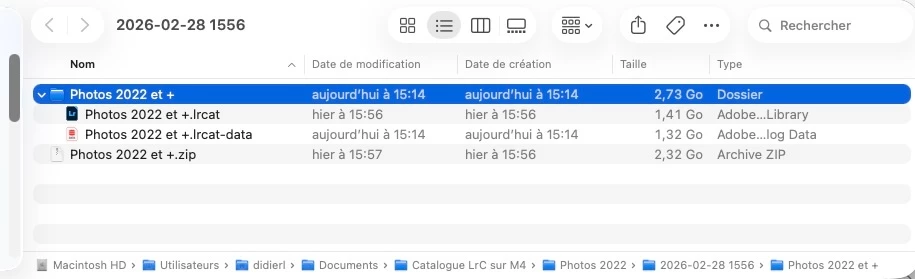
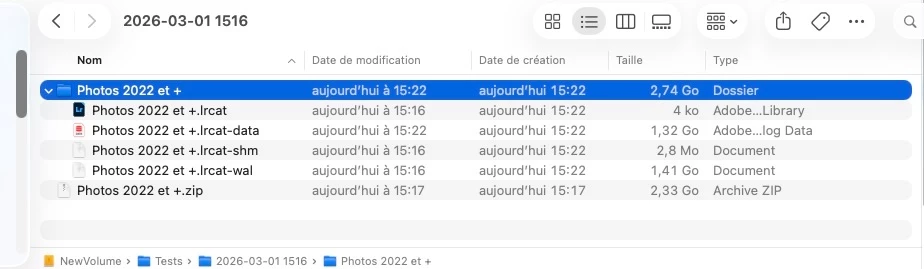
2) backup stored on an external disk ‘SSD disk as Sandisk Extrem Pro or hard disk as La Cie USB 3) (ExFAT format) : WRONG
The zip file contains 4 elements :
-
a catalog file named Photos 2022 et +.lrcat,
-
a folder Photos 2022 et +. lrcat-data
-
2 additional fles (temp files) Photos 2022 et +.lrcat-shm et Photos 2022 et +.lrcat-wal
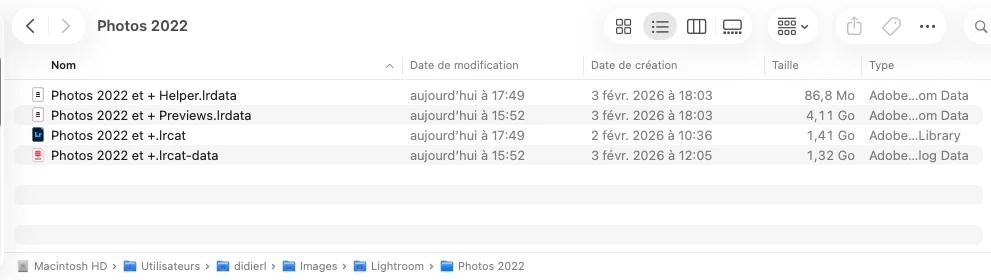
At end of closure operation, catalog folder is correct :
-
a file named Photos 2022 et + Helper.lrdata,
-
a file named Photos 2022 et + Previews.lrdata,
-
a catalog file named Photos 2022 et +.lrcat,
-
a folder Photos 2022 et +. lrcat-data
Informations système
Nom du modèle : Mac mini
Puce : Apple M4 - Mémoire : 24 Go
Informations sur le logiciel LightRoom Classic
Version Lightroom Classic: 15.2 [ 202602111402-ec4112e8 ]
Licence: Creative Cloud - Paramètre de langue: fr-FR
Système d'exploitation : Mac OS 26
Version : 26.3.0 [25D125]
Architecture de l'application : arm64
Version SQLite: 3.36.0
Version Adobe GSDK: 1.4.0.171


 AdChoices