
Known Participant
January 4, 2023

P: 32bit TIFFs are no longer treated as raw files

  • January 4, 2023
  • 24 replies
  • 5671 views

Broken: LrC 12.1

Working: LrC 12.0.1

OS: Win11 22H2

GPU driver: Nvidia gameready 527.56 (disabling GPU acceleration does not resolve the issue)


32bit TIFF files (such as 3D renders, astro stacks, HDRs from third party tools, etc) are not being rendered correctly in Lightroom Classic 12.1. The bug is new in 12.1, 12.0.1 handles them correctly/as previous versions did.


Here's how 12.0.1 handles this file:
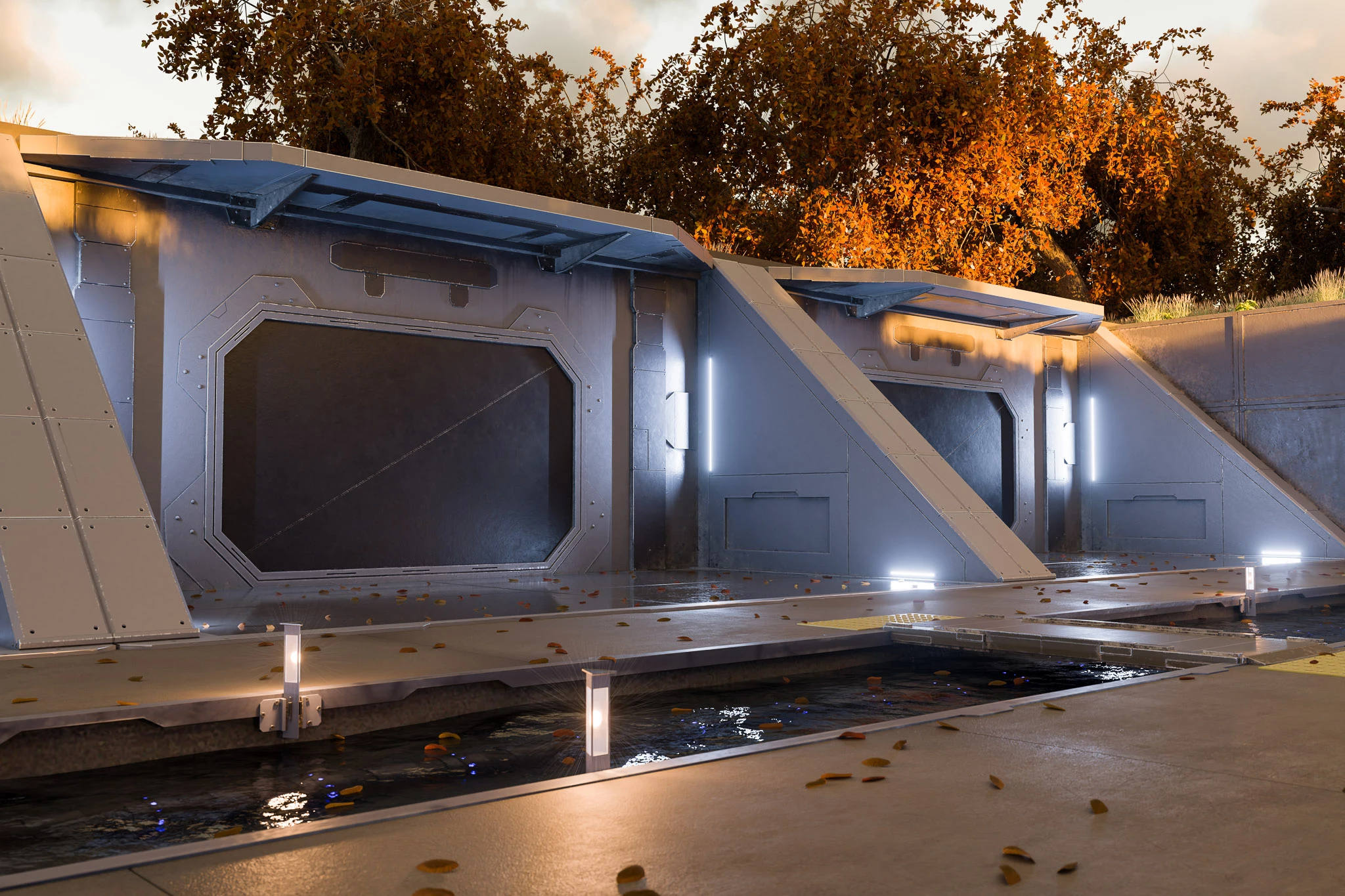
 

Here's the same file, with the same develop settings and export settings, from 12.1:
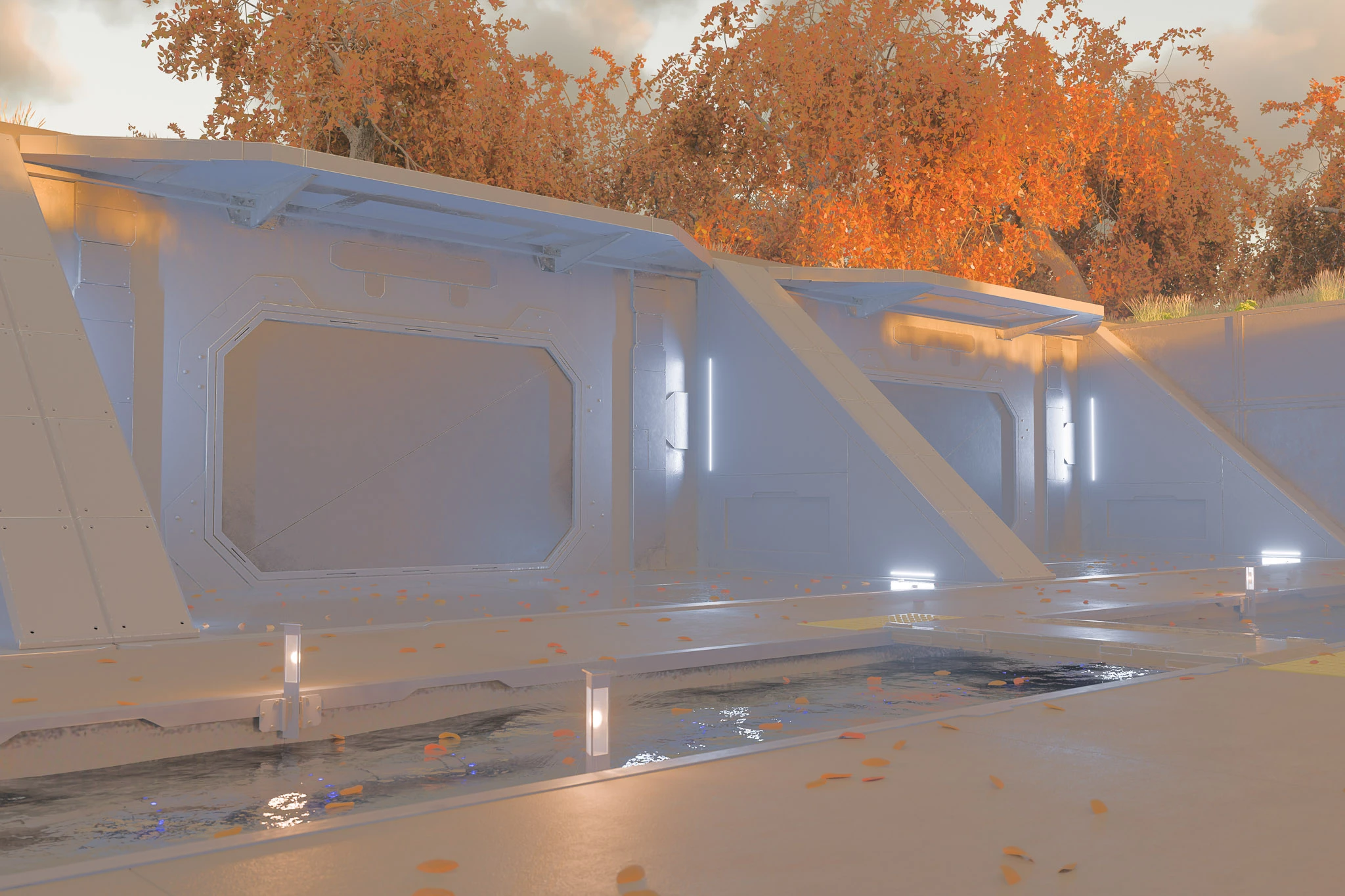
 

The highlights and shadows adjustments simply flatten the contrast of the image. Additionally, in 12.1 the white balance slider is now relative(-100 to +100) instead of absolute (showing a kelvin temp). As if 32bit TIFFs are being treated as non-raw/non-linear files or something like that?


Here's a sample TIFF: https://drive.google.com/file/d/1WvqO09WhL3QtTVw4SEaCost6ChcwKJYX/view?usp=share_link


Steps to reproduce:

  1. Load any 32bit tiff, the sample file linked above will do
  2. Attempt to make some adjustments, particularly the highlights/shadows sliders
  3. Note that the result is not at all as expected. (also note the white balance slider is curiously not displaying a temp, but rather a relative value)
This topic has been closed for replies.

24 replies

JtheNinjaAuthor
Known Participant
November 11, 2023

@Tijolo3075623940hb Yeah, I'm seeing the same. I've got a number of things that I just can't export in their original form anymore. Only exceptions are the things I converted to DNG prior to updating to LrC 13

Participant
November 11, 2023

@SvenFlock 


For my albuns it doesn't have the old behaviour for previously imported 32bit tiff images. If I just open any old image in develop module or even just create a virtual copy, LR renders the image completely differently making impossible to export the images again to obtain the same previous results.

Participating Frequently
November 10, 2023

Further, even if it is intented to have TIFF file treated the new way starting with v13, it is still inconsistent to have the old behaviour on previous importet 32bit TIFF file in the even updated Lightroom Classic catalogue.

Participant
November 10, 2023

So Adobe silently decides to brake a long stabilished behaviour like it doesn't affect users and we are condemned to get stuck to version 12.0.1 forever?

JtheNinjaAuthor
Known Participant
November 9, 2023

Ok, follow up on this comment. After @Rikk Flohr: Photography stated this was an intentional change, I got curious about how editing in PS works for images with HDR enabled. It does indeed return them as...32bit TIFF! So it appears that the TIFF-32 importer has been repurposed from being a scene-referred loader (old behavior) to a display-referred HDR loader? That...at least kinda makes sense. It ensures PS edits return to LR exactly as they looked in PS (bringing the edited TIFF in as a scene-referred file and simply re-applying the same develop settings might produce signficantly different results)


Except this leaves LR 13.x with only Linear DNG for scene-referred input, and almost nothing supports writing that. Not even PS can write 32bit files to Linear DNG. If you have a scene-referred file from another application such as 3rd party HDR tools, astro stacking, 3D renders, etc, you're apparently out of luck unless you have an app that can convert TIFF-32/OpenEXR/Radiance to Linear DNG. Which btw, is not a functionality that exists in any Adobe product that I'm aware of. (it did in LrC 12.x, hillairiously enough, by importing a 32bit TIFF and converting it to DNG!)


tl:dr: Adobe, can we have OpenEXR import support now?

JtheNinjaAuthor
Known Participant
November 9, 2023

Why was the decision made to treat TIFF-32 differently from Linear DNG, when they contain essentially the same data? Is there plans for an alternative file type to Linear DNG (such as OpenEXR) since so few tools support exporting Linear DNG? Lightroom has an excellent pipeline for handling scene-linear RGB images, but it's near unuseable if it only accepts Linear DNG as inputs for that pipeline.

Rikk Flohr_Photography
Community Manager
Community Manager
November 9, 2023

@SvenFlock 

Please note that while the behavior today is a departure from previous behavior(s), it is the as-designed behavior currently and was a deliberate change going forward. 


Rikk Flohr: Adobe Photography Org
Participating Frequently
November 9, 2023

LoL, so let's hope Adobe takes it serious and fixes it in an upcoming minor .x update 🙂

Participant
November 8, 2023

I'm experiencing the same issue and I can ensure you that neither me or the issue are phantoms.

Participating Frequently
November 1, 2023

Hi,


there is indeed a workaround to get functional Kelvin color temperature and color settings back to work. The new version of Photomatix Pro (v7) supports linear DNG export. So, I tested the workflow to safe my HDR content to Radiance files (TIFF don't work) and then skip the tonemapping and choose direct export to DNG. Please find a screenshot attached, color temperature is back. Though, there are extra steps involved, it's better than the currently broken ACR version. Hope that helps!