

Pierre Vignau
Participating Frequently
Apr 26, 2015 4:26 PM UTC
Released

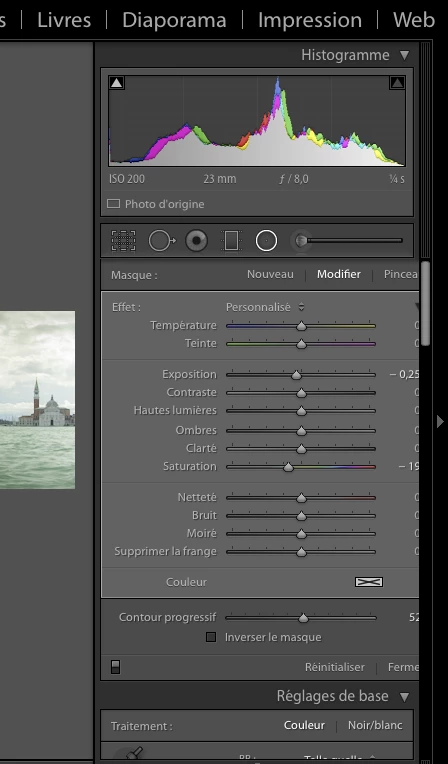
P: Adjustment Gradient tool Panel is too wide in French: can't read the numbers on the right

Lightroom CC: display width problem in Adjustments panels (gradient tools) where slider descritors in the French language use longer words then in English and extend the width of the panel, making the numbers on right side unreadable. Screenshot: look at the "Defringe" slider in French is "Supprimer la frange". No problem in English.
This topic is closed to new replies. Start a new post to keep the conversation going.

13 replies

Rikk Flohr-Retired
Adobe Employee
Apr 26, 2015 7:43 PM UTC
Ok. Thanks.
Translate
Rikk Flohr: Adobe Photography Org
Pierre Vignau
Participating Frequently
Apr 26, 2015 7:41 PM UTC
Yes I have. If you look at the screen shot, you will see that the panel below it is the proper width. Here it is at the full width, same issue.
Translate
Rikk Flohr-Retired
Adobe Employee
Apr 26, 2015 5:11 PM UTC
Have you dragged the panel to its maximum width and you are still seeing this?
Translate
Rikk Flohr: Adobe Photography Org