



johnrellis
Brainiac
November 5, 2021

P: Adobe Stock publishing service uploads a keyword when Include On Export unchecked

  • November 5, 2021
  • 6 replies
  • 1910 views

The Adobe Stock publishing service uploads a keyword even if Include On Export is unchecked. To reproduce:


1. Create the keyword "Test", unchecking the attribute Include On Export.


2. Apply Test to a photo.


3. With the photo selected, select Will Export and observe that Test is not displayed.


4. Drag the photo to Submit To Adobe Stock under the Adobe Stock publishing service, select Submit To Adobe Stock, and click Publish.


5. When asked, click Yes to Go To Adobe Stock To Complete Your Submission And Start Selling.


6. Observe that Test appears in the Keywords for the photo on Adobe Stock:
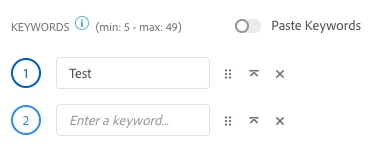
See the attached screen recording.


This bug doesn't occur with other publish services, pointing the finger at the Adobe Stock plugin.


Tested with LR 11.0.1 / Mac OS 11.6. 

This topic has been closed for replies.

6 replies

johnrellis
Brainiac
February 25, 2024

I verified that the bug doesn't occur with LR 13.2.

Rikk Flohr_Photography
Community Manager
Community Manager
February 21, 2024

Greetings all,


Updates for the Adobe Photography Products have been released.  The February 2024 updates contain an update for this issue. 

If you do not see the update in your Creative Cloud Application, you can refresh it by hitting [Ctrl/Cmd]+[Alt/Opt]+[ R ].

Note: It may take up to 24 hours for your update to be available in your Creative Cloud app.


Thank you for being so patient.

Rikk Flohr: Adobe Photography Org
johnrellis
Brainiac
June 7, 2022

See here for how to work around this bug and others in the Adobe Stock plugin:

https://community.adobe.com/t5/lightroom-classic-discussions/keywords-not-sent-to-adobe-stock/m-p/12990768#M277378

Inspiring
January 2, 2022

I have a number of keywords setup that are for my use and not for export - they are all marked as such.

However recently when publishing to Adobe Stock they are included in the keywords exported to Adobe.  They don't show in the "Will Export" panel, but do show in "Keywords and containing keywords".

Only happens with Adobe Stock.

Any ideas apppreciated

johnrellis
Brainiac
January 3, 2022

It's a known bug that hasn't been fixed yet.  Other than deleting the unwanted keywords at the Adobe Stock web site, you could use the Metadata Wrangler plugin to remove them from the published photos:

http://regex.info/blog/lightroom-goodies/metadata-wrangler 


Rikk Flohr_Photography
Community Manager
Community Manager
December 14, 2021

Set status to investigating.

Rikk Flohr: Adobe Photography Org
Known Participant
November 5, 2021

Hello,

I'm running last version of Lightroom on Mac OS Catalina 10.15.7


I've just realized that there is a bug (I think) never seen before: I used to tag photos both with keywords for metadata export both for my personal internal search use only.

In previous versions it was easy to note that a specific keywords should not be exported, just double clicking the tag on keyword list and dialog box let you choose if that specific keyword should be exported or not.


Now it seems that this do not work anymore.

The dialog box still appears but checking or unchecking any of the choices (not only the include / exclude from export) does not give any results. 
And now if I export image it contains all keywords, also that ones that I usually exlude.


Is there a solution for this? It's a bug?

I have the italian version.

Thanks for any help

GoldingD
Brainiac
November 5, 2021

Learned something new


Ok, one test.


  • Selected one Photo
  • Added two keywords, California, and Roses.
  • Brought up keyword list, double clicked on Roses, clicked top option, that unchecked all, excluding from export.
  • Export screen at defaults. Exported. Roses not included in keywords in the new photo, California is as desired.


So, not an issue on my rig in small experiment.